Don’t choose based on the USB plug alone: first check whether the charging base is compatible with your exact toothbrush model and whether it has a USB-A or USB-C connection. A multi-port USB charger is useful if you also want to connect other devices, but it won’t replace a model-specific base. If the charger supplied with your toothbrush is enough, there’s no need for an extra charging station. Keep the mains adapter in a dry place and check which base, cable and adapter are included.
Which charging solution is right for you?
Student with a USB charging base
Your toothbrush sits on its own base with a USB plug. Check that the base is compatible with your handle and which type of USB connection it needs. Philips warns that not all Sonicare chargers are compatible with one another.
Student with one spare socket
You want to connect your compatible toothbrush charger and other devices to a single USB power supply. Match the port type to the base’s plug and check what’s included with the power supply.
Student in a small shared space
You’re looking for a practical place to charge your toothbrush and want to keep the electrical supply away from water. Oral-B specifically warns that the iO charger in question must not come into contact with water.
What should you look for in a USB toothbrush charger?
| What to consider |
What should you check? |
Who might care more about this? |
| Compatibility |
Make a note of the exact toothbrush model and check that the base is suitable for it. Also check whether the plug is USB-A or USB-C. |
If I need a missing or replacement base, I want to make sure it fits my handle. Around 31% of consumers give compatibility top priority. |
| Multiple devices |
Count how many USB-A and USB-C ports you need. If you’ll be using them at the same time, check how much power is available from each port. |
If I want to charge other devices as well as my toothbrush, I look for enough suitable connections. Around 25% of consumers prioritise charging multiple devices at once. |
| Charging location |
Choose a dry spot and check that the cable and base can fit there without being pinched. |
In a small room, I want to put the charger somewhere practical, but still away from water. Around 25% of consumers consider the charging location most important. |
| Parts you need |
Check which base, cable and mains adapter you already have, and what’s included with a new charger. |
If my existing parts are still usable, I don’t want to buy an extra part I don’t need. Around 19% of consumers prioritise avoiding unnecessary purchases. |
Common buying mistakes
-
Assuming every USB charger will fit your toothbrush
USB may simply be the connection used to power a dedicated, model-specific charging base. Having a USB plug doesn’t automatically make the base suitable for every handle.
Before buying, check the handle model, the matching base and the USB plug separately.
-
Choosing a charger without checking the port type
A USB-C charger won’t provide a suitable connection for a base with a USB-A plug unless you have a suitable solution.
Compare the plug on your toothbrush base with the ports on the exact version of the charger.
-
Putting the charger somewhere wet
A spot near the sink isn’t automatically suitable for the power supply. Oral-B warns that its iO charger must not come into contact with water.
Set up a dry charging spot and follow the instructions for your toothbrush and charger.
Brands to consider
Philips Sonicare
Worth considering if you already have a Sonicare handle and are looking for a compatible standalone charging base.
- Philips says that charging station CP1977/01 has a USB connector and is suitable for many Sonicare models.
- Check compatibility with your exact handle; Philips warns that not all Sonicare chargers are interchangeable.
Belkin
A multi-port USB-C power supply may suit you if you want to connect other devices as well as a compatible USB-C toothbrush base.
- Belkin specifies that the WCH013vfBK has two USB-C ports.
- Belkin says that when both ports are used at the same time, the power is split between a maximum of 45 W and 20 W. This model has no USB-A port, and compatibility with a toothbrush base hasn’t been confirmed.
UGREEN
A multi-port power supply may be worth considering if you need a combination of USB-A and USB-C.
- UGREEN lists a USB-A connection alongside USB-C connections on the Nexode 65W with retractable cable.
- This isn’t a replacement charging base for a toothbrush. Check which plug you need and the exact version.
Oral-B
Worth considering if your Oral-B handle uses a specific charging standard.
- For the iO charger in question, Oral-B recommends using the charger supplied with the device.
- The iO charger reviewed doesn’t confirm that a standard multi-port USB charger will work directly with every Oral-B handle. Keep the charger away from water.
USB chargers at Joybuy
These are multi-port USB chargers for powering compatible toothbrush bases and other devices; they don’t replace a model-specific base. Before buying, check that your base’s plug fits one of the ports.
 Image unavailable
6-in-1 charging station, 320 W, two retractable USB-C cables
An option if you want to connect several devices; check whether your toothbrush base’s plug fits one of the connections.
The product name lists 320 W and two retractable USB-C cables.
View at Joybuy
 Image unavailable
OnePlus 80W Dual Ports SUPERVOOC Adapter, Type A + Type C, white
Worth considering if your toothbrush base’s plug fits one of the connections; check the port layout before buying.
The product name lists 80 W, Type A and Type C.
View at Joybuy
 Image unavailable
USB wall charger, 65 W, 2 USB-C + USB-A
An option if you want to connect other devices as well as a compatible toothbrush base. Check which port fits your base’s plug.
The product name lists 65 W, two USB-C ports and one USB-A port. According to the product information, this charger is intended for indoor use; avoid moisture and contact with water.
View at Joybuy
 Image unavailable
USB Multi Charger, 10 Ports
This charging station may suit you if you want to connect several devices; check the port layout on your chosen version and the connection on your toothbrush base.
The product name lists USB-A and USB-C connections. According to the product warning, the charging station must not be covered while in use and must be kept away from water and excessive moisture.
View at Joybuy
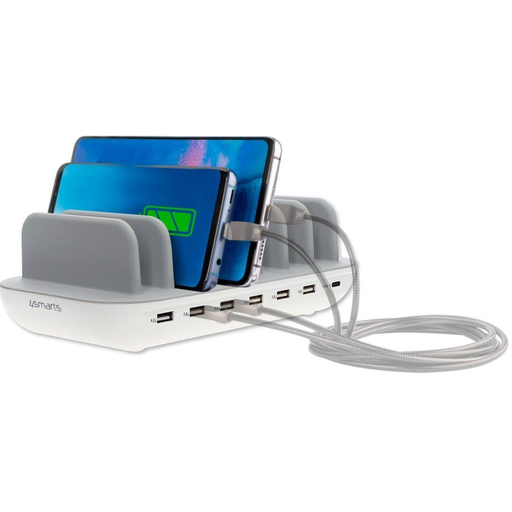 Image unavailable
4smarts Charging Station Office 60W, white
A multi-port charging station to consider if you want to connect various USB devices. Check that the ports fit your toothbrush base’s plug.
The product name lists 60 W. According to the product warning, the station must not be covered while in use and must be kept away from water and excessive moisture.
View at Joybuy
Frequently asked questions
Will your toothbrush work with any USB charging stand?
Don’t assume it will: check your handle model and the matching base. Philips says that not all Sonicare chargers are compatible with one another.
Where should you put the charger?
Choose a dry spot and follow the instructions for your model. Oral-B warns that the iO charger in question must not come into contact with water.
What can you do if a new charger breaks down quickly?
If there’s a fault, contact the seller. According to the Dutch government, the Netherlands doesn’t have a fixed two-year statutory guarantee period for every product.


