What should you look for when choosing?
First, compare the capacity with your entire archive and decide how you’ll keep a second copy. Then consider write times, connectors, the file system and any confidential information.
| What to consider |
What should you look for? |
Who is this important for? |
| Keeping your archive safe |
Decide where you’ll keep a second copy and regularly check that the files still open. North Holland Archives warns that storage media can be damaged; Safe Internet explains the risks of keeping files in just one location. |
If I don’t want my work to depend on a single stick, keeping my archive safe comes first. Around 28% of consumers say this is their top priority when choosing. |
| Space for folders and versions |
Add up your project folders and versions, then compare the total with the available space on the exact model. Kingston notes that formatting and features use some of the stated capacity on the DataTraveler Max. |
If I want to keep several large projects and versions, the capacity I choose needs to suit my archive. Around 22% of consumers prioritise this need for space. |
| Write time |
Compare the stated write speed for the exact model. Kingston says optimal DataTraveler Max performance requires a USB 3.2 Gen 2 host port; a hub can also limit transfer speeds. |
If I often copy large projects, I want to know how quickly the stick writes and which connection my computer has. Around 22% of consumers prioritise reducing waiting time. |
| Connecting and opening files |
Check whether the devices you use have USB-A or USB-C, and look at the file system. Microsoft states that FAT32 has a 4 GiB limit per file; Apple describes exFAT as an option for use on Mac and Windows. Formatting erases existing files. |
If I want to open archive files on different computers, the connection and file system need to be compatible. Around 17% of consumers prioritise access on the devices they plan to use. |
| Confidentiality |
Consider whether your project folders contain personal data and whether encryption suits the way you use them. The Dutch Data Protection Authority cites the loss of a USB stick containing unencrypted personal data as a potential data breach. |
If my project files contain confidential or personally identifiable information, I want to take that protection into account. Around 11% of consumers prioritise confidentiality. |
USB sticks at Joybuy
These Joybuy products are USB sticks for extra storage and copies of project files. Compare their capacity and connectors with your own archive and devices; don’t use a stick as your only archive copy.
 No image available
SanDisk Ultra Dual Drive Go USB 3.1/USB-C 512 GB
An option if you want to move files between devices with USB-A and USB-C; keep a separate archive copy too.
Capacity: 512 GB. The product description lists USB-A and USB-C, and read speeds of up to 150 MB/s.
Joybuy
 No image available
SanDisk Ultra Flair USB 3.0 256 GB
A USB stick for an archive that fits within 256 GB; keep a separate copy of your projects too.
Capacity: 256 GB. The product description lists read speeds of up to 150 MB/s.
Joybuy
 No image available
Kingston DataTraveler 512 GB 220 MB/s Metal USB 3.2 Gen 1 SE9 G3
An option if the stated 512 GB suits your project folders; for long-term storage, keep a second copy too.
Capacity: 512 GB. The product description lists read speeds of up to 220 MB/s.
Joybuy
 No image available
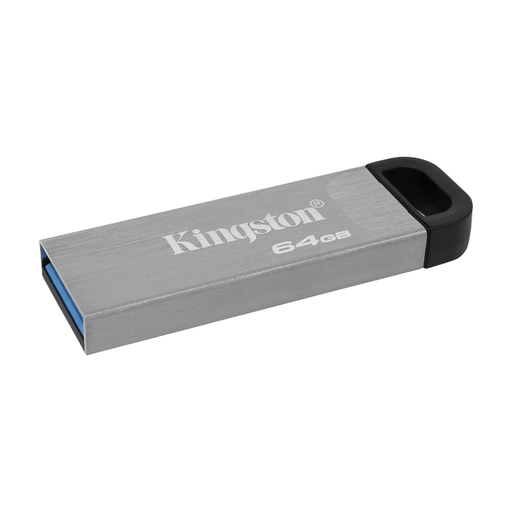
Kingston DataTraveler Kyson 64 GB USB flash drive
Capacity is limited to the stated 64 GB, so compare it with your entire project archive before choosing. Keep a separate copy too.
The product description lists read speeds of up to 200 MB/s and write speeds of 60 MB/s, and use via a USB-A port.
Joybuy
 No image available
Samsung MUF-512DA USB Type-C 512 GB USB 3.2 Gen 1
An option if your archive fits within the stated 512 GB and your devices have USB-C; use the stick as an extra copy.
Capacity: 512 GB. The product description lists USB Type-C and read speeds of up to 400 MB/s.
Joybuy
Frequently asked questions
Can one USB stick be my only archive?
It’s best not to use a single stick as the only copy of work you want to keep. North Holland Archives warns that storage media can be damaged; keep a separate copy too, and check that you can still open your projects.
Which file system works for large files on Mac and Windows?
First, check the size of individual files: Microsoft states that FAT32 has a 4 GiB limit per file. Apple describes exFAT as an option for a drive you want to use on Mac and Windows. Make a copy before formatting, as this erases existing files.
Why don’t I get the stated speed?
Speed depends in part on the connection and files you use. Kingston says optimal DataTraveler Max performance requires a USB 3.2 Gen 2 host port; a hub can also limit speeds. Stated speeds are maximums, not a guarantee for your project folder.
What should I check after copying and while storing my files?
Check that the expected folders and files are there and open correctly. Repeat this check while they’re in storage: North Holland Archives points out that storage media can deteriorate, while files and the software needed to open them may change over time.
Should I encrypt art files on a USB stick?
That depends on the contents and how you use the files. If they contain personal data, consider how you process it and whether encryption suits your situation. The Dutch Data Protection Authority cites the loss of a stick containing unencrypted personal data as a potential data breach; for organisations, whether a breach must be reported depends on the risk to the people affected. The GDPR does not apply to processing carried out purely for personal or household use.


