Choose a USB stick that works with the shared computer, and use it as an extra copy rather than your only archive. The National Cyber Security Centre advises keeping at least three versions of important files: the original and two backups. You should also test that files can be opened from a backup. If scripts contain personal data or other restricted content, decide who is allowed to access them and check that any security features work on the computer you share.
Who is this relevant to?
Script archivist
You want to retrieve earlier versions of scripts and keep a separate copy alongside your working files. The National Cyber Security Centre advises keeping multiple versions of important files and recommends testing that you can restore them.
Confidential script manager
You need to control who can view scripts on the shared workspace, especially if they contain personal data. The Dutch Data Protection Authority points out that losing a USB stick containing unencrypted personal data could constitute a data breach.
User of multiple computers
You take scripts between devices, so you need to check which ports are available and whether the files can be opened on each device. SanDisk describes the Ultra Dual Drive Luxe as having both USB-A and USB-C connectors.
What should you look for?
First, check the port and access requirements of the shared computer. Then work out how much storage space your script archive needs and how you’ll keep a separate copy that you can restore.
| What to consider |
What to look for |
Who should prioritise it |
| Restorable script versions |
Keep a separate copy and periodically open files from it to check that recovery works. |
I want to retrieve earlier script versions and avoid losing my archive through a single mistake. Around 33% of consumers prioritise the ability to restore files. |
| Access to confidential content |
Check who can read or edit files on the work computer and whether the computer can unlock a secure USB stick. |
If scripts contain personal data, I want to control who can open them. Around 27% of consumers give confidentiality their highest priority. |
| Compatibility with the computers you use |
Check whether the shared computer and your other devices have USB-A, USB-C or both, and test the setup with a file. |
I want to open scripts both at work and on my other devices. Around 27% of consumers prioritise compatibility with the devices they use. |
| Storage space and transfer time |
Check the size of your script folder and allow for new versions. Compare write speeds only if transfer time matters for your needs. |
I expect my archive to grow or I copy files often. Around 13% of consumers give storage space or transfer time their highest priority. |
Common pitfalls
-
Using a USB stick as your only archive
A single copy isn’t enough if the stick goes missing or files become damaged. The National Cyber Security Centre advises keeping multiple versions of important files and testing that you can restore them.
Keep copies separate from the work computer and regularly open a file from a backup to check that it’s readable.
-
Assuming encryption controls access on the computer
Securing the USB stick doesn’t automatically control who can read or edit a file once it’s on the shared computer.
Check both file permissions on the computer and how the stick is unlocked and managed. Passwords and access permissions also need ongoing management.
-
Focusing only on read speed
Archiving scripts means writing files to the stick, and read speed alone doesn’t tell you how quickly that will happen. Transcend notes that the JetFlash 790’s speed can vary depending on the computer, software, usage and capacity.
First check the size of your script folder, then look at write speed if you often copy large numbers of files.
Brands to consider
Kingston
The DataTraveler Exodia is designed for everyday storage via USB-A. The IronKey Locker+ 50 G2 is worth considering if hardware encryption and access management matter to you.
- Kingston lists USB-A and capacities from 64 to 512 GB for the Exodia.
- For the IronKey Locker+ 50 G2, Kingston lists hardware encryption and separate administrator and user passwords.
- The IronKey has specific system requirements. Before buying, check that the shared computer meets them. These security features don’t automatically apply to the Exodia.
SanDisk
The Ultra Dual Drive Luxe is designed for transferring files between devices with USB-A and USB-C ports.
- SanDisk lists both connector types for this product range.
- Having two connector options doesn’t automatically manage file permissions or access on a shared computer. Also check that the devices in question can open the files.
Transcend
The JetFlash 790 is a USB-A alternative with a retractable connector.
- Transcend lists USB-A and capacities from 16 to 512 GB.
- According to Transcend, speed can vary depending on factors including the computer, software, usage and capacity. This product range isn’t described here as encrypted storage.
USB sticks at Joybuy
These USB sticks are designed for portable copies of scripts. Check which connector and storage capacity suit your workspace, and assess any security features separately from the access permissions on the shared computer.
 No image available
SanDisk Ultra Flair, 64 GB, USB 3.0
A portable copy for scripts when the shared computer has a compatible USB-A port.
The product description lists password protection and 128-bit AES file encryption. Check that it works with your setup on the shared computer; this doesn’t replace access permissions for files stored there.
Joybuy
 No image available
Kingston Technology DataTraveler 512GB 220MB/s Metal USB 3.2 Gen 1 SE9 G3
The storage capacity may suit a larger script archive; compare it with the folder you actually want to keep.
The product information lists 512 GB, USB 3.2 Gen 1, a metal casing and a keyring loop.
Joybuy
 No image available
Samsung MUF-256BE, 256 GB, USB Type-A
A portable copy for a computer with USB Type-A, if 256 GB suits the size and growth of your archive.
The product name lists USB 3.2 Gen 1 (3.1 Gen 1). The description mentions an integrated carrying loop.
Joybuy
 No image available
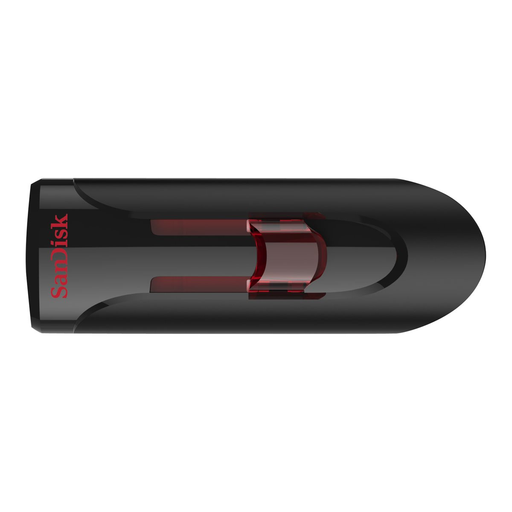
SanDisk USB Flash Drive, 32 GB, USB 3.0
A portable copy when 32 GB is enough for your selected script folders and versions.
The product description lists password protection and 128-bit AES file encryption. Also check the file permissions on the shared computer.
Joybuy
 No image available
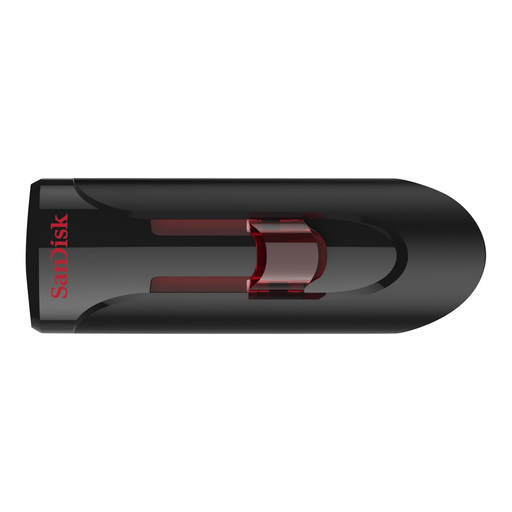
SanDisk Ultra, 64 GB, USB 3.0
The storage capacity may suit a script archive that’s larger than a small selection of files; check the folder size before choosing.
The product description lists password protection and 128-bit AES file encryption. Check that your intended setup is suitable for the shared computer.
Joybuy
Frequently asked questions
Can one USB stick hold your entire script archive?
Don’t rely on the stick as your only way to recover files. The National Cyber Security Centre advises keeping at least three versions of important files: the original and two backups. Also test that you can actually open files from a backup.
What should you do after copying files on a shared Windows computer?
Check that you can open the new copy, then use ‘Safely Remove Hardware’ before unplugging the stick. Microsoft recommends safely removing it to prevent data loss.
What else should I organise alongside the USB stick?
Decide where to keep a separate backup and who is responsible for copying files and testing recovery. If you choose a secure stick, also decide who will keep the administrator password and check that the work computer meets the system requirements.
When is encryption relevant for theatre scripts?
Encryption is relevant when the content and the risk of loss mean you need extra protection against unauthorised access. The Dutch Data Protection Authority points out that losing a USB stick containing unencrypted personal data could constitute a data breach. Separately, decide who is allowed to open files on the shared computer.


