If you mainly use a computer with USB-A and want as little of the stick to protrude as possible, look for a low-profile USB-A model. If you move notes between devices with USB-A and USB-C, a stick with both connectors is a better fit. Also check the storage capacity, the stated write speed and where you keep a separate copy: read speed doesn’t tell you how quickly files are written to the stick.
Who is this guide for?
Student with limited desk space
You copy notes on a computer with USB-A and want the stick to protrude as little as possible. Kingston describes the DataTraveler Micro as a low-profile model; Verbatim says the Store ’n’ Stay NANO protrudes by around 5 mm when plugged into a USB-A port.
Student with different USB ports
You transfer notes between, for example, a computer with USB-A and a device with USB-C. Kingston says the microDuo 3C and Verbatim says the Dual USB Drive both have these connectors.
Student who wants to be able to restore notes
You want to be able to restore a separate copy if files are lost or overwritten. Keep it apart from your everyday files, and if it contains sensitive information, consider who else might be able to access it.
What should you consider when choosing?
First, choose a design that suits the ports on your devices and the space around them. Then decide how you’ll keep a separate copy and how much storage you need for your files.
Low-profile USB-A stick
A good fit if: you mainly use a computer with USB-A and want as little hardware as possible sticking out on your desk.
Keep in mind: a USB-A model won’t automatically give you a direct USB-C connection, so check the ports on all your devices.
USB-A and USB-C stick
A good fit if: you want to transfer notes directly between devices with different USB ports.
Keep in mind: this isn’t the same as an almost flush nano stick. If you’re using a phone or tablet, also check that it supports external USB storage.
| Concern |
What should you look for? |
Who is this important for? |
| As little hardware sticking out as possible |
Check whether your device has USB-A and how much space there is around the port. Also consider whether you’ll want to remove the stick often. |
I don’t want the stick to protrude or get in the way on a small desk. Around 31% of consumers say compact size is their top priority. |
| Connections for your devices |
Check the ports on both devices. If you’re using a phone or tablet, also check whether it supports external USB storage. |
If I want to transfer notes between devices, the connectors need to fit without me having to find another solution each time. Around 31% of consumers put port compatibility at the top of their list. |
| A copy you can restore |
Keep a separate copy apart from your computer and check that you can restore a file. A stick that stays connected isn’t automatically a separate backup. |
I want to be able to recover important notes if they’re lost or overwritten. Around 25% of consumers name recoverability as their main concern. |
| Storage capacity and transfer time |
Consider the size of your files and any different versions. Check the stated write speed for the exact model; Microsoft says FAT32 has a maximum file size of 4 GiB per file. |
If I keep lots of versions or larger files, storage capacity and a manageable transfer time both matter. Around 13% of consumers say these are their top priorities. |
Common mistakes when choosing
-
Assuming a connected stick is a secure backup
A backup stick that stays connected can also be affected by ransomware. The Consumers’ Association also warns that synchronisation can copy over deletions or overwritten files.
Keep a copy you can check separately from your computer, and unplug the stick after copying.
-
Assuming a high read speed means fast copying to the stick
Reading and writing are different operations. A stated read speed doesn’t tell you how long it will take to write your files to a stick.
Check the stated write speed for the exact model, if one is given, and bear in mind that your computer and files also affect transfer times.
-
Choosing a compact USB-A stick without checking the other port
A USB-A stick won’t plug directly into a USB-C port. A low-profile design and two different connectors are two different solutions.
Before buying, check the ports on the devices you want to transfer notes between. If you’re using a phone or tablet, also check whether it supports external storage.
Brands to compare
Kingston
The DataTraveler Micro is designed for a compact USB-A setup; according to Kingston, the microDuo 3C has both USB-A and USB-C.
- Kingston describes the Micro as having a low-profile metal casing and an integrated keyring loop.
- The Micro doesn’t have a USB-C connector. Stated read speeds aren’t measured write times.
Verbatim
The Store ’n’ Stay NANO is designed to minimise the amount of USB-A hardware that protrudes; the Dual USB Drive is made for use with USB-A and USB-C.
- For the 64 GB NANO, Verbatim says it protrudes by around 5 mm and has a stated write speed of up to 25 MB/s.
- The 32 GB Dual USB Drive has two connectors, but it isn’t the same almost flush nano design.
SanDisk
The Ultra Fit is a compact USB stick for a compatible port; the 256 GB model appears on a Dutch visitor ranking.
- SanDisk describes the Ultra Fit as a model that can be left plugged in.
- SanDisk states transfer speeds of up to 400 MB/s for certain capacities. This doesn’t prove the write speed for study notes on every model.
Transcend
The JetFlash 710 is a small USB-A stick that, according to Transcend, you can carry on a keyring.
- Transcend lists dimensions of 22,4 × 12,2 × 6 mm and capacities from 32 to 256 GB.
- This model doesn’t have a second USB-C plug. The manufacturer’s durability claims aren’t independent test results.
Joybuy products
These product choices are for copying and storing study notes, with models for USB-A and for use with both USB-A and USB-C.
 No image available
SanDisk Ultra Flair, 64 GB, USB 3.0
An option if you want to store notes on a computer with USB-A; the product description says it can be used with USB-A computers.
According to the product name: 64 GB and USB 3.0.
Joybuy
 No image available
Kingston DataTraveler SE9 G3, 64 GB, 220 MB/s, Metal, USB 3.2 Gen 1
An option for transferring notes between compatible devices with USB-A.
The product name lists 64 GB, USB 3.2 Gen 1 and 220 MB/s; this speed isn’t specified as a measured write time.
Joybuy
 No image available
Kingston DataTraveler Exodia M, 64 GB, black and blue
An option if you want to store notes on a USB-A device and carry the stick between workspaces.
The product name lists 64 GB and USB 3.2 Gen 1.
Joybuy
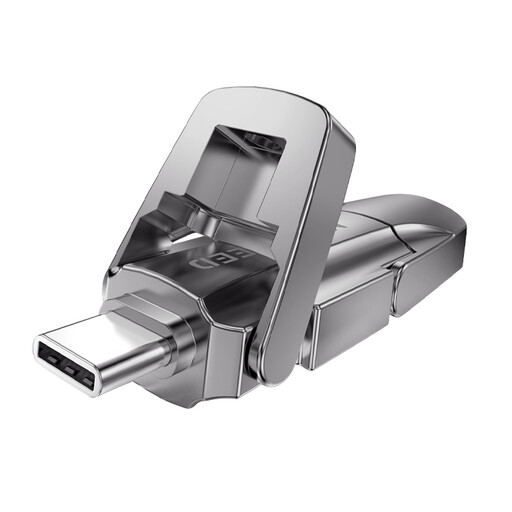 No image available
MOVESPEED YSUYVP10-256GSR, 256 GB
An option for transferring notes between devices with USB-A and USB-C. If you’re using a phone or tablet, check whether it supports external USB storage.
The product name lists 256 GB, USB 3.2 Gen 1 and dual connectors, including USB-C.
Joybuy
 No image available
MOVESPEED YSUYC-256GSN, 256 GB, silver
An option if you want to transfer notes between devices with USB-A and USB-C and also store sensitive files.
The product name lists 256 GB and USB 3.2 Gen 1. The product description mentions AES-256 encryption and fingerprint access; check that these features suit your devices and the way you work.
Joybuy
Frequently asked questions
Can I use the same stick with my laptop and phone?
Yes, if the connector fits and your phone supports external USB storage. A stick with USB-A and USB-C has both plugs, but check that your own devices support it too.
Why won’t one large file fit when there’s still space on the stick?
Check the file system. Microsoft says FAT32 has a maximum file size of 4 GiB per file. Before changing it, also check which file systems your other devices support, and make a copy of the contents first.
How do I remove a USB stick without risking my copy?
In Windows, use the ‘Safely Remove Hardware’ feature before unplugging the stick. Microsoft recommends this to help prevent data loss.
Can I store other people’s personal data unprotected on a USB stick?
That depends on who is processing the data and why. The Dutch Data Protection Authority says that losing a stick containing unencrypted personal data could be a data breach, and that organisations should tailor their security measures to the risks. If you’re handling course materials, also check the rules that apply to them.
Do Dutch USB-C charging rules mean a USB stick must have a USB-C plug?
No, don’t assume that the charging rules apply here. The Dutch government’s guidance covers the charging connectors on the rechargeable devices it lists, not a general USB-C requirement for storage sticks. Choose a connector to suit your own devices.


