Who is this USB stick for?

Copying patterns between devices

You want to transfer digital sewing patterns between devices, such as a computer and another device, without using the cloud. The connectors at each end determine which stick will work for you. This is reflected in product specifications from SanDisk, Kingston Technology and Samsung Netherlands.

Keeping your own pattern archive

You want to keep an extra local copy of your pattern files, so a lost or faulty stick isn’t the only place they’re stored. SanDisk Support and VeiligInternetten describe external storage as one possible place to keep a copy.

Transferring embroidery files to a machine

You want to open files directly on an embroidery machine. Check that your specific machine supports the file format, too. Brother Support and Brother Sewing & Craft explain that importing files to a machine and using embroidery files depend on the model and software.

What should you consider when choosing one?

What to consider What should you check? Who is this important for?
Compatible connector Check the ports on both devices and whether the receiving device can read USB storage. Choose USB-A, USB-C or a stick with both connectors, depending on your devices. I want to copy files between devices without relying on the cloud or finding that the connector doesn’t fit. Around 36% of consumers mainly need compatible ports.
An extra copy Copy the files rather than moving them. Once the transfer is complete, open a few files to check them and keep a second copy on another device or in another location. I want to keep my pattern archive available locally without making one stick my only copy. Around 29% of consumers mainly want to keep an extra copy.
Room for your archive Add up the size of your current files, allow for new patterns and check how much space is available after formatting. I want enough space for my existing patterns and future additions, without relying on an average number of files. Around 21% of consumers mainly need room for their archive.
Easy to carry around Check the design of the exact version you’re considering. Don’t mistake read speeds for write speeds: the maximum read speed quoted doesn’t tell you how quickly your files will be written to the stick. I transfer files locally regularly and want a stick that suits the way I carry it around. Around 14% of consumers prioritise convenience when transferring files repeatedly.

What mistakes can you avoid?

  • Using the stick as the only place to store all your patterns

    Moving a file to the stick without keeping a second copy isn’t an extra backup. If the device gets lost or stops working, you could lose your only copy of the file.

    Keep at least one separate copy as well as the one on your stick, and check that the files are readable after copying them.

  • Choosing a connector that doesn’t fit your devices

    USB-A and USB-C versions have different plugs. Without a compatible connector, you can’t copy files directly between the devices you want to use.

    Check the ports on both devices before you buy. If you need both types, a stick with USB-A and USB-C could be an alternative. Also check that your devices support USB storage.

    If the connector isn’t suitable, you may need an adapter or a different stick.

  • Confusing maximum read speed with write speed

    The stated maximum read speed doesn’t tell you how quickly your collection of pattern files will be written to the stick.

    Only compare speeds that describe the same activity, capacity and relevant conditions. For small files, also consider the connector and how you transfer them.

  • Assuming every machine can open every file from every stick

    Brother explains how to import embroidery designs and create PES files using specific software. That doesn’t automatically mean your machine supports a standard PDF or every USB stick.

    Check the manual for your exact machine model to see which connector, file system and design formats it supports.

    For direct transfers to a machine, an incompatible combination could mean extra file conversion or the need for a different stick.

Which brands are worth considering?

Kingston DataTraveler Exodia M

The DataTraveler Exodia M is a USB-A range for carrying files locally. The manufacturer lists part number DTXM/64GB for the 64GB version.

  • Kingston lists a sliding protective cap and a five-year manufacturer’s warranty for this range.
  • This version doesn’t have a built-in USB-C plug. No guaranteed write speed for pattern files is specified.

SanDisk Ultra Dual Drive Go

This range is designed for transfers between USB-A and USB-C devices. Check the version and regional code for each listing.

  • For the 64GB version reviewed, SanDisk lists both connectors and sequential read speeds of up to 150 MB/s.
  • This speed is a manufacturer’s read-speed figure, not an independent measurement or a guaranteed write speed.

Samsung USB Flash Drive Type-C

The Dutch product page describes model MUF-64DA/APC as a USB-C option for devices with that connector.

  • Samsung Netherlands lists read speeds of up to 300 MB/s for the 64GB version.
  • The manufacturer notes that speeds depend on the device and conditions. This version doesn’t have a built-in USB-A plug.

Transcend JetFlash 790

The JetFlash 790 is a USB-A range with a retractable connector. Transcend lists TS64GJF790K as the black 64GB version.

  • Transcend describes a cap-free design and a five-year limited manufacturer’s warranty.
  • This version doesn’t have a USB-C plug, and the manufacturer’s documentation doesn’t specify a guaranteed transfer speed for this use.

Joybuy products for managing patterns locally

These Joybuy options include USB sticks for storing and transferring files locally via USB-A, USB-C or both connectors.

SanDisk Ultra Dual Drive Go USB 3.1/USB-C 512GB

SanDisk Ultra Dual Drive Go USB 3.1/USB-C 512GB

Suitable for transferring files locally between devices with USB-A and USB-C connectors.

Capacity: 512 GB.

The product name lists USB 3.1 and USB-C.

View at Joybuy

Kingston DataTraveler SE9 G3 64 GB

Kingston DataTraveler SE9 G3 64 GB

A USB-A option for storing files locally on devices with a compatible port.

Capacity: 64 GB. The product name lists USB 3.2 Gen 1.

View at Joybuy
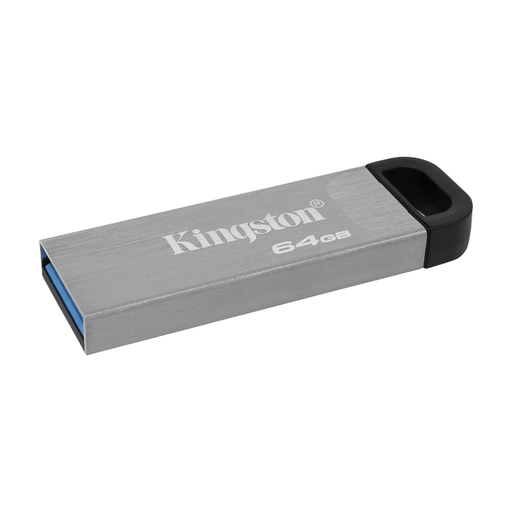
Kingston DataTraveler Kyson 64 GB

Kingston DataTraveler Kyson 64 GB

Suitable for storing and transferring files locally with a device that supports USB-A storage.

Capacity: 64 GB.

View at Joybuy

Kingston DataTraveler Exodia M 64 GB, Black + Blue

Kingston DataTraveler Exodia M 64 GB (Black + Blue)

A USB-A stick for pattern files on devices with a compatible USB-A port.

Capacity: 64 GB. The product name lists USB 3.2 Gen 1.

View at Joybuy

Samsung MUF-512DA USB Flash Drive 512 GB, USB Type-C

Samsung MUF-512DA USB Flash Drive 512 GB USB Type-C

Suitable for storing and transferring files locally between devices that support USB-C storage.

Capacity: 512 GB. The product name lists USB Type-C and USB 3.2 Gen 1 (3.1 Gen 1).

View at Joybuy

Frequently asked questions

Can my sewing machine open a PDF sewing pattern directly?

Don’t assume it can: a PDF sewing pattern and a machine-readable embroidery file are used in different ways. Brother describes PES files for embroidery designs and importing designs via USB on supported machines. Check your machine model’s manual before choosing a stick for direct transfers to the machine.

How can I make an extra copy of my patterns without using the cloud?

Copy the files to the stick and leave the original in place for now. SanDisk Support warns that moving files to an external drive without keeping another copy doesn’t create a backup; VeiligInternetten lists a USB stick as one possible external storage option.

What can I do if a USB stick fails quickly during normal use?

When you buy as a consumer in the Netherlands, your statutory guarantee applies in addition to any manufacturer’s warranty. According to ACM ConsuWijzer, the seller must resolve an issue free of charge if a product breaks sooner than you could reasonably expect. This could mean repairing or replacing it, or giving you your money back. This won’t automatically restore lost files, so keep a separate copy.

Can I copy and share sewing patterns I’ve bought?

The Government of the Netherlands describes a private copy for personal use and says it must not be distributed or made public. For computer programs, it only allows a backup copy. Check the terms for the specific pattern, too, as the general government guidance doesn’t cover every possible licence or type of distribution.
