What should you consider when choosing a USB stick?
A sewing project may include several pattern PDFs and instructions; Notches shows combinations like these in its Dutch range. Choose the capacity based on the size of your own folders, and allow for any files you plan to add.
| What to consider |
What to look for |
Who should prioritise this? |
| Space for project folders |
Check the total folder size, allow for it to grow and confirm the capacity of the exact model. |
I want to carry complete project folders with pattern versions and instructions, while leaving space for new files. Around 31% of consumers prioritise having room for complete project folders. |
| Write speed |
Look up the stated write speed for the exact model you’ve chosen and check the computer’s USB port. |
If I regularly copy large folders, I want to know how quickly the stick writes, not just how quickly it reads. Around 31% of consumers give transfer speed the highest priority. |
| Connection and readability |
Check that the stick fits the USB-A and USB-C ports you use, and that the receiving device supports its file system. |
When I switch between devices, I want a compatible connection and files that the receiving device can read. Around 23% of consumers prioritise connection and readability. |
| Keeping files safe |
Decide how you’ll keep and check a separate backup in addition to the USB stick. |
I don’t want the stick to be my only copy of important patterns, so I keep them somewhere else too. Around 15% of consumers give keeping files safe the highest priority. |
Brands and product ranges to compare
The features described below apply to the specific product ranges and models listed; a brand name alone doesn’t tell you whether every stick is suitable.
Transcend
The JetFlash 920 is a USB-A option to compare if you regularly write large folders.
- Transcend lists maximum speeds of 420 MB/s for reading and 400 MB/s for writing, and says this range is pre-formatted as exFAT.
- These are manufacturer figures, not independent test results or a guarantee for every transfer. Before using it with a sewing or embroidery machine, check that the specific device supports exFAT.
Kingston
The DataTraveler Duo is designed for sharing files between USB-A and USB-C devices; the Kyson is a separate USB-A range.
- The DataTraveler Duo is available in 128 GB and 256 GB. For Kyson models from 128 GB to 512 GB, Kingston lists maximum speeds of 200 MB/s for reading and 60 MB/s for writing.
- Kyson speeds don’t automatically apply to the DataTraveler Duo or other capacities. Always compare the specifications for the exact model.
Samsung
The BAR Plus model MUF-256BE4/APC is a 256 GB USB-A stick for anyone looking for a metal casing and carry loop too.
- For this model, Samsung quotes a sequential read speed of up to 400 MB/s under the stated test conditions.
- This read speed isn’t a stated write speed for copying project folders. Check the exact model when comparing.
SanDisk
The Ultra Flair is a USB-A range for transferring files, also available in 128 GB.
- SanDisk quotes a transfer speed of up to 150 MB/s for the Ultra Flair.
- That claim alone doesn’t predict the write speed when transferring large folders. For that, compare the write specifications of the model you’ve chosen.
USB sticks at Joybuy for project files
This selection includes USB sticks for carrying project files between devices: models with USB-A and USB-C, as well as models with USB-A only. Compare capacity, connection and stated write speed with the way you plan to use yours.
 Image unavailable
SanDisk Ultra Dual Drive Go USB 3.1 USB-C 512GB
The two connectors are designed for transferring files between USB-C and USB-A devices.
Capacity: 512 GB. The product description lists a read speed of up to 150 MB/s; this isn’t a write speed.
Joybuy
 Image unavailable
SanDisk Ultra Flair USB 3.0 256GB
A 256 GB USB stick for carrying project files between computers.
The product description lists a read speed of up to 150 MB/s; that figure doesn’t tell you how quickly large folders will be written to the stick.
Joybuy
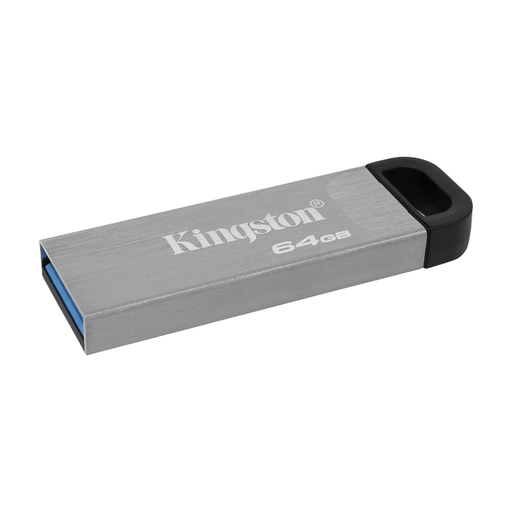 Image unavailable
Kingston DataTraveler Kyson 64GB
A USB-A model for carrying project files between devices with a compatible port.
Capacity: 64 GB. The product description lists a write speed of up to 60 MB/s.
Joybuy
 Image unavailable
Samsung MUF-256BE USB Flash Drive 256GB USB Type-A 3.2 Gen 1 Grey
A 256 GB USB Type-A model for project files on devices with a compatible connection.
The product description lists USB 3.2 Gen 1 and a write speed of 30 MB/s.
Joybuy
Frequently asked questions about USB sticks for sewing patterns
Do I need 256 GB for sewing patterns?
No, not just because of the number of patterns. Check the size of your project folders and choose a capacity that suits the files you want to carry, with room for any you may add later. The available storage may be less than the stated capacity.
Can a project folder larger than 4 GiB be stored on a FAT32 stick?
Yes, as long as no individual file is larger than 4 GiB. Microsoft Learn gives this limit for individual files on FAT32; a folder can contain several smaller files. The same comparison gives exFAT a higher file-size limit. Check that the receiving device supports exFAT, and store your files elsewhere before formatting a stick.
Can I use the same USB stick directly in my sewing or embroidery machine?
That depends on the machine model. Check the manual for supported USB connections, file types, file systems and folder structures. Instructions for specific Brother models won’t necessarily apply to every machine.
Is a USB stick enough as the only backup for my patterns?
No. Keep a separate backup too, and check that you can restore your files from it. The National Cyber Security Centre describes a backup as a copy used to restore data or systems.
What warranty and cancellation rights apply to online purchases in the Netherlands?
When you buy as a consumer, you’re entitled to a product that is fit for purpose; according to the Dutch government, there is no fixed statutory warranty period in the Netherlands. For online purchases from a business, a 14-day cancellation period applies in many cases, subject to legal exceptions.


