
Volunteer managing the pattern archive
Wants to transfer a complete, verifiable copy without relying on the USB stick as the only place to store it. The Netwerk Digitaal Erfgoed and the Library of Congress offer guidance on preserving digital files.


First, choose a connector that works with the volunteers’ computers, then check how much space the complete pattern folder needs. If it contains lots of large scans, the write specification of the exact model is also relevant. Use a USB stick for transferring files or as an extra copy, not as your only long-term archive storage: the Netwerk Digitaal Erfgoed considers USB sticks less suitable for long-term preservation. If files contain personal data, assess the appropriate security measures based on a risk analysis, as advised by the Autoriteit Persoonsgegevens. For each pattern, also check what copying and access rights the archive has.
Wants to transfer a complete, verifiable copy without relying on the USB stick as the only place to store it. The Netwerk Digitaal Erfgoed and the Library of Congress offer guidance on preserving digital files.
Moves files between devices with USB-A and USB-C ports and wants to check which connectors will fit before buying.
Assesses appropriate access security if files contain, for example, contributors’ details. The Autoriteit Persoonsgegevens advises that measures should be based on a risk analysis.
Start by checking the connections and the size of the complete archive folder. Then decide whether transfer time or protecting personal data is a particular priority.
| What to consider | What should you check? | Who is this important for? |
|---|---|---|
| Complete copy and preservation | Measure the complete folder, including any accompanying files. Check the available space and open the files after copying. Also store the archive on a separate storage solution. | If I want to transfer the whole pattern folder and keep the archive safe even if the stick is lost, I’ll use separate storage too. Around 36% of consumers prioritise complete transfers and archive preservation. |
| Connections | Note the ports on the source and destination devices, and check that both can read the stick and its files. | When I move files directly between devices with different ports, I want to know whether the connectors will fit. Around 29% of consumers give top priority to compatibility with all the devices they use. |
| Access to sensitive files | Assess whether files contain personal data and use a risk analysis to decide what security, access controls and recovery procedures are appropriate. | If the archive contains identifiable information, I want to limit unauthorised access without preventing volunteers from doing their work. Around 21% of consumers prioritise protecting personal data. |
| Transfer time | Compare the write specification for the exact model with the device’s connection and the size of the transfer. | If I have a large scan folder or update it often, I want to know how long the transfer will take. Around 14% of consumers give top priority to transfer time for large files. |
Capacity alone doesn’t make a USB stick suitable as your only place to store files. The Netwerk Digitaal Erfgoed considers USB sticks less suitable for long-term preservation.
Use the stick to transfer files or as an extra copy, and arrange separate, managed storage for the archive.
Write speed matters when copying files to the stick. An advertised read speed or USB connection speed doesn’t directly tell you how long your transfer will take.
Compare the write specification for the exact model with the capabilities of the source device, especially for large scan folders.
The Dutch government describes a private copy as being for personal use and makes clear that it must not be distributed or made publicly available. Auteursrechtnl states that heritage organisations generally need permission to digitise protected works and make them available online; exceptions have specific conditions.
Check who holds the rights to each pattern and what copying and access rights apply to the archive.
Kingston offers a range of options for USB-A transfers and hardware encryption.
SanDisk describes models for transferring files between USB-A and USB-C devices, as well as a separate model for larger transfers.
The Dual USB Drive USB-C/USB-A is designed for transferring files between devices with compatible connections.
The JetFlash 790C is a USB-C option for devices with a compatible USB-C connection.
This selection includes USB sticks for transferring pattern files, including USB-A models and a product described as having a dual interface. Don’t use a stick as your only long-term archive copy.
 No image available
For file transfers via USB-A; this model is listed as having 128 GB of storage and USB 3.2 Gen 1.
 No image available
A 64 GB model for transferring files; the product name lists USB 3.2 Gen 1 and 220 MB/s. Before buying, check that the connection is compatible with the devices you use.
 No image available
The 512 GB model is designed for transferring files; the product information lists 220 MB/s. Measure your archive folder and check the devices’ connections before choosing the capacity.
 No image available
For transferring files via USB-A; this Exodia M model is listed as having 64 GB of storage and USB 3.2 Gen 1. Check that the ports on the source and destination devices are compatible.
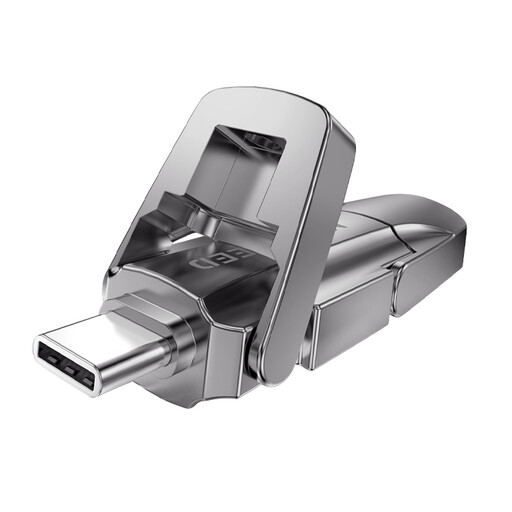 No image available
For transferring files between devices with different connections; the product name lists 256 GB and a dual interface with USB 3.2 Gen 1 and Type-C. Check that the connectors and device support are compatible on both devices.
Don’t use a USB stick as your only long-term archive storage. The Netwerk Digitaal Erfgoed considers USB sticks less suitable for long-term preservation. Keep a separate, managed copy as well, and check that the transferred files can be opened.
First, check the connections on the source and destination devices and whether both can read the stick and its files. Test it with a representative folder and open the files on the destination device. According to the USB-IF, a USB connection operates at the lowest speed supported by both devices.
Yes. If the files need to remain available long term, plan for separate archive storage and its ongoing management. The Netwerk Digitaal Erfgoed discusses options including external drives, NAS, cloud storage and digital repositories.
Not automatically. The Dutch government says that a private copy for personal use must not be distributed or made publicly available. Auteursrechtnl states that heritage organisations generally need permission to digitise protected works and make them available online; exceptions have specific conditions. Check the rights, permissions and intended access for each pattern.
The Autoriteit Persoonsgegevens advises that security measures should be based on a risk analysis; this doesn’t mean that one particular type of USB stick is automatically required. The regulator cites the loss of a stick containing unencrypted personal data as a possible data breach. Assess the actual files and risks to decide which measures are appropriate.