When choosing a USB stick for scanned moving receipts, first check the connections on the scanner and on the device you’ll use to open the scans later. Keep the stick as a separate copy, not as your only storage location. If the receipts contain sensitive information, also check the encryption method and what’s needed to unlock it. Veilig Internetten describes a backup as a copy, while the Dutch Data Protection Authority warns that losing a USB stick containing unencrypted personal data could result in a data breach.
Who should consider this?
Anyone moving house who doesn’t want to lose their receipts
You scan receipts to keep for later and want a separate, easy-to-find copy while packing. Using a USB stick as your only copy still leaves you at risk of losing your files; Veilig Internetten and the Dutch Consumers’ Association both highlight the importance of backups.
Anyone using scanners with different USB ports
You create or receive scans on one device and open them on another. Check whether you need USB-A, USB-C or both; model information from Kingston, SanDisk and Samsung shows that connections vary between models.
Anyone storing confidential receipts
Your receipts may contain information you wouldn’t want exposed if the stick were lost. The Dutch Data Protection Authority highlights the risk of losing a USB stick containing unencrypted personal data, so compare the security method and device requirements.
What should you look for?
First, check that the stick connects directly to the devices you use to scan and open files. Then work out how much storage you need and whether you want to protect your data further.
| What to consider |
What should you check? |
Who is this important for? |
| A recoverable copy |
Open the scans from the stick and keep a separate copy as well. |
If I don’t want to lose my scans while moving house, I want a second copy that I can find and open. Around 36% of consumers prioritise being able to recover their files. |
| The right connection |
Check which USB ports both devices have and whether the scanner supports external storage. |
If I want to move scans between devices with different ports, the stick needs to connect to them. Around 29% of consumers prioritise compatibility. |
| Data protection |
Check whether the scans contain sensitive information and whether the unlocking method works on your devices. |
If my receipts contain information I don’t want anyone to access if they’re lost, confidentiality matters. Around 21% of consumers prioritise this protection. |
| Storage and write time |
Check the size of your scan folder, leave room for new files and, if needed, check the write-speed specification. |
If I want to store lots of scans or large files, I need enough space and an idea of how long copying could take. Around 14% of consumers prioritise storage capacity or transfer time. |
Common pitfalls
-
Using the USB stick as your only storage location
A stick can be lost or damaged. If it holds your only copy, you could lose your scans.
Keep a separate copy too, and check that you can open files from the stick.
-
Confusing a protective cap with data security
A cap protects the connector, not your files. If an unencrypted stick is lost, personal data could be exposed.
Consider how sensitive your scans are and check that your chosen encryption works on your devices.
-
Looking only at capacity or read speed
A large storage capacity doesn’t tell you how much space your scan folder needs. Write speed also matters when copying files to the stick; the stated read speed won’t tell you how long writing takes.
Check the size of your scan folder and, if copying time matters, look for information about write speed rather than read speed alone.
Brands to consider
Kingston
Kingston offers USB-A models for straightforward file transfers, as well as the security-focused IronKey Locker+ 50.
- Kingston lists a sliding cap and a five-year warranty for the DataTraveler Exodia M.
- Kingston says the IronKey Locker+ 50 has hardware encryption; check the unlocking requirements and system compatibility. These features aren’t available on all Kingston sticks.
SanDisk
The Ultra Dual Drive Go is an option if you want to transfer files between devices with USB-A and USB-C ports.
- SanDisk lists both connections for this model.
- Having two connections doesn’t make the stick a separate second backup, nor does it in itself confirm built-in encryption.
Samsung
The MUF-128DA/APC is a USB-C option if you don’t need a USB-A connector on the stick.
- Samsung lists 128 GB capacity and sequential read speeds of up to 400 MB/s for this version.
- The stated speed is for reading; it doesn’t tell you the write speed for scans, and the specification doesn’t apply to all Samsung sticks.
Transcend
The JetFlash 790 is a USB-A alternative with a retractable connector.
- Transcend lists versions including a 128 GB model.
- The retractable design protects the connector, not the confidentiality or preservation of your files.
USB sticks on Joybuy
These USB sticks are designed for storing and transferring scans. The versions shown differ in features such as connection type and storage capacity.
 No image available
Kingston DataTraveler Exodia, 128 GB, USB 3.2 Gen 1 Type-A
Suitable for use with a device that has USB-A; check that the connection matches your scanner.
128 GB storage; the title specifies USB 3.2 Gen 1 Type-A.
Keep a separate copy as well: this stick is one storage medium.
View on Joybuy
 No image available
SanDisk Ultra Dual Drive Go, 512 GB
Suitable for transferring scans between devices with USB-A and USB-C, provided both devices support external USB storage.
512 GB storage; the product description specifies USB-A and USB-C.
Two connections don’t make a second backup; keep a separate copy elsewhere.
View on Joybuy
 No image available
Samsung MUF-512DA, 512 GB, USB Type-C
Suitable for devices with USB-C; a different connection or an adapter is needed for a device with USB-A only.
512 GB storage; the product title specifies USB Type-C 3.2 Gen 1.
The stated maximum speed is for reading and doesn’t tell you how long it will take to write scans. Keep a separate copy too.
View on Joybuy
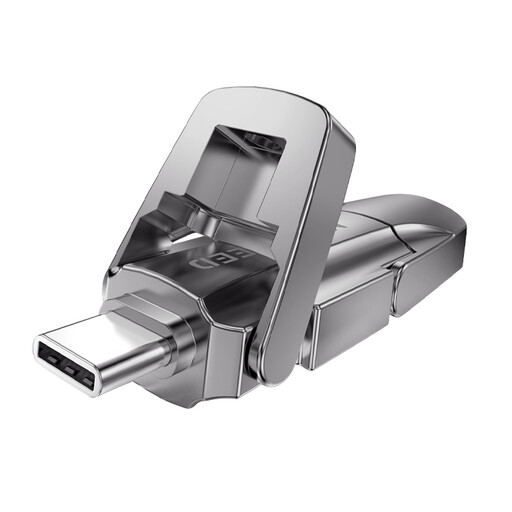 No image available
MOVESPEED YSUYVP10-256GSR, 256 GB
The product description lists USB-A and USB-C for transferring files between devices with those connections.
256 GB storage. The stated speeds are product claims; don’t treat them as an independent performance comparison.
Keep a separate copy as well: this stick is one storage medium.
View on Joybuy
 No image available
MOVESPEED YSUYC-256GSN, 256 GB, silver
The product description lists USB-A and USB-C, as well as AES-256 encryption and fingerprint access. Check that these work with your devices.
256 GB storage; the stated read and write speeds are product claims.
Keep a separate copy too; encryption isn’t a substitute for a backup.
View on Joybuy
Frequently asked questions
Can you delete the scans from your phone or computer once they’re on the stick?
Only delete them after checking that you can open the files from the stick and that you have a separate, usable copy elsewhere. A USB stick can be lost; without another copy, you may have to rely on the paper receipts.
How should you use the stick while scanning and packing?
First, check that the connection fits and that the device supports external storage. Copy the scan folder, open a few files from the stick and keep it separate from your only other copy. Disconnect the backup stick when you’re not copying files; the Dutch Consumers’ Association warns that ransomware can also encrypt connected storage.
Does a USB stick replace other storage or guarantee that your files are safe?
No. A stick is one storage medium and won’t automatically recover files that have been lost. Check the warranty terms for the specific version: Kingston, for example, lists a five-year warranty for the DataTraveler Exodia M, but that doesn’t guarantee file recovery.
Can you throw away all your paper receipts after scanning them in the Netherlands?
Not as a general rule. For business VAT records, the Dutch Tax and Customs Administration describes conditions under which original invoices and receipts don’t need to be kept after digitisation; digital records must remain available for inspection throughout the applicable retention period. These tax rules don’t automatically make a personal receipt from a house move part of a business’s records.


