Choose a USB stick that works with your client’s device and has enough space for the final photo folder. For large transfers, compare the stated write speeds too. A stick with both USB-A and USB-C gives you flexibility if the devices have different ports. If the images include identifiable people, consider what level of security is appropriate and agree with your client on how they’ll unlock the stick.
Who is this guide for?
Creator who doesn’t know what device the client uses
You want to hand over the photos in person, but you don’t yet know whether your client uses USB-A or USB-C. A stick with both connectors can help if you’re not sure which port they have; also check that the files open on the receiving device. Verbatim lists both connectors for the Dual QuickStick.
Creator with a large selection of photos
You want to copy a large final folder and need enough storage space and a suitable write speed. The stated speed can also depend on the computer and connection. Kingston recommends a compatible USB 3.2 Gen 2 connection for optimum performance with the DataTraveler Max.
Creator working with sensitive images
You’re handing over photos that include identifiable people and want to weigh up suitable protection without locking your client out. Consider how your client will unlock the stick; the Dutch Data Protection Authority stresses that organisations should tailor security measures to the risks of their processing activities.
What should you consider when handing over photos?
Start with your client’s port and the size of the final folder. Then consider how long writing the files will take and, if they include identifiable people, whether extra access security is appropriate. Finally, test that the files open on the intended device.
| What to consider |
What to look for when buying |
Who should pay closer attention? |
| Connection to the client’s device |
Ask which port your client uses and test the connector you choose. A stick with both USB-A and USB-C can be useful if the devices differ. |
If I don’t yet know which port my client uses, I want to avoid choosing a stick that won’t plug in directly. Around 28% of consumers therefore give connectivity top priority. |
| Space for the photo folder |
Check the size of the final folder and make sure there’s enough usable space. According to Microsoft, FAT32 has a maximum file size of 4 GiB per file. |
If the whole selection needs to fit on one stick, I want to compare the folder size with the available capacity in advance. Around 22% of consumers prioritise having enough space. |
| Write time before the appointment |
Compare the stated write speed for the exact model and check the port and any hub you’re using. Read speed doesn’t tell you how quickly you can write files to the stick. |
If I need to copy a large selection before handing it over, I look at write speed rather than read speed alone. Around 22% of consumers prioritise a short copying time. |
| Protection of personal data |
Assess the risks associated with the images and agree with your client on how they’ll unlock the stick. The Dutch Data Protection Authority says organisations should protect personal data appropriately, based on the risks. |
If my portfolio includes identifiable people, I want to consider the risk of unauthorised access without making it difficult for my client to access the files. Around 17% of consumers give protection top priority. |
| Opening files when they’re received |
Test sample files on the intended device. Make a copy before formatting, as formatting erases existing files; Apple lists exFAT as a Windows-compatible format. |
If I only consider the handover successful once my client can open the files, I want to check access in advance. Around 11% of consumers prioritise being able to open files without any problems. |
Common mistakes when choosing a USB stick for photos
-
Comparing advertised read speeds alone
When preparing a handover, you write the images to the stick. Samsung lists a maximum sequential read speed of 400 MB/s for the MUF-256DA/APC; this figure doesn’t indicate the write speed.
Check the write speed for the exact model and make sure your computer’s port is suitable for the connection you plan to use.
-
Assuming a USB plug that fits means the files will be accessible
The plug may fit, but your client might not be able to read the files. Apple says a Mac may be able to read an NTFS drive, but not write to it. Formatting erases the existing contents.
Test the port, file system and a few sample files on the intended device. Make a copy of the files before formatting the stick.
Reformatting or copying the files again can take extra time just before the handover.
-
Putting images of identifiable people on an unprotected stick without assessing the risks
The Dutch Data Protection Authority considers identifiable people in images to be personal data. For business use, an organisation must tailor its security to the risks; losing a stick containing unencrypted personal data could constitute a data breach.
Consider what level of security is appropriate for the images and the handover, and agree in advance how your client can use any access security.
Brands to compare for this handover
Verbatim
The Dual QuickStick #32040 is a 128 GB model with USB-A and USB-C, designed for transfers between devices with different ports.
- Verbatim lists maximum read speeds of 510 MB/s and write speeds of 460 MB/s for this model.
- According to Verbatim, the included Nero Backup software is for Windows only, so don’t count it as a Mac feature.
Kingston
The DataTraveler Max is a USB-C range for fast transfers, while the separate IronKey Locker+ 50 range is designed for secure transfers.
- Kingston lists maximum read speeds of 1,000 MB/s and write speeds of 900 MB/s for the DataTraveler Max. For optimum performance, Kingston recommends a compatible USB 3.2 Gen 2 connection.
- According to Kingston, the IronKey Locker+ 50 has hardware encryption and USB-A. Your client must be able to unlock it to access the files; these features belong to a different product range from the DataTraveler Max.
Samsung
The MUF-256DA/APC is a 256 GB USB-C stick for devices with a USB-C port.
- Samsung lists a maximum sequential read speed of 400 MB/s for this model.
- Samsung says actual speeds may vary. The stated read speed isn’t the write speed, so compare the latter separately if copying time matters.
SanDisk
The Ultra Dual Drive Luxe SDDDC4-128G-G46 is a 128 GB model with USB-A and USB-C for transfers between devices.
- The manufacturer lists the connectors and capacity for this model.
- If copying time is a deciding factor, check the write speed for this model separately.
USB sticks for handing over a portfolio
These USB sticks are designed for storing and handing over a final selection of photos. Before buying, check that the capacity and connectors are suitable for your files and your client’s device.
 No image available
Kingston DataTraveler Exodia DTX 256 GB, USB 3.2 Gen 1
An option if your photo folder fits within 256 GB and the connector is compatible with your computer.
256 GB storage; USB 3.2 Gen 1; stated write speed of up to 625 MB/s.
View at Joybuy
 No image available
Kingston DataTraveler SE9 G3 512 GB, USB 3.2 Gen 1
The 512 GB model may suit a larger selection of photos; check the size of the final folder before copying.
512 GB storage; USB 3.2 Gen 1.
View at Joybuy
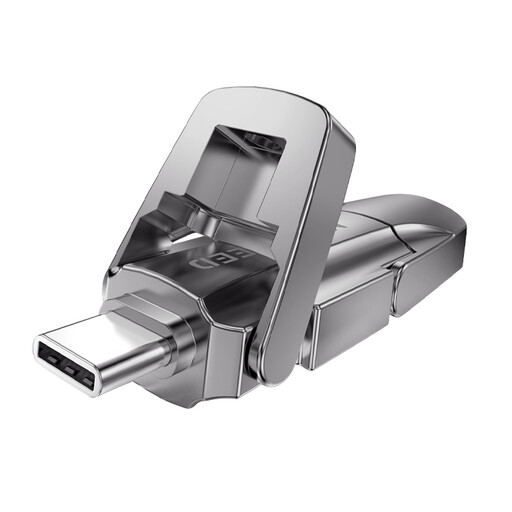 No image available
MOVESPEED YSUYVP10-256GSR, 256 GB, USB 3.2 Gen 1 and Type-C
Worth considering if you’re looking for a dual-interface stick. Check exactly which connectors this model has and whether they fit both devices.
256 GB storage; USB 3.2 Gen 1 and Type-C. The stated 1.090 MB/s is the read speed, not the write speed.
View at Joybuy
 No image available
MOVESPEED YSUYC-256GSN (Silver), 256 GB, dual interface
An option if you’re looking for a dual-interface stick for transferring files between devices; check the exact ports and your client’s connection.
256 GB storage; USB 3.2 Gen 1 and Type-C; stated speeds of up to 550 MB/s read and 500 MB/s write.
View at Joybuy
 No image available
MOVESPEED YSUYVP10-512GSR, 512 GB, USB 3.2 Gen 1 and Type-C
The capacity may suit a larger selection of photos; also check exactly which connectors this model has.
512 GB storage; USB 3.2 Gen 1 and Type-C. The stated 1.090 MB/s is the read speed, not the write speed.
View at Joybuy
Frequently asked questions
How can you make sure your client can open the photos?
Check the port and operating system in advance, copy the final folder and open a few files on the receiving device. Apple lists exFAT as a Windows-compatible format; also check that the intended device supports the format you choose. Formatting erases the existing contents of the stick.
Why does copying take longer than the speed on the packaging suggests?
First, check whether the stated speed refers to reading or writing: write speed matters when filling a stick. For optimum performance with the DataTraveler Max, Kingston recommends a compatible USB 3.2 Gen 2 port; a cable or hub can also limit the connection.
Do you have to hand over portfolio photos on an encrypted stick in the Netherlands?
Not as a general rule for every portfolio handover. The Dutch Data Protection Authority considers identifiable people in photos to be personal data. If an organisation processes this data, it must decide on appropriate security based on the risks; agree with your client on how they’ll unlock the stick.
What should you do if a stick containing personal data goes missing?
Assess the risk of a potential data breach. The Dutch Data Protection Authority gives the loss of a stick containing unencrypted personal data as an example; whether you have to report it depends on the risk to the people concerned. If the organisation responsible for the data has to report it, the regulator says the deadline is 72 hours after becoming aware of the breach.
What if the USB stick stops working too soon during normal use?
For a consumer purchase in the Netherlands, statutory rights apply alongside any manufacturer’s warranty. According to ACM ConsuWijzer, if a product is faulty during normal use, the retailer must provide a remedy free of charge under the applicable conditions; there isn’t one fixed warranty period for all USB sticks. Keep your original photo files somewhere else too.


