
Creator with lots of captures
You want to prepare a complete collection of clips and screenshots. Check the folder size and the usable capacity of the model you choose before starting the copy.


First, check the total folder size and the size of the largest individual clip. Then check the connections and file system requirements of both devices. To compare copy times, focus on the stated write speed. For confidential client files, choose a level of security that suits the content, and keep a separate, checked copy as a sensible precaution.
You want to prepare a complete collection of clips and screenshots. Check the folder size and the usable capacity of the model you choose before starting the copy.
You’re transferring captures from a console or computer to another device. Check the connections and the file system required by both devices for your transfer.
If the files contain sensitive information, choose security measures that suit the content and how the client will access the files. The Dutch Data Protection Authority stresses that appropriate security depends on the circumstances.
| What to consider | What to look for | Who should pay particular attention? |
|---|---|---|
| Space for the transfer | Compare the measured folder size with the capacity and usable free space of the stick you choose. | If you want to take the whole collection of clips and screenshots with you in one go, the stick needs to have enough space. Around 36% of consumers say sufficient space is their top priority. |
| Write time | Check the stated write speed for the exact model; read speed doesn’t tell you how quickly files are written to the stick. | If you need to copy lots of video footage before an appointment, focus on how long it will take to write the files. Around 29% of consumers prioritise copy time. |
| Works with both devices | Check the ports at both ends and make sure the file system is suitable for the transfer. FAT32 has a 4 GB per-file limit, as Microsoft Learn explains. | If you’re transferring clips from a console to a client’s device, you’ll want both devices to be able to use the stick and open the files. Around 21% of consumers prioritise compatibility. |
| Access to sensitive files | Consider whether encryption and password protection are appropriate for the content. Also check in advance how the recipient will be able to open the files. | For confidential client files, you’ll want to prevent unauthorised access without blocking the client from opening them. Around 14% of consumers make security their top concern. |
The time it takes to copy captures to a stick depends on write speed, not just read speed. Kingston lists a maximum read speed of 220 MB/s and a write speed of 100 MB/s for the DataTraveler SE9 G3.
Look up the write speed for the exact model and bear in mind which port you’re using.
A lower-than-expected write speed can mean extra waiting before the transfer is complete.
As well as having enough total storage space, the file system must be able to handle large individual files. FAT32 has a 4 GB per-file limit.
Check the size of the largest clip and the requirements of both devices before choosing a file system. Make a separate copy of any existing files first: formatting can erase the stick.
A stick can be lost, and a security feature won’t prevent a transfer from failing. Verbatim says that data on the Secure Pro is erased after ten failed access attempts. The Dutch Data Protection Authority also highlights the risk of losing a USB stick containing unencrypted personal data.
Test unlocking the stick with the recipient in advance, and keep a separate, appropriately secured copy as well.
If the stick is lost or can’t be unlocked, files may be missing or the transfer may be delayed.
The JetFlash 920 is a USB-A range for anyone who regularly transfers larger files.
The Extreme PRO USB 3.2 Solid State Flash Drive comes in USB-A models designed for larger files.
The DataTraveler Duo has USB-A and USB-C connectors; the DataTraveler SE9 G3 is a separate USB-A range.
The Store ’n’ Go Secure Pro is a USB-A range with hardware encryption, for transfers that need access protection.
The FIT Plus 256 GB MUF-256AB/APC is a compact USB-A model.
These USB sticks are designed for storing and transferring gameplay captures, with a range of capacities and connections. Before buying, check that the model you choose suits your folder size, devices and preferred copy time.
 No image available
An option if your captures fit within 256 GB and you take the stated write speed into account.
256 GB; USB 3.2 Gen 1; shock-resistant; stated write speed of up to 625 MB/s.
 No image available
Worth considering if the transfer you’ve measured fits within 64 GB.
64 GB; USB 3.0.
 No image available
A high-capacity option if your captures need more space than a smaller stick can offer.
512 GB; USB 3.2 Gen 1; metal design. Kingston lists a maximum read speed of 220 MB/s and a write speed of 100 MB/s for the SE9 G3.
 No image available
An option for transfers that fit within 64 GB.
64 GB; USB 3.2 Gen 1.
 No image available
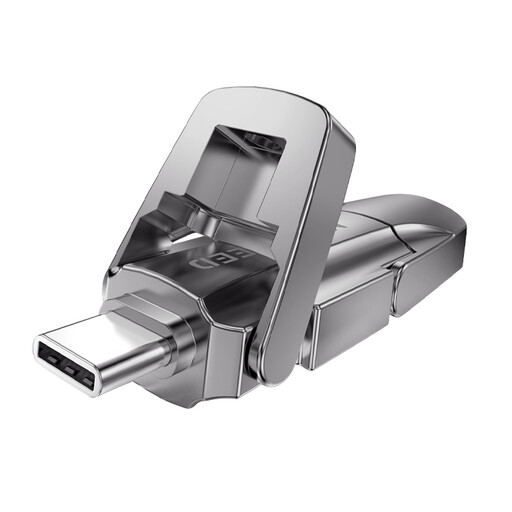
Worth a look if 256 GB is enough and your devices have different connections.
256 GB; USB 3.2 Gen 1 and Type-C dual interface; stated read speed of 1090 MB/s.
On your PS5, open the Media Gallery, select a capture and choose Copy to USB Drive from the More menu. This copies individual captures; it’s not the same as a full console backup, as PlayStation explains.
Don’t assume you can: Xbox Support specifies USB 3.0 and NTFS for recording directly to external storage, while PlayStation specifies FAT32 or exFAT for a PS5 console backup. These are different uses. Check the requirements for your transfer and make a separate copy of any existing files before formatting.
Check the size of the individual file and the file system: FAT32 has a 4 GB per-file limit. Microsoft Learn explains this limit. Before formatting the stick, also check which file systems the source and destination devices support.
When you buy as a consumer, the product must be of satisfactory quality, and the retailer is your point of contact if there’s a problem. The Dutch Government says there’s no fixed statutory warranty period for every product; a manufacturer’s warranty is additional. This consumer guidance doesn’t determine whether the same rights apply when buying on behalf of a business.
Not as a general rule for all gameplay captures. If an organisation processes personal data, the GDPR requires appropriate security measures that depend on the circumstances. The Dutch Data Protection Authority cites the loss of a USB stick containing unencrypted personal data as a possible data breach. So, consider the content and the risks involved in the transfer.