
Anyone who needs to find the notes again later
You want to check that the right files are on the stick and open correctly before handing it over, without losing the original. The Digital Trust Center recommends testing that a backup actually works.


Choose a stick that fits both the source and destination computers, then check that the copied notes open from the stick while the original remains separate. If the files contain personal data or confidential customer information, first check whether the transfer is permitted and what security measures are required. An ordinary USB stick is not automatically a suitable secure transfer method.
You want to check that the right files are on the stick and open correctly before handing it over, without losing the original. The Digital Trust Center recommends testing that a backup actually works.
You want to copy notes between devices without finding that the connector is incompatible. Check the ports on both computers first; manufacturers such as SanDisk and Transcend offer models with USB-A and USB-C.
First check whether the files contain personal data or confidential customer information, and which transfer methods and security measures are permitted. The Dutch Data Protection Authority stresses that organisations must protect personal data properly and cannot simply share it without good reason.
First establish whether the content can be transferred and what security measures are appropriate. Then check the connections and test the copy separately from keeping the original.
| What to consider | What should you check? | Who is this important for? |
|---|---|---|
| A readable copy | Check the file names and versions, make sure there is enough free space, and confirm that the files open on the destination computer. Keep the original separate. | If I want to be sure the right version opens from the stick before the handover, while keeping the original, I prioritise recoverability. Around 31% of consumers choosing a stick for this purpose prioritise this need. |
| Compatibility with both computers | Look at the physical ports on both devices and check whether the stick has USB-A, USB-C or both types of connector. | When I’m copying between computers with different ports, I want to be able to plug the stick straight in. Compatibility with both devices is the main concern for around 25% of consumers in this situation. |
| Permitted, confidential transfer | Establish whether the notes contain personal data, who is allowed to receive them and what security policy applies. Also check whether the destination computer supports the secure stick you choose. | If the files may contain customer data, I first want to know whether sharing is permitted and what security measures are required. Around 25% of consumers choosing a stick for this type of transfer prioritise confidentiality. |
| Storage space and copying time | Compare the folder size with the capacity of the exact model. If time is tight, check the stated write speed, not just the read speed. | If I need to copy lots of files or large files, I want enough space and a relevant write-speed specification. Around 19% of consumers in this situation give storage space or copying time top priority. |
A copy is only useful if the file works and you don’t lose the original at the same time. The Digital Trust Center recommends testing that a backup works.
Keep the original separate and open a copied file directly from the stick before the handover.
The maximum sequential read speed Samsung quotes for the BAR Plus is not a write speed. Transcend lists read and write speeds separately for the JetFlash 930C; manufacturers’ maximum figures do not tell you how quickly your files will copy.
If time is tight, compare the write-speed specification for the exact model and don’t assume that stated maximums are guaranteed in real-world use.
A product’s security features and whether personal data may be shared are two separate issues. The Dutch Data Protection Authority says organisations cannot simply share personal data with others without good reason.
First establish what the files contain, who is allowed to receive them and which organisational policies apply. Only then check whether an encrypted stick can be used on the destination computer.
The DataTraveler Exodia M is a USB-A range for everyday file transfers; the IronKey Locker+ 50 G2 is a separate model with hardware encryption.
The Ultra Dual Drive Luxe 128 GB has USB-A and USB-C connectors for devices with different ports.
The BAR Plus 128 GB is a USB-A model with a metal casing.
The JetFlash 930C combines USB-A and USB-C and has stated read and write speeds.
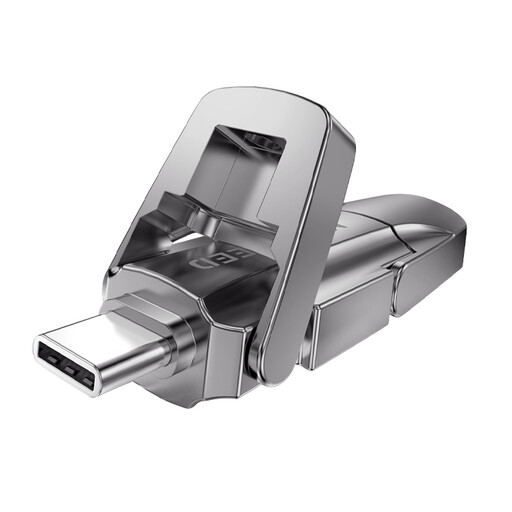
The Store ’n’ Go Dual USB Drive 32 GB combines USB-C and USB-A for transfers between compatible devices.
This selection includes USB-A sticks, a USB-C model and a model with USB-A and USB-C for transferring files between computers. Check the ports on both devices before buying; having two types of connector does not automatically mean that files are encrypted.
 No image available
A USB-A option for copying notes between computers with a compatible port.
 No image available
A USB-A stick for notes on computers with a compatible port.
 No image available
A USB-A model for transferring files on computers with a compatible port.
 No image available
A USB-C model for transferring files between computers with a compatible USB-C port.
 No image available
A model with two types of connector for transferring files between devices with USB-A and USB-C ports.
Open a few files directly from the stick on the destination computer, check that they are the versions you need and keep the original separate. The Digital Trust Center recommends testing that backups can actually be restored. On Windows, safely eject the stick before disconnecting it, as Microsoft advises.
Not directly if the stick only has USB-C and the computer only has USB-A. Check the ports on both devices and, if necessary, choose a model with both types of connector; SanDisk specifies USB-A and USB-C for the Ultra Dual Drive Luxe.
Owning the stick does not mean that you can. If the notes contain personal data, the organisation responsible must consider, among other things, the legal basis, purpose of sharing and appropriate security measures. The Dutch Data Protection Authority says organisations cannot simply share personal data; whether this transfer is permitted depends on the content and circumstances.
Not every loss automatically leads to the same reporting requirements. The Dutch Data Protection Authority cites the loss of a stick containing unencrypted personal data as an example of a data breach. Whether an organisation has to report a data breach depends on its potential impact on the people affected.
In the Netherlands, there is no fixed period for the statutory guarantee; what you can reasonably expect from a product and how it has been used both matter. According to the Government of the Netherlands, the seller must provide an appropriate solution if a product is faulty. Any manufacturer’s warranty is separate.