Choose a USB stick that suits the sensitivity of the letters, as well as the ports and unlocking options available on both computers. If you opt for encryption, agree in advance how the client will access the files. Check them on the receiving device and, if needed, keep a separate copy. A USB stick alone is not automatically a reliable long-term archive.
Who is this choice relevant to?
Anyone transferring confidential letters
If there is a risk that someone could access the scans without authorisation, choose an appropriate security method and check that the client can unlock the files. The Dutch Data Protection Authority points out that documents or a USB stick taken outside the workplace can be lost.
Anyone responsible for the scan archive
You’ll want to be able to check which files have been transferred and keep a separate, usable copy for as long as necessary and permitted. The National Archives describes digital archiving as selecting and organising information and making it accessible; the Digital Trust Center recommends keeping backups in both a physical and a digital location.
Anyone transferring scans between different computers
Check that the stick works with both your device and the client’s, and that the files can be opened on each. SanDisk describes models with USB-A and USB-C; Kingston lists specific system requirements for the IronKey Locker+ 50 G2.
What should you consider when choosing?
First, consider what level of security is appropriate for the contents and whether the client can unlock the stick you choose. Then check the connection, make sure the files are complete, and only then consider the capacity and transfer time you’ll need.
The Dutch Data Protection Authority highlights the risk of losing documents when they are taken outside the workplace. The National Archives explains that archiving involves more than simply copying files, while the Digital Trust Center recommends keeping backups in separate locations.
| What to consider |
What to look for when buying |
Who is this most relevant to? |
| Access to confidential scans |
Consider what level of security is appropriate for the contents and check how the client will unlock the exact model, including what happens if they forget or enter the password incorrectly. |
If I’m transferring confidential scans, I want to stop unauthorised people from reading them. Around 34% of consumers prioritise access protection. |
| A complete copy that can be opened again |
Compare the selected folders with the copied files and open sample files on the receiving device. If necessary, keep a separate copy for as long as your retention period and security arrangements allow. |
I want to check that the transfer is complete and that the scans can be opened again. Around 33% of consumers prioritise having a copy they can check. |
| Working on both devices |
Check the USB ports and whether external storage can be used on both devices. Also test that files open and, if the stick is secure, that it can be unlocked. |
I don’t want to discover at the client’s that the stick won’t connect or the files won’t open. Around 20% of consumers prioritise access on both computers. |
| Capacity and transfer time |
Check the size of the scans you’ve selected and compare it with the capacity of the exact model. If the transfer is time-sensitive, compare the stated write speed, not just the read speed. |
If my scan bundle is large or needs to be transferred quickly, I want to estimate the storage space and write time I’ll need. Around 13% of consumers prioritise capacity and transfer time. |
Common mistakes when choosing
-
Putting the only copy of the letters on the stick you’re handing over
A portable stick can be lost. And copying files is not the same as organising them, making them accessible and being able to restore them.
Check the transferred files and, for as long as necessary and permitted, keep a separate, secure copy that you can test.
-
Choosing an encrypted stick without agreeing how to unlock it
The Kingston IronKey Locker+ 50 G2 has specific system requirements. Kingston also states that ten consecutive incorrect administrator passwords will cryptographically erase the contents.
Test the exact stick on the client’s computer and agree in advance who will manage the access details.
-
Mistaking maximum read speed for transfer speed
A stated read speed doesn’t tell you how quickly scans will be written to the stick. Actual speeds also depend on the devices and conditions involved.
Check the stated write speed for the exact model and, if transfer time matters, time a test transfer.
Brands to consider
Kingston
The DataTraveler Exodia is a standard USB-A option; the IronKey Locker+ 50 G2 is a separate model with hardware encryption.
- Kingston lists USB-A for the Exodia and AES-256 hardware encryption with administrator and user passwords for the IronKey Locker+ 50 G2.
- IronKey encryption isn’t automatically included with the Exodia. The IronKey requires USB-A and specific system requirements; Kingston says incorrect administrator password attempts can erase the contents.
SanDisk
The Ultra Dual Drive Luxe is designed for devices with USB-A and USB-C ports. The Extreme PRO Dual Drive is a separate model with speeds quoted by SanDisk.
- For 64–256 GB versions of the Ultra Dual Drive Luxe, SanDisk quotes a maximum read speed of up to 400 MB/s. For the 256 GB Dutch version of the Extreme PRO Dual Drive, SanDisk quotes maximum read and write speeds of 1000 MB/s and 900 MB/s respectively.
- These are manufacturer figures, not a guarantee of how quickly scans will transfer on a particular computer. The Ultra Dual Drive Luxe’s read speed is not a stated write speed.
Samsung
The BAR Plus is a USB-A option if both computers have that connection.
- Samsung quotes a sequential read speed of up to 400 MB/s for the 512 GB BAR Plus.
- Samsung notes that speed depends on the conditions of use. This specification alone tells you nothing about write speed or built-in access protection.
iStorage
The datAshur PRO² is an option that unlocks with a PIN entered on the stick, if that method suits the transfer and receiving environment.
- iStorage describes the datAshur PRO² as hardware-encrypted and says it can be unlocked with a 7–15 digit PIN, without unlocking software.
- Check in advance that the client can use the stick on their computer. Choosing a particular stick does not, by itself, determine whether a process complies with the GDPR.
Verbatim
The Store ’n’ Go Secure Pro is a USB-A option with password-protected hardware encryption.
- For the 16 GB model, Verbatim lists 256-bit AES hardware encryption and data erasure after ten failed access attempts.
- Verbatim lists system requirements and a firmware update for Windows 10. Check the exact model and the recipient’s computer in advance.
USB sticks at Joybuy
This selection focuses on USB sticks for transferring scans: mainly USB-A models, plus one model with USB-A and USB-C.
 No image available
Kingston DataTraveler Exodia, 128 GB, USB 3.2 Gen 1 Type-A
A standard USB-A stick for transferring files when both devices support USB-A.
- Capacity: 128 GB.
- Connection: USB-A.
- USB 3.2 Gen 1.
View at Joybuy
 No image available
SanDisk Ultra Flair, 512 GB, USB 3.0
A USB-A option for scans when both computers have a USB-A port.
- Capacity: 512 GB.
- Connection: USB-A.
- The product information mentions password protection via SanDisk SecureAccess software.
View at Joybuy
 No image available
SanDisk Ultra, 512 GB, USB 3.0
A USB-A stick for storing and transferring scans when both devices support USB-A.
- Capacity: 512 GB.
- Connection: USB-A.
- According to the product information, the stated password protection and 128-bit AES encryption use SanDisk SecureAccess software.
View at Joybuy
 No image available
Kingston DataTraveler SE9 G3, 512 GB, USB 3.2 Gen 1
A USB stick with 512 GB of capacity for storing and transferring files.
- Capacity: 512 GB.
- Read speeds of up to 220 MB/s according to the product description.
- The product description mentions a compact design with a keyring loop.
View at Joybuy
 No image available
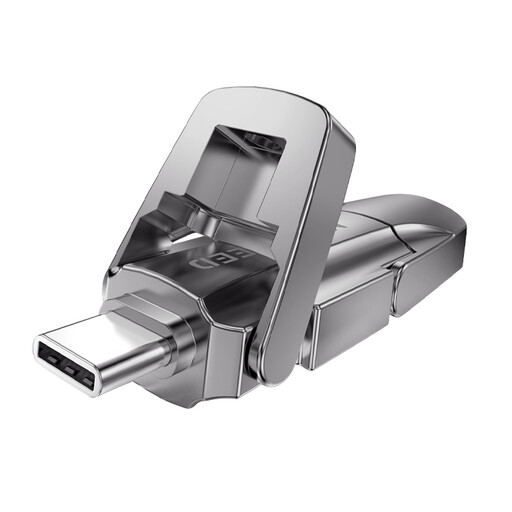
MOVESPEED YSUYVP10-256GSR, 256 GB, USB-A and USB-C
An option when the devices at either end have different USB-A and USB-C ports.
- Capacity: 256 GB.
- Connections: USB-A and USB-C.
- The product description states a maximum read speed of up to 1090 MB/s; this is not a write speed.
View at Joybuy
Frequently asked questions
Does a USB stick for client letters always need hardware encryption under the GDPR?
No. The Dutch Data Protection Authority’s guidance doesn’t set a general requirement for USB sticks to always have hardware encryption. If the scans contain personal data, choose security measures that are appropriate to the situation and the risks. The Authority highlights the risk of losing or having documents stolen when they are taken outside the workplace, and mentions encryption as an option when storage on the work server isn’t possible.
Can I use the stick as my only archive after the transfer?
Don’t rely on a single USB stick as a complete archive. The National Archives describes digital archiving as selecting and organising information and making it accessible; the Digital Trust Center recommends keeping backups in separate locations and testing that you can restore them.
How can you make sure the client can open the scans?
Before the transfer, check the connections on both computers and open sample files on the receiving device. If you’re considering a Kingston IronKey Locker+ 50 G2, also check Kingston’s system requirements and agree who will manage the password needed to unlock it.
How long can I keep a copy of letters containing personal data?
The GDPR doesn’t set one specific retention period that applies in every case. According to the Dutch Data Protection Authority, personal data must not be kept for longer than necessary, although other laws may set specific periods. The appropriate retention period depends on the letters and the obligations that apply to your organisation.
Do I always have to report a lost USB stick containing personal data?
No. You don’t automatically have to notify the Dutch Data Protection Authority in every case. The Authority says an organisation must report a personal data breach unless it is unlikely to pose a risk to the rights and freedoms of the people affected. Whether those people must also be informed depends on whether the breach is likely to create a high risk.


