First, check which USB ports both devices have, how large the transfer is and whether the files are confidential. A USB-A stick will work if both devices have that port; if they have different ports, a stick with USB-A and USB-C may be more convenient. Only choose security features if they suit the files and the way your client will use the stick. Before completing the handover, test the files on the receiving device.
Who is this buying guide for?
Transferring files between different laptops
If you want to open the same presentation on devices with USB-A and USB-C ports, check that the stick supports both connections and that its file system is compatible. SanDisk lists USB-A and USB-C connectors for the Ultra Dual Drive Go.
Transferring confidential client files
When transferring personal data or other confidential files, consider the risks of loss and unauthorised access, as well as how the recipient will unlock the stick. The Dutch Data Protection Authority stresses that security measures should be appropriate to the processing and the privacy risks involved.
Transferring large presentation packs
If you’re copying large media files or lots of files, check the total storage space required and the size of the largest file. Kingston Technology lists maximum read and write speeds for the DataTraveler Max; the port you use is also important.
What should you look for when choosing?
First check the connection and confirm the client can read the files. Then work out how much usable storage you need, and finally consider whether faster write speeds or security features matter.
The percentages give a general indication of the main buying priority when choosing a USB stick for this type of client handover. Other needs may also play a part.
| What to consider |
What should you check? |
Who is this most important for? |
| Connection and file compatibility |
Check the USB ports on both devices and test whether the receiving device can read the file system. |
I want to make sure the client can connect the stick and open the files. Around 36% of consumers put connection and file compatibility first when choosing. |
| Confidentiality |
Assess the files and, if needed, agree in advance how the client will unlock the stick. |
When I’m transferring confidential client files, I want to consider the risks of loss and unauthorised access. Around 29% of consumers prioritise protecting sensitive data. |
| Storage space and file size |
Check the size of the entire folder and the largest file. Also make sure the chosen file system supports that file. Microsoft Learn states that FAT32 has a 4 GiB limit per file. |
I need the whole presentation pack to fit, including any large media files. Storage space and file size are the main buying priority for around 21% of consumers. |
| Copying time |
Compare the stated write speed and check that the computer’s port and any hub can support it. |
When I’m transferring large files repeatedly or under time pressure, copying time can be a major consideration. Around 14% of consumers put this priority first. |
Common mistakes
-
Looking only at storage capacity
A stick may have enough free space overall but still be unable to store a particular file. Microsoft Learn states that FAT32 has a maximum file size of 4 GiB.
Check the size of both the entire folder and the largest file. Only choose or change the file system after checking that the client can read it; formatting can erase existing files.
-
Assuming a USB-C connector or high read speed means fast copying
Write speed also matters when copying files to a stick. A port or hub may slow down the transfer. Kingston Technology lists maximum speeds of up to 1,000 MB/s for reading and 900 MB/s for writing across the DataTraveler Max range. These figures are not measurements of your files or equipment.
Check the stated write speed for the specific model and make sure the computer’s port and any hub can support the intended speed.
-
Choosing a secure stick without preparing the client to unlock it
Secure access won’t help with the handover if the recipient can’t open the files. The unlocking process needs to work for both the client and the devices they’ll use.
Agree the process in advance and test it with the intended devices. Verbatim states that data on the Store ’n’ Go Secure Pro is erased after ten unsuccessful access attempts, so bear this in mind when sharing access details.
-
Removing the stick as soon as copying appears to be complete
A copy progress indicator alone doesn’t confirm that the files are complete and readable. Microsoft recommends safely removing USB storage before disconnecting the stick.
Open a few copied files, check that the entire folder is there, then use your operating system’s eject function.
Brands and product ranges to consider
Kingston
The range includes everything from standard USB-A sticks to models with hardware encryption or a focus on speed.
- Kingston Technology specifies USB-A for the DataTraveler Exodia M. For the DataTraveler Max, the manufacturer lists maximum read and write speeds; Kingston Technology says you need a suitable USB 3.2 Gen 2 port for optimum performance.
- The stated maximum speeds aren’t measured transfer speeds for your files. The IronKey Keypad 200 also requires an unlocking process the recipient can use.
SanDisk
The Ultra Dual Drive Go is an option for moving files between devices with USB-A and USB-C ports.
- SanDisk lists both connectors for this model.
- Having two connectors doesn’t guarantee that every file system or protected file will work on the client’s device, so check this separately.
Verbatim
The Store ’n’ Go Secure Pro is a USB-A option if hardware encryption and password-protected access suit the handover.
- Verbatim specifies 256-bit AES hardware encryption for this model.
- Verbatim says the data is erased after ten unsuccessful access attempts, so agree how the recipient will access the files.
Transcend
The JetFlash 790 is a standard USB-A model with a retractable connector.
- Transcend lists a 64 GB version, among other options.
- Transcend notes that actual capacity may differ from the stated capacity. Check how much space is available for your files.
USB sticks on Joybuy
The options shown include USB-A sticks and a model with USB-A and USB-C. Check the ports on both devices in advance, and make sure the client will be able to open the files.
 No image available
SanDisk Ultra Flair 64 GB USB 3.0
An option for transfers via USB-A, if the capacity is suitable for your presentation pack.
64 GB; USB-A; read speeds of up to approximately 150 MB/s according to the product information.
The product information mentions password protection using SanDisk software with 128-bit AES file encryption. Check that this approach suits the devices and arrangements you have with your client.
Joybuy
 No image available
Kingston DataTraveler SE9 G3 64 GB
A USB-A option if both devices have that port and the stated capacity is sufficient.
64 GB; USB Type-A; USB 3.2 Gen 1; read speeds of up to 220 MB/s and write speeds of up to 100 MB/s according to the product information.
Check the actual transfer speed with the computer and files you’ll be using; stated speeds aren’t a measurement of your setup.
Joybuy
 No image available
Kingston DataTraveler SE9 G3 512 GB
This version is designed for transfers where the stated 512 GB capacity is useful.
512 GB; USB 3.2 Gen 1; metal casing; read speeds of up to 220 MB/s according to the product information.
Check how much space your files actually need and make sure the connection is suitable for both devices.
Joybuy
 No image available
Kingston DataTraveler Exodia M 64 GB, black and blue
A standard USB-A option if both the source and receiving devices have a compatible USB-A port.
64 GB; USB Type-A; USB 3.2 Gen 1. The product information mentions a sliding cap and a loop for a keyring.
Compare the usable storage with the size of the entire folder and check that the client can read the file system.
Joybuy
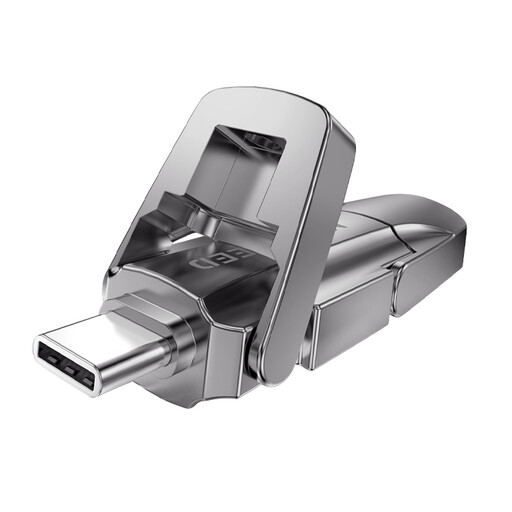 No image available
MOVESPEED YSUYVP10-256GSR 256 GB
An option for moving files between devices with USB-A and USB-C ports.
256 GB; USB-A and USB-C; USB 3.2 Gen 1. The product information lists read speeds of up to 1,090 MB/s and write speeds of up to 1,030 MB/s.
The stated maximum speeds aren’t measured speeds for your files; check the ports and any hub too.
Joybuy
Frequently asked questions
Which file system should you choose when transferring files between a Mac and a Windows PC?
Apple lists exFAT as a format compatible with Windows. Check that the receiving device can read it before formatting, as formatting erases existing files. Microsoft Learn states that FAT32 has a 4 GiB limit per file.
What should you check just before handing the USB stick to your client?
Open a few copied files, check that the entire transfer folder is there and safely eject the stick. Microsoft recommends safely removing USB storage before disconnecting it.
Does every client presentation in the Netherlands need to be on an encrypted USB stick?
No, not every presentation automatically needs an encrypted stick. The Dutch Data Protection Authority says organisations must protect personal data appropriately, based on how it is processed and the privacy risks involved. The files and the organisation’s applicable policies determine what approach is suitable.
What should you do if a USB stick containing personal data is lost?
Report the loss immediately in line with your internal procedure, as a lost stick containing unencrypted personal data may constitute a data breach. The data controller assesses whether the Dutch Data Protection Authority and affected individuals need to be notified. If notification to the Authority is required, the AP specifies a deadline of 72 hours from becoming aware of the breach.


