First, find out whether your light has its own battery, which you simply want to recharge, or whether it needs a continuous USB power supply while you read. For a low-power light, support for low-current devices matters more than a high fast-charging output; check how long that mode remains active too. MOJOGEAR and Anker describe these features for specific models, while the Consumers’ Association advises matching the port and cable to your device.
Who is this choice relevant to?
Readers using a USB light that needs continuous power
Your light needs to stay connected to USB while you read. Look for support for low-current devices and check how long that mode lasts. MOJOGEAR and Anker highlight these points for specific power banks.
Readers who recharge their light between sessions
If your light has its own battery, match the cable and output to its connection. The Consumers’ Association explains that power banks can have different types of USB connection.
People working from home with several devices
If you want to connect a phone as well as your light, for example, check the number of outputs and how much power is available when using them simultaneously. The Consumers’ Association and Belkin cover these points when discussing power banks.
What should you look for?
First, decide whether you want to recharge the light or power it while you read. If you’ll be using it continuously, check the low-current mode and stated running time. Then look at the connection, capacity and any extra ports.
| What to consider |
What should you check? |
Who is this important for? |
| Will the light stay on? |
Check whether the exact model has a low-current mode, which port it works with and how long the mode stays active. |
I want my light to stay on while I read, even when it draws very little power. Around 40% of consumers say continuous light at low power consumption is their top priority. |
| The right connection |
Match the cable and light’s plug to an output that actually supplies power. |
I want to be able to plug in my light without any hassle. Around 30% of consumers put finding the right connection first. |
| Running time and size |
Compare the light’s power consumption and your preferred session length with the usable capacity, weight and dimensions. |
I want enough power for my reading session without taking up too much space on my desk. Around 20% of consumers give greatest weight to running time and compact size. |
| Several devices |
Check the number of outputs and how power is shared when you use multiple ports at once. |
I want to connect my light and, for example, a phone at the same time. Around 10% of consumers prioritise simultaneous use. |
Common buying pitfalls
-
Looking only at the capacity in mAh
The stated battery capacity doesn’t tell you exactly how long your light will stay on. Usable output energy and the light’s power consumption also matter.
Check your light’s power consumption and how long you want to use it, then compare these with the power bank’s usable capacity.
-
Assuming low-current mode works indefinitely
A claim that a power bank supports small devices doesn’t mean it will keep powering them all evening. MOJOGEAR states that the MINI EVO’s low-current mode lasts for up to 2 hours.
Check the stated duration for the exact model, and distinguish between recharging a light and powering it continuously.
-
Assuming every USB-C port is an output
Anker states that the USB-C port on the 313 Power Bank (PowerCore 10K) is for input only.
Before buying, check whether each port can supply power to your light.
-
Continuing to use a damaged or specifically recalled power bank
The Dutch Fire Service warns against using damaged cables or batteries. On 15 September 2026, the Netherlands Food and Consumer Product Safety Authority reported a fire risk with certain batches of the imoshion MagSafe Powerbank.
If there’s a safety warning, check the product and batch numbers and follow the instructions. Don’t use a damaged cable or a swollen battery.
Brands to consider
Anker
The Anker 313 Power Bank (PowerCore 10K) is a wired option for which Anker describes a mode for low-power devices.
- Anker explains how to activate low-current mode.
- According to Anker, USB-C on this model is for input only. A reference to small accessories isn’t a real-world test with a lamp.
MOJOGEAR
According to its Dutch product page, the MINI EVO 10,000 mAh combines USB-A, USB-C and a low-current mode.
- The manufacturer states that two connections can be used at the same time.
- MOJOGEAR states that low-current mode lasts for up to 2 hours. This may not be long enough if your light needs continuous power during an extended reading session.
Belkin
The 20,000 mAh BoostCharge BPB012 is an example of a power bank with several wired outputs.
- Belkin lists two USB-A outputs and one USB-C output.
- When all three ports are used at once, the stated total output is up to 15 W. Check separately whether the model is suitable for a low-power light.
Xtorm
According to Xtorm, the 10,000 mAh NextGen XNG101W35 has several connections and a display.
- Xtorm lists USB-A, two USB-C ports, a weight of 212 g and up to 35 W via USB-C.
- For this exact model, check whether your low-power light stays on; the maximum charging output doesn’t prove that it will.
Joybuy products for a USB reading light
These products are for anyone considering a wired power bank. Check that each model’s connection suits your light and that the power bank can handle a low current draw if you’ll be using it continuously.
 No image available
MOMAX 1-Power F.Pass+ ultra-slim power bank, 10,000 mAh
A wired option if your light charges via USB-C; check whether the model can handle your light’s low current draw.
The description lists a built-in USB-C cable, a USB-C input/output, a USB-A output and support for up to three connected devices at once.
View at Joybuy
 No image available
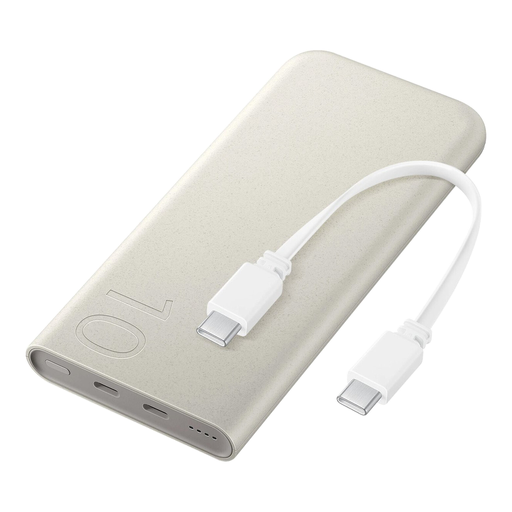
SAMSUNG 25W inductive power bank, 10,000 mAh, beige
Could be a wired option for a light with a compatible USB-C connection; check whether it supports continuous use at a low current draw.
The product description lists an integrated USB-C cable, wired charging up to 25 W, wireless charging up to 7.5 W and support for up to three connected devices at once.
View at Joybuy
 No image available
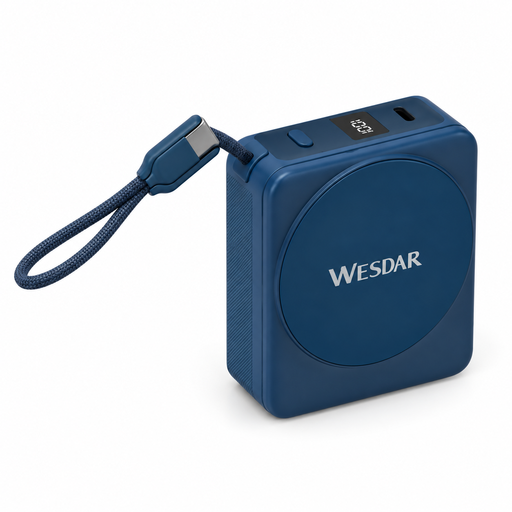
Magnetic power bank, 10,000 mAh, 22.5 W wired and 15 W wireless
The built-in USB-C cable may suit a light with USB-C; check the output and how it performs with a low current draw.
The title lists 22.5 W wired charging and 15 W wireless charging. The description mentions a built-in USB-C cable and a digital display.
View at Joybuy
 No image available
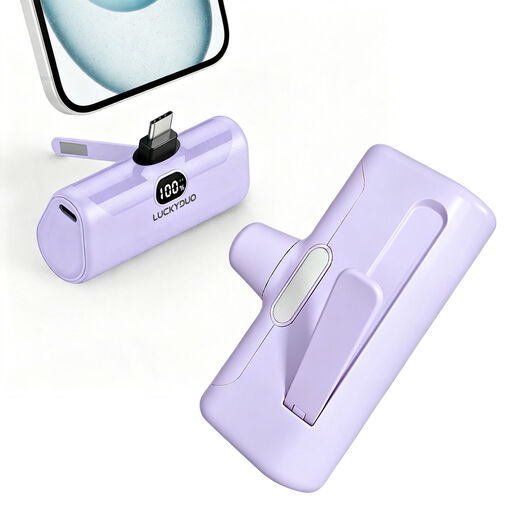
Ultra-compact USB-C power bank, 5,000 mAh, 15 W PD
A compact option to consider if your light charges via USB-C; check that the port supplies power and is suitable for continuous use with your light.
The product description lists USB-C charging with 15 W Power Delivery, an LCD display and built-in LED lighting.
View at Joybuy
 No image available
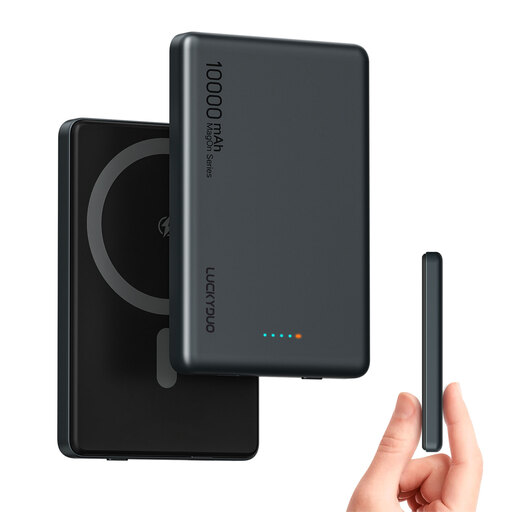
Magnetic wireless power bank, 10,000 mAh, dual USB-C PD 20W
Could suit a light with USB-C if you want to use that connection for wired power; check whether the power bank can power the light continuously at a low current draw.
The title lists two USB-C ports and 20 W PD charging. The description mentions an extra USB-C port for a second wired device.
View at Joybuy
Frequently asked questions
Can any power bank keep your USB reading light on all evening?
No, you can’t tell from the capacity alone. A light that needs continuous USB power may switch off automatically if it draws very little current. Check whether the exact model has a low-current mode and how long it lasts. A light with its own battery that you only need to recharge has different requirements.
How can you check whether your light will connect to the power bank?
Match your light’s connection and cable to an output that actually supplies power. Check what each port does on the exact model: Anker, for example, states that USB-C on the 313 Power Bank (PowerCore 10K) is for input only.
Can you use the light while charging the power bank?
Only if the manual for the exact model allows charging and discharging at the same time through the connection you want to use. MOJOGEAR lists this feature for the MINI EVO, but that doesn’t confirm that other models support it or that low-current mode will stay active without interruption.
How can you use a power bank safely on your desk?
Use a suitable, undamaged cable and place the charger in an open space so heat can escape. The Dutch Fire Service advises against charging under a pillow or duvet and using damaged cables. If there’s a safety warning, follow the instructions for the exact product.
What cooling-off period applies to an online purchase in the Netherlands?
According to the Dutch Government, consumers generally have 14 days to change their mind when buying at a distance, although there are exceptions. Check the seller’s information for the specific offer; this statutory cooling-off period isn’t a manufacturer’s warranty.


