First, check which plug is on your reading light’s charging cable and follow the light’s charging instructions. A separate USB charger is a good choice if you have an accessible socket and only need to charge the light. An extension lead with USB is more useful if you also need extra sockets somewhere convenient. If you’re charging several devices at once, check the stated output for each port and the relevant safety information.
Who is this for?
Someone with one reading light
You want to charge your light without adding unnecessary connections to the mains. The plug on your cable and your light’s charging instructions will determine whether an existing charger or a simple separate one will work.
Home worker with a crowded desk
You want an accessible charging point for your light, as well as sockets for other desk equipment. Cable length and placement are important, too.
Someone who charges devices at the same time
You want to connect a second device as well as your light, so you’re comparing port types and the stated output when both are in use.
What should you consider when choosing?
Separate USB wall charger
Choose this option: if you have an accessible socket and mainly want to charge your reading light; match the port to the cable.
Bear in mind: you won’t get extra mains sockets or a longer cable to reach your desk.
Extension lead with USB
Choose this option: if you need mains sockets somewhere accessible as well as USB charging.
Bear in mind: an extension lead takes up space. Check the cable length and the separate limits for USB outputs and mains sockets.
Multi-port USB-C charger
Choose this option: if your light’s cable fits a USB-C port and you also want to connect a second USB-C device.
Bear in mind: check the output specifications when both ports are in use. A USB-C port won’t connect directly to a USB-A plug.
| What to consider |
What should you check? |
Who is this most relevant to? |
| Compatible connection |
Check the plug at the power end of the cable, the connection on the light and the charging instructions. |
If I only want to charge my reading light, I first want to make sure the cable fits the charger. Around 33% of consumers put a compatible connection first. |
| Accessible desk sockets |
Measure the cable length you need and work out how many mains sockets you actually need. |
For a desk with several devices, having a charging point somewhere convenient is important; around 27% of consumers prioritise accessible connections. |
| Charging at the same time |
Compare the port types and stated output for each port when in use at the same time with the requirements of both devices. |
If I want to connect a second device as well as my light, I check that both cables fit and what output is available. Around 20% of consumers put simultaneous charging first. |
| Safe placement and use |
Check that the charging product carries the required CE marking, use an undamaged cable and keep the charger unobstructed. Connect high-power appliances directly to a wall socket; the Fire Service recommends this for such appliances. |
If you want to use a charging point carefully, pay attention to the marking, cable and heat dissipation; around 20% of consumers prioritise safe placement and use. |
Pitfalls to avoid
-
Looking only at the number of USB ports
Two ports won’t help if your charging cable’s plug doesn’t fit. USB-A and USB-C are different physical connections.
Before you buy, compare the plug on your cable with the port type and check your light’s charging instructions.
If the plug doesn’t fit, you may need a different cable or charger.
-
Choosing the highest wattage to charge your reading light faster
The stated output may change when you use several ports at once. A high power rating on the packaging doesn’t, by itself, tell you what output your light needs.
Compare the specifications for one and two connected devices with the requirements of your own devices.
-
Using an extension lead as if every appliance has a low power draw
USB outputs and mains sockets have separate limits. The Fire Service recommends connecting high-power appliances directly to a wall socket.
Check the specifications for both types of connection and use the extension lead as directed in its instructions.
Brands to consider
IKEA
IKEA offers, among other products, an extension lead with USB ports and a separate USB-C charger with two ports.
- IKEA Netherlands lists four sockets, two USB ports, a 3.0 m cable and a maximum of 5 V and 2600 mA for the USB ports on the KOPPLA.
- For the SJÖSS, IKEA Netherlands lists 45 W when using one USB-C port and 22 W per port when using two.
- These are different models with different connections; the KOPPLA specifications don’t demonstrate USB-C charging performance.
Belkin
Belkin offers wall chargers with two USB-A ports and models combining USB-A and USB-C.
- Belkin Netherlands lists a maximum of 12 W per USB-A port for the WCB002vfWH. For the WCB009vfWH, Belkin lists a maximum of 30 W via USB-C and 12 W via USB-A.
- These wall chargers don’t add mains sockets or an extension cable. The stated figures are product specifications, not independent measurements taken with a reading light.
Anker
The Anker 323 Charger, model A2331, is a compact charger with one USB-A port and one USB-C port.
- According to Anker’s product information, the stated output for each port varies when both ports are used at the same time.
- Check the output specifications for the combination of devices you want to connect; a two-port charger doesn’t guarantee the same output from both ports.
Joybuy products
This selection includes USB extension leads and separate USB chargers for charging a reading light at or near a home-working desk.
 Image unavailable
10-in-1 extension lead, 4 sockets, 3 USB-A and 2 USB-C ports, 3 m
Suitable for a desk where you want to charge USB devices and need extra mains sockets.
The product name lists four sockets, three USB-A ports, two USB-C ports and a 3 m cable. The stated maximum is 2500 W; not intended for high-power appliances. Don’t connect this extension lead in series with another extension lead.
View at Joybuy
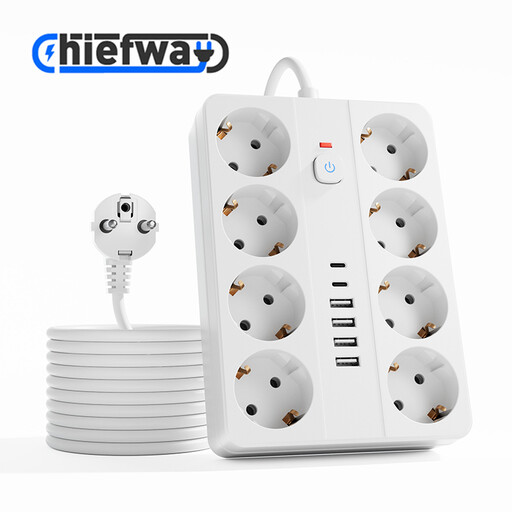 Image unavailable
14-in-1 extension lead, 8 sockets, 4 USB-A and 2 USB-C ports, 3 m
Suitable for a desk where you want several mains connections and USB ports in one place.
The product name lists eight sockets, four USB-A ports, two USB-C ports and a 3 m cable. The stated maximum is 2500 W; not intended for high-power appliances. Don’t connect this extension lead in series with another extension lead.
View at Joybuy
 Image unavailable
OnePlus 80W Dual Ports SUPERVOOC adapter, USB-A + USB-C
The combination of USB-A and USB-C may suit a cable with one of those plug types; check the connection on your light.
The product name lists two ports and 80 W. This doesn’t tell you how much power an individual port delivers; check your devices’ charging instructions.
View at Joybuy
 Image unavailable
65 W adapter with 2 USB-C ports
This option is designed for a cable with a USB-C plug; check that it matches the connection on your reading light’s cable.
The product name lists two USB-C ports and 65 W. It doesn’t mention a USB-A output.
View at Joybuy
 Image unavailable
65 W wall charger with 2 USB-C and 1 USB-A port
The USB-A and USB-C ports offer connections for different cable plugs; check which type your light uses.
The product name lists 65 W, two USB-C ports and one USB-A port. Check the output specifications when charging several devices at the same time.
View at Joybuy
Frequently asked questions
Will any USB charger work with my reading light?
No. Check the plug at the power end of your cable and follow the charging instructions for your specific light. A USB-C port is not the same physical connection as USB-A.
What should you check when charging two devices at once?
Check that both cables fit and look at the stated output for each port when they’re in use at the same time. For the IKEA SJÖSS, the stated output per USB-C port changes from 45 W when one port is in use to 22 W per port when both are in use. This is a model specification, not an indication that your reading light will charge faster.
When is an extension lead with USB more useful than a separate charger?
An extension lead with USB may be more useful if you also need extra mains sockets somewhere accessible. If you only need a compatible charging point for your light and there’s already a socket nearby, a separate charger may be enough.
How can you position a charging point safely on your desk?
Keep the charger unobstructed so heat can dissipate, and don’t use a damaged cable. Also follow the instructions for the charger or extension lead. The Fire Service recommends connecting high-power appliances directly to a wall socket.
Is CE marking required for an electrical charging product?
According to the Netherlands Food and Consumer Product Safety Authority, CE marking is required for electrical products to which the marking applies. Check the marking on the charging product you’re actually buying; this doesn’t confirm whether a particular model carries it.


