If you only need to charge a USB reading light, a simple multi-port charger may be enough, provided its connection and charging specifications are suitable for your light. A charging station with USB-A and USB-C ports or extra desk sockets is most useful if you want to charge other devices too. If so, check the power output per port when several devices are connected at once. Keep the charger uncovered and don’t charge the light under anything.
Who is this relevant to?
Student with one reading light
You mainly want to charge the light you already have. First, check its connection, cable and charging specifications, as USB reading lights don’t all use the same connection. IKEA Netherlands and Glocusent give examples of specific products with USB-A connections.
Student with several devices
You want to charge your reading light alongside, for example, a phone or laptop. Look at the combination of USB-A and USB-C ports, and how the power is shared when several devices are connected at once. UGREEN, Belkin and Hama describe models with different combinations of ports.
Student with limited space around the socket
You need somewhere accessible to place the charger, away from bedding. The Fire Service advises keeping chargers uncovered so heat can escape.
What should you look for?
Compact USB-A charger
A good fit if: your light charges via USB-A and you only want to connect a few small devices as well. IKEA Netherlands describes the SMÅHAGEL as having three USB-A ports.
Keep in mind: the SMÅHAGEL has no USB-C output and its stated total power output is 17 W, not 17 W per port.
Charger with USB-A and USB-C
A good fit if: your light uses USB-A, but you also want to charge a USB-C device. UGREEN says the Nexode 65W has two USB-C ports and one USB-A port.
Keep in mind: extra charging power offers no proven benefit if you’re only charging a reading light. Check the requirements of your other devices.
Desk charging station with a mains cable
A good fit if: you want sockets within easy reach on your desk. Belkin lists four ports and a 2 m mains cable for the WCH010.
Keep in mind: the 108 W quoted by Belkin is the total available power. That much capacity may be unnecessary if you’re only charging a reading light.
| What to consider |
What to look for |
Who is this important for? |
| Connection and specifications |
Compare the light’s manual and cable with the charger’s available connection and output. |
I want to make sure the plug and charging specifications are suitable for the light I already have. Around 36% of consumers put connection and compatibility with their light first. |
| Ports and charging several devices at once |
Count your devices and plug types; check both the total power output and how it is shared across the ports in use. |
If I want to charge other devices as well as my reading light, I need enough suitable ports. Around 29% of consumers prioritise charging several devices at once. |
| A safe, accessible spot |
Choose a clear, stable place and check that the mains cable can reach it. The Fire Service advises keeping chargers uncovered and not charging them under a pillow or duvet. The NVWA states that CE marking is mandatory for electrical products such as chargers. |
I want to put the charger somewhere accessible without tucking it among the bedding. Around 21% of consumers prioritise safe, practical placement. |
| No unnecessary features |
Compare chargers that are suitable for your light and decide whether you really need extra ports or laptop-charging power. |
I don’t want to pay for features I don’t need for my light and other devices. Around 14% of consumers prioritise a straightforward charging solution that meets their needs. |
Common mistakes
-
Confusing a USB hub with a charging station
A USB hub powered through a computer isn’t the same as a standalone mains-powered charging point. So a hub can’t automatically take the place of a mains charger.
Check whether the product has its own power connection and specified charging outputs.
If the hub can’t charge devices on its own, you may still need a suitable mains charger.
-
Confusing total wattage with power per port
IKEA lists the SMÅHAGEL as having 17 W total and a maximum of 12 W per USB port. So the total power isn’t the same as the power supplied by each port individually.
When charging several devices at once, compare both the total power and the specifications for each port.
-
Placing the charger among the bedding or under paper
The Fire Service advises keeping chargers uncovered so they can release heat, and warns against charging them under a pillow or duvet.
Set up a clear, stable charging spot and don’t use damaged cables.
Brands to consider
IKEA
IKEA describes the SMÅHAGEL as a USB charger with three ports.
- According to IKEA, this model has USB-A outputs, a total output of 17 W and a maximum of 12 W per port. IKEA also states that this model has CE marking.
- The model has no USB-C output, so check that your light’s cable connects via USB-A.
UGREEN
According to UGREEN, the Nexode 65W is a charger with both USB-A and USB-C.
- UGREEN lists two USB-C ports and one USB-A port for this model.
- The 65 W rating doesn’t, on its own, indicate any benefit when charging just a reading light.
Belkin
Belkin describes the BoostCharge Pro WCH010 as a multi-port charger that can also be used on a desk.
- According to Belkin, this model has four ports, up to 108 W total and a 2 m mains cable.
- That total capacity may be more than you need if you’re only charging a reading light.
Hama
Hama’s model 00201978 is a charging station with USB-A and USB-C ports.
- According to Hama, the model has three USB-C ports and two USB-A ports; Hama lists 140 W for the charging station.
- Hama lists a maximum of 65 W on the first USB-C port, even when other devices are connected. That power output doesn’t prove any benefit if you’re only charging a reading light.
Joybuy product picks
These picks include USB-A and USB-C chargers, as well as desk charging points for anyone who may want to charge a reading light alongside other devices. Before use, check that the connections and charging specifications are suitable for your light.
 No image available
20 W USB-A and USB-C wall charger
An option if you want to connect a USB-C device as well as a USB-A reading light.
The product description lists USB-A and USB-C, with two-port charging; the product name states 20 W.
View at Joybuy
 No image available
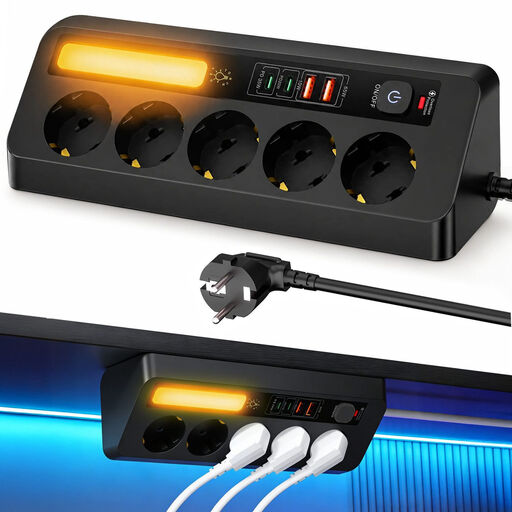
9-in-1 corner extension lead, 4 USB ports
An option if you want to connect several devices at your desk and the corner design suits your setup.
The product name lists five sockets and a 2 m cable. The product description lists two USB-A and two USB-C ports.
View at Joybuy
 No image available
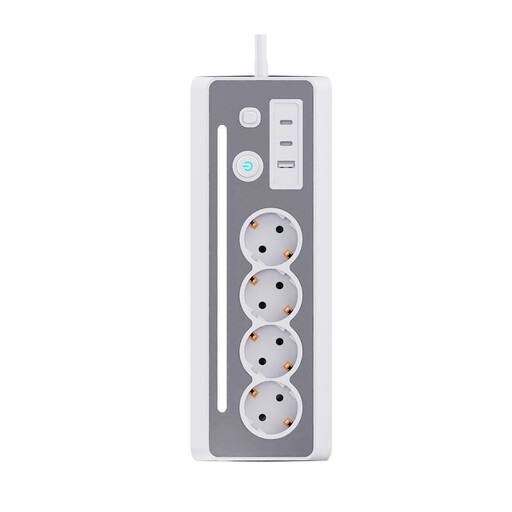
7-in-1 desk extension lead, white/grey
An option if you want to connect standard mains plugs at your desk as well as USB devices.
The product description lists three Schuko sockets, two USB-C ports, one USB-A port and a 1.5 m cable.
View at Joybuy
 No image available
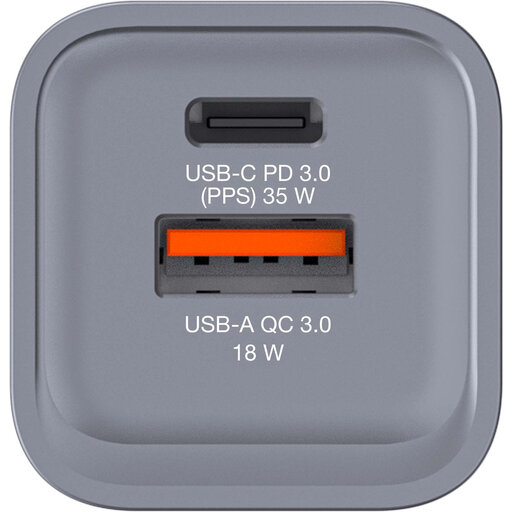
Verbatim GNC-35 34 W GaN charger
An option if you want to use USB-A for your light and USB-C for another device.
The product description lists one USB-C PD port, one USB-A QC 3.0 port and charging via both ports at once.
View at Joybuy
 No image available
Neomounts DS22-840BL6
An option if you want to create a dedicated charging spot on your desk and can attach the clamp in a suitable place.
The product description lists three Schuko sockets, two USB-C ports, one USB-A port and a 1.4 m mains cable. The stated USB outputs are 20 W for USB-C and 18 W for USB-A.
View at Joybuy
Frequently asked questions
Will every USB reading light work with every charging station?
No. Check your light’s connection, cable and charging specifications. For example, Glocusent lists USB-A for a specific reading light model; that doesn’t confirm which connection another model uses.
Where’s the best place to put a charging station?
Keep the charger uncovered so heat can escape, and don’t charge the light under a pillow or duvet. The Fire Service also advises against using damaged cables.
Is CE marking mandatory for a mains-powered USB charger in the Netherlands?
Yes. The NVWA lists chargers among the electrical products that must carry CE marking. Check the marking on the specific product; CE marking alone doesn’t prove that an individual item is safe.
What if a charger bought online doesn’t meet expectations or breaks too soon?
In the Netherlands, online purchases generally come with a statutory 14-day cooling-off period from delivery, although exceptions apply; ACM ConsuWijzer explains this period. Products must also meet the standard you could reasonably expect. If a product develops a fault during normal use, contact the seller to find a solution.


