Start by checking your radio’s input and charging instructions, then choose a power bank with a suitable output and cable. A compact model may be enough for occasional top-ups. If you need to go for longer without a mains socket, extra capacity can be useful, but the stated mAh figure alone won’t tell you how much energy your radio will receive. Also check whether your radio can play while charging and whether the power bank stays switched on when the power draw is low.
Who is this relevant for?
Radio with an unknown USB connection
You want to check which output, cable and charging settings are right for your radio. For example, the manual for a specific Multi DAB+ emergency radio lists a USB-C input and model-specific charging instructions. Always check the manual for your own radio.
Going for longer without a mains socket
You want to top up the charge during a longer working session, so you need to weigh the stated capacity against the energy the power bank actually delivers.
Radio that stays on while charging
You want to listen while your radio is receiving power. Check whether your radio allows this and whether the power bank stays on when the power draw is low. Support for a low-current mode varies by model.
What should you look for?
First, check your radio’s input and charging instructions. Then decide how long you need to work without a mains socket and whether the radio needs to keep playing while it charges.
| What to consider |
What should you check? |
Who is this important for? |
| Connection and charging instructions |
Check the radio’s input, the right cable and the permitted charging settings in the manual. |
I want to make sure the connector and charging settings are right for my radio before I buy. Around 36% of consumers put the connection and instructions first. |
| Usable capacity |
Work out how long you need to go without a mains socket and, where available, compare measurements taken using the same test method. The Consumers’ Association tests how much power banks actually deliver. |
If I can’t get to a mains socket during a longer working session, I want to know how much energy my radio can receive. Around 29% of consumers prioritise how long it will last. |
| Power while playing |
Check whether the radio can play while charging and whether the exact power bank model has a suitable low-current mode. |
I want to keep listening while my radio is connected to the power bank, without the power cutting out. Around 21% of consumers prioritise uninterrupted listening. |
| Practical use at your desk |
Consider how many outputs you need, which cables will fit and whether the battery status display is easy for you to read. |
Convenient connections and cables for use alongside my other equipment matter to me. Around 14% of consumers mainly choose based on practical use at their desk. |
Common buying mistakes
-
Assuming a high mAh figure guarantees a certain playing time
The stated capacity doesn’t directly tell you how much energy your radio will receive. The Consumers’ Association measures how much power banks actually deliver.
Compare the playing time you want with your radio’s power consumption and charging instructions. Where possible, use measurements taken using the same test method.
-
Choosing a built-in cable without checking your radio’s input
A built-in USB-C cable won’t necessarily match every radio’s connection or charging settings.
Read your radio’s manual and check that the power bank also has an output to suit the cable you need.
-
Overlooking a safety warning or model number
On 15 July 2025, the Netherlands Food and Consumer Product Safety Authority issued a warning about specific Anker models: A1257, A1647, A1681 and A1689.
Compare the full model number on the product and packaging with the relevant safety notice. Don’t assume a product is affected based on the brand name alone.
Brands to consider
Trust
The Primo 24678 is an example of a compact power bank with several wired connections.
- Trust lists a capacity of 10,000 mAh, two USB-A outputs and one USB-C port for this model.
- The capacity figure doesn’t give you a measured estimate of how long your radio will run.
Belkin
The BoostCharge BPB012btBK is worth considering if you’re looking for a higher stated capacity and several wired connections.
- Belkin lists a capacity of 20,000 mAh, two USB-A ports and one USB-C output.
- Belkin lists a maximum total output of 15 W when all three ports are used at the same time. The stated smartphone usage time isn’t the same as radio playing time.
Anker
The Nano A1259 is an example of a model with a built-in USB-C cable and additional USB outputs.
- Anker lists a capacity of 10,000 mAh and USB-C and USB-A outputs for the A1259.
- Anker says you should check whether low-current mode is supported on each model. This general guidance doesn’t confirm that the A1259 has this feature.
- The 15 July 2025 warning from the Netherlands Food and Consumer Product Safety Authority names other specific Anker models.
Power banks at Joybuy
This selection includes wired power banks with USB connections and a stated capacity of 10,000 or 20,000 mAh. Before buying, check which output and charging settings are right for your radio.
 No image available
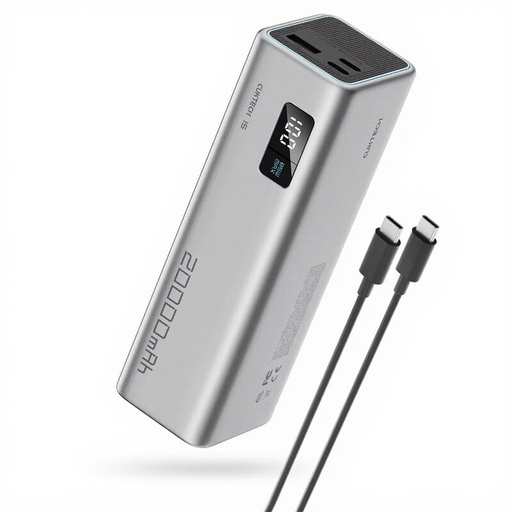
CUKTECH 15 SE Power Bank 20,000 mAh PB200
Could suit you if you need to work for longer without a mains socket, provided the output and cable are right for your radio.
20,000 mAh; 65 W; two USB-C outputs and one USB-A output.
Joybuy
 No image available
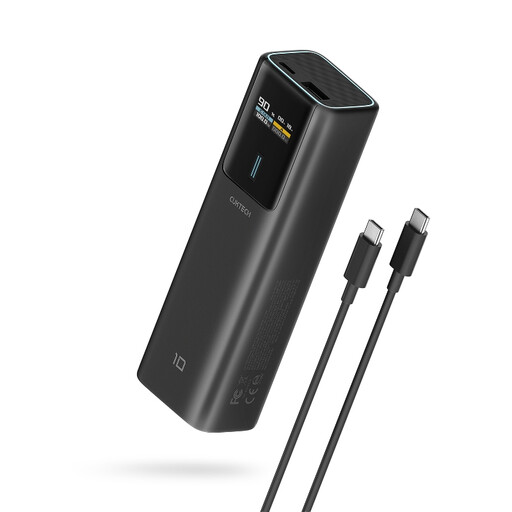
CUKTECH 100W Power Bank 10,000 mAh PB100P
Could suit you if you’re looking for a stated capacity of 10,000 mAh for occasional top-ups. Check your radio’s charging instructions first.
10,000 mAh; USB-C output up to 100 W; TFT display.
Joybuy
 No image available
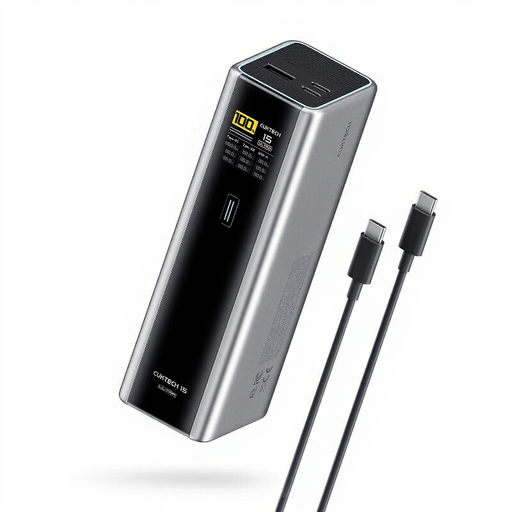
CUKTECH 15 Ultra Power Bank 20,000 mAh PB200U
Could suit you if you need to work for longer without a mains socket, as long as the radio is compatible with the available connection and cable.
20,000 mAh; 140 W; two USB-C outputs and one USB-A output.
Joybuy
 No image available
Samsung Power Bank Fast Charge 45W 20,000 mAh
Could suit you if you need to go for longer without a mains socket and your radio has a USB-C connection. Check your radio’s manual for the required charging settings.
20,000 mAh; three USB-C ports; USB-C cable included.
Joybuy
Frequently asked questions
Can I use any USB-C power bank with my radio?
No, not based on the connector alone. Check your radio’s input specifications and compare them with the power bank’s output and cable. The manual for a specific Multi DAB+ emergency radio lists 5 V, 1 to 2.2 A and advises against using a fast charger. These instructions don’t automatically apply to other radio models.
Can my radio play while it’s connected to the power bank?
It depends on the instructions for your radio model. The manual for the specific Multi DAB+ emergency radio allows it to be used while charging, but notes that charging will take longer and that FM or DAB+ reception may be affected. Check the manual for your own radio.
What can I do if the power bank keeps switching off when connected to my radio?
First, check the cable, connection and your radio’s manual. If the radio draws little power, see whether the exact power bank model has a low-current mode designed for this purpose. Anker says support should be checked for each model.
How can I charge a power bank safely at my desk?
Follow the manufacturer’s instructions, don’t use damaged cables and leave charging equipment uncovered so heat can escape. The Fire Service advises charging devices with batteries in a room with a working smoke alarm.
Is 20,000 mAh automatically enough for a full working day?
Not necessarily: the stated capacity alone doesn’t tell you how much energy your radio will receive. Check your radio’s charging requirements and power consumption, and where available compare measurements of delivered energy taken using the same test method. The Consumers’ Association tests how much power banks actually deliver.


