
Student with one USB radio
You’re mainly looking for a suitable, compact power solution. Extra ports aren’t necessary if you won’t be charging other devices at the same time.


Start with your radio’s manual: check the connector, cable and required power supply before choosing a charger. If you’re only charging the radio, a suitable compact wall charger is often the simpler option. If you also charge other devices in the same place, compare the port types and the power available when they’re used at the same time. According to the Netherlands Food and Consumer Product Safety Authority, CE marking is mandatory for mains-powered electrical products sold in the Dutch market. It is a declaration by the manufacturer, not an independent approval.
You’re mainly looking for a suitable, compact power solution. Extra ports aren’t necessary if you won’t be charging other devices at the same time.
You want to charge your radio and, for example, your phone in the same place. The types of ports and how power is shared may then matter more than simply the number of connections.
You want to connect devices conveniently in your room and use extension leads safely.
Choose this if: you mainly charge one radio and the connection and power supply match the instructions in its manual.
Consider: you’ll need an accessible socket. The stated total power output alone doesn’t tell you whether the charger is suitable for your radio.
Choose this if: you regularly charge your radio and several other devices in one place.
Consider: it takes up more space, and you’ll need to check how power is shared when several ports are in use at once.
Choose this if: you need extra mains sockets as well as USB ports.
Consider: check the load and positioning, and don’t connect extension leads to each other without checking first.
| What to consider | What to look for | Who is this important for? |
|---|---|---|
| Connection and power supply | Check the connection, cable and required input in the radio’s manual. | If you want a charger that works with your radio, start by checking the connection and power supply. Around 36% of consumers put compatibility first when choosing. |
| Safe charging | Check the CE marking on the specific mains-powered model and charge on a hard surface. | If you want to set up a safe charging spot, check the specific charger and where you’ll use it. Around 29% of consumers put safe charging first. |
| Multiple devices | Compare the port types you need and the stated power output when using them at the same time. | If you want to charge your radio and other devices in the same place, suitable ports and clear power distribution will help. Around 21% of consumers put simultaneous charging first. |
| Space and sockets | Consider where you’ll place the charger, how the cables will run and how many USB and mains connections you need. | If you have limited space or access to sockets, choose a charging solution that suits the space you have. Around 14% of consumers put space and connections first. |
The stated total power output doesn’t tell you how much power is available through the port you’re using. When several devices are connected, the power distribution may change.
First check the radio’s power requirements. Then compare the relevant port and, if you’re connecting several devices, the stated power distribution.
The Anker 735 Charger (Nano II 65W), model A2667, isn’t automatically the same version as the Anker Prime 735 67 W. Anker states that the Nano II delivers up to 65 W when using a single port.
Check the full model number and product specifications before treating one model as a replacement for another.
Incorrectly connecting extension leads can be hazardous. Brandweer Twente warns against connecting extension leads to each other without checking first.
First decide whether you need extra mains sockets, then follow the instructions for positioning and connecting the product.
The BoostCharge WCB009 is a wall charger with one USB-A port and one USB-C port, making it a good option if you use both cable types.
The Nexode 10335 has two USB-C ports and one USB-A port, making it suitable if you use more than one cable type.
The 00201978 desktop charging station has three USB-C ports and two USB-A ports, designed for a space where you charge several devices.
The Anker 735 Charger (Nano II 65W), model A2667, is a compact multi-port wall charger.
This selection includes USB wall chargers and charging solutions for a desk or extension lead. For each model, check that its connection and power supply match the instructions in your radio’s manual.
 No image available
Could suit you if you want to charge your radio and other USB devices, provided the radio’s manual specifies a compatible port.
Three ports: two USB-C and one USB-A. Check the CE marking on the specific model; according to the Netherlands Food and Consumer Product Safety Authority, it is mandatory for mains-powered electrical products sold in the Dutch market.
 No image available
Could be suitable if its connection and power supply match the instructions in your radio’s manual. The two ports also leave room for a second device.
Has one USB-C port and one USB-A port. Check the CE marking on the specific model; according to the Netherlands Food and Consumer Product Safety Authority, it is mandatory for mains-powered electrical products sold in the Dutch market.
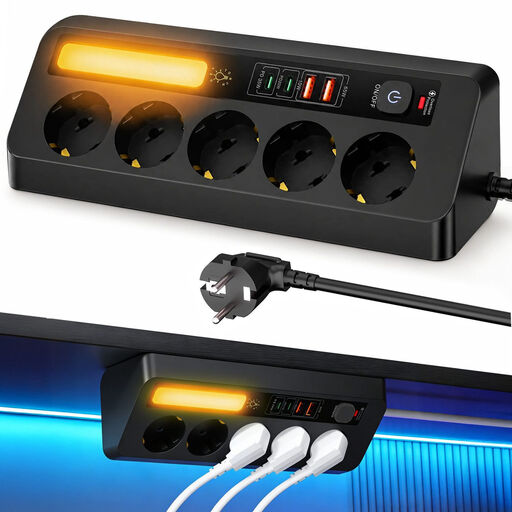 No image available
Could be suitable for a shared charging spot where you want to connect several mains-powered devices as well as USB devices.
The product name specifies five sockets, four USB ports and PD 35 W. Check the CE marking on the specific model; according to the Netherlands Food and Consumer Product Safety Authority, it is mandatory for mains-powered electrical products sold in the Dutch market.
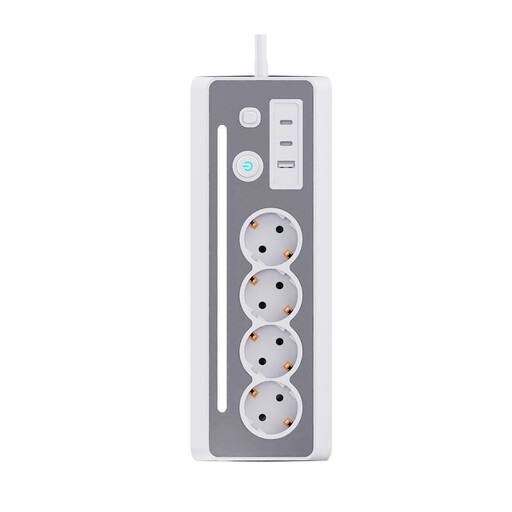 No image available
Could be suitable if you want to connect mains-powered devices in the same place as your USB radio.
The product name specifies three Schuko sockets and three USB ports. Check the CE marking on the specific model; according to the Netherlands Food and Consumer Product Safety Authority, it is mandatory for mains-powered electrical products sold in the Dutch market.
 No image available
Could be suitable for a permanent charging spot at your desk, provided the USB connection matches the instructions in your radio’s manual.
Has a clamp fitting and USB-C and USB-A ports. Check the CE marking on the specific model; according to the Netherlands Food and Consumer Product Safety Authority, it is mandatory for mains-powered electrical products sold in the Dutch market.
No. Check your radio’s specifications first. Look at the connection, cable and required power supply in the manual. A USB-C port or high wattage alone doesn’t prove that a charger is suitable for an unspecified radio model. European rules on a common charging port apply to certain categories of device, and don’t confirm that your radio is covered.
The fire service advises placing the device on a hard surface while it charges and, ideally, charging it when you’re nearby. Unplug the charger after use, and don’t connect extension leads to each other without checking first.
For online consumer purchases, you generally have a statutory 14-day cancellation period starting from delivery, although exceptions may apply. This is separate from your statutory guarantee: if the product doesn’t meet what you could reasonably expect when used normally, the seller must resolve the problem.
According to the Netherlands Food and Consumer Product Safety Authority, CE marking is mandatory for electrical products sold in the Dutch market. The marking is the manufacturer’s declaration that the product complies with the relevant European rules. Check this on the specific mains-powered model.