What should you look for when buying?
Start with your radio’s requirements, then work out which connections and setup you need for the shared desk.
| What to consider |
What should you check? |
Who is this important for? |
| Output for the radio |
Compare the connection, cable, output voltage and current with the manual for your radio model. For example, Roberts Radio specifies 5 V and 1 A for the Revival Petite 2; this isn’t a general requirement for USB radios. |
If I want to charge my radio, I first check the requirements for that exact model and its cable. Around 36% of consumers prioritise radio compatibility. |
| Fixed position and reach |
Check that the clamp fits the desk thickness and that the cable and ports can reach the seating areas. ACT specifies a maximum desk thickness of 5,5 cm and a 1,5 m cable for the AC2480. |
At a shared desk, I want charging points colleagues can reach without the setup moving. Around 29% of consumers prioritise a fixed, accessible position. |
| Using several devices at once |
Check the power available for each combination of ports and work out which USB and mains connections will be needed at the same time. For the AC2420, ACT specifies a total of 15 W for the listed combinations of two or three USB ports. |
If several colleagues are charging at once, I want to know how much power is available when ports are used together. Around 21% of consumers prioritise capacity for simultaneous use. |
| Connections you need |
Decide whether you need mains sockets as well as USB, and how many devices will actually be connected at once. |
For just a radio, I don’t want to choose connections I won’t need; for varied use, extra capacity could be useful. Around 14% of consumers value a simple setup more than having extra connections. |
Joybuy products
This selection includes extension leads with USB ports for desks, as well as a compact USB charging station without mains sockets.
 No image available
Extension lead with 4 sockets, 3 USB-A ports and 2 USB-C ports
A desk or office setup with USB ports and mains sockets.
The product title lists 4 sockets, 3 USB-A ports, 2 USB-C ports, a digital clock, a 3 m cable and 2500 W MAX.
View at Joybuy
 No image available
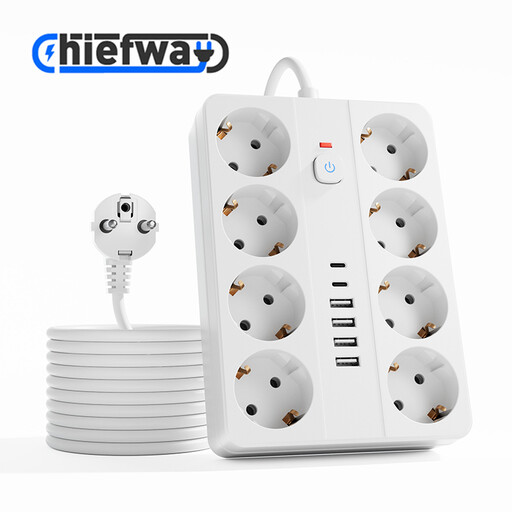
Extension lead with 8 sockets, 4 USB-A ports and 2 USB-C ports
A desk or office setup with several USB and mains connections.
The product title lists 8 sockets, 4 USB-A ports, 2 USB-C ports, a switch, a 3 m cable and 2500 W MAX.
View at Joybuy
 No image available
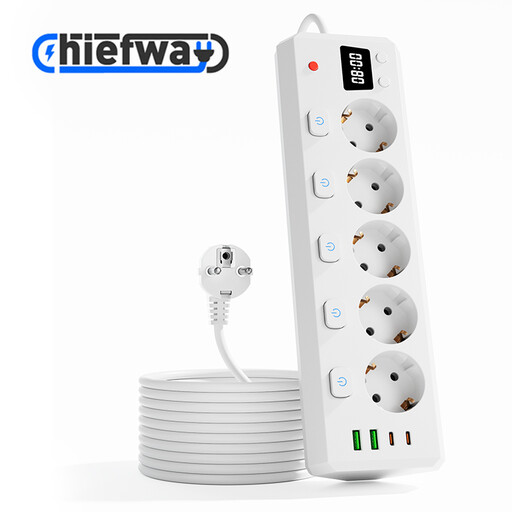
Extension lead with 5 sockets, 2 USB-A ports and 2 USB-C ports
A desk or office setup with USB ports alongside several mains sockets.
The product title lists 5 sockets, 2 USB-A ports, 2 USB-C ports, individual switches, a digital clock, a 3 m cable and 2500 W MAX.
View at Joybuy
 No image available
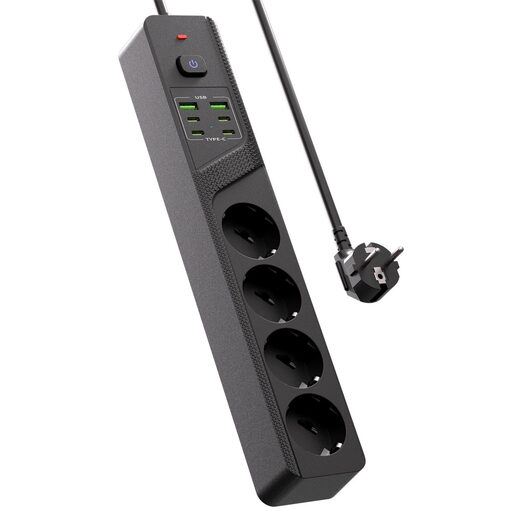
Desk extension lead with 4 Schuko sockets, 4 USB-C ports and 2 USB-A ports
A desk setup with USB ports and Schuko sockets for connecting several devices.
The product title lists 4 Schuko sockets, 4 USB-C ports, 2 USB-A ports and an on/off switch.
View at Joybuy
 No image available
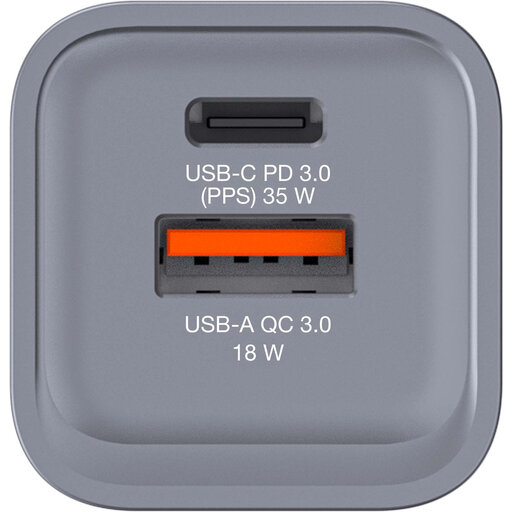
Verbatim GNC-35 GaN charger, 34 W
A compact USB charging station without mains sockets for a desk or office.
The product details list a USB-C PD port, a USB-A QC 3.0 port and up to 34 W. Check that the output meets your radio’s requirements.
View at Joybuy
Frequently asked questions
How do I check whether a charging station is suitable for my USB radio?
Compare the manual for your exact radio model with the charging station’s connection and required output. For example, Roberts Radio specifies 5 V and 1 A for the Revival Petite 2; don’t use those values as a guide for a different radio model.
How do I position a charging station safely on a shared desk?
Keep the charging station and cables in good condition, and leave the charger uncovered so heat can disperse. Brandweer Nederland advises placing a charger in an open space. If you’re using a clamp model, also check that it fits the desk edge and route the cable so it doesn’t pull on the connection.
Which marking should I check on a mains-powered charger in the Netherlands?
The Netherlands Food and Consumer Product Safety Authority states that CE marking is mandatory for electrical products. The mark is the manufacturer’s declaration of conformity; it doesn’t mean that every product has been independently tested.
What can I do if the charging station develops a fault during normal use?
Contact the seller. According to the Dutch government, there’s no fixed statutory warranty period in the Netherlands; what you can expect from a product depends on factors including the product itself and the sales information. A manufacturer’s warranty is in addition to your statutory rights.
Do European rules require my USB radio to have a USB-C connection?
The European Commission doesn’t list USB radios separately among the device categories covered by the common charger rules. The rules for the listed categories have applied since 28 December 2024 and have also applied to laptops since 28 April 2026; this doesn’t mean your radio has USB-C. Check your radio model’s manual.


