What should you look for when choosing?
First, decide whether you’ll have access to mains power during your stay. Then check which devices you want to charge at the same time, or without a socket.
| What to consider |
What should you check? |
Who is this important for? |
| Suitable connection and power supply |
Check your radio’s manual, the connectors at both ends of the cable and the required power supply. |
I want to avoid choosing a charger that won’t connect to my radio. Around 40% of consumers put compatibility first. |
| Charging multiple devices at once |
Check the number and type of outputs and the power per port; don’t just add up the combined power. |
I want to connect my radio and another device to the same charger. Around 30% of consumers put shared charging first. |
| Backup power without a socket |
Check that the power bank has the right output and can be charged in advance; don’t try to work out how many times it will charge your radio from the mAh capacity alone. |
If I don’t have access to a socket for a while, I still want to be able to top up my radio. Around 20% of consumers prioritise this kind of short-term backup power. |
| Powering several devices for longer |
Work out the power consumption and connections needed for all your devices, then check the outputs on the exact model. |
I need to power devices other than my radio when there’s no mains electricity. Around 10% of consumers put this need first. |
Joybuy products for mains charging
These products are multi-port USB chargers and power strips for use with mains power. Before buying, check that the connections and charging instructions suit your radio and any other devices you want to use.
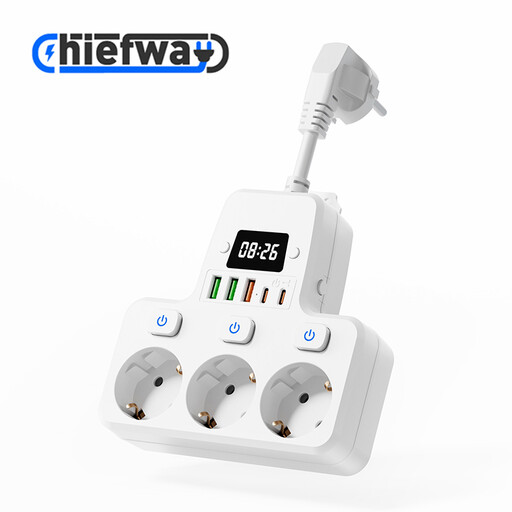 Image unavailable
9-in-1 power strip with 3 AC outlets, 3 USB-A and 2 Type-C ports, 4000W MAX
May suit you if you want to connect your radio and other devices via USB to one power strip; first check that your radio and cable support the port you’ve chosen.
The product name lists 3 AC outlets, 3 USB-A ports, 2 Type-C ports and individual switches.
The product name states 4000 W MAX; check the permitted load and don’t exceed it.
View at Joybuy
 Image unavailable
7-in-1 power strip with 3 AC outlets, USB-A and Type-C, 2500W MAX, 1.5 m cable
May suit you if you want to charge your radio via USB and connect other equipment to the same power supply; check which port and cable you need.
The product name lists 3 AC outlets, USB-A and Type-C ports, and a 1.5 m cable.
The product description warns not to exceed the maximum load of 2500 W, connect the power strip to another power strip, or expose it to water or moisture.
View at Joybuy
 Image unavailable
65 W wall charger with USB-A and 2 USB-C ports
May suit you if you want to charge your radio and other devices from the mains using a suitable USB cable; check which output your radio needs.
The product name lists 65 W, 2 USB-C ports and one USB-A port.
The product description says it’s for indoor use only and warns against exposure to water and moisture.
View at Joybuy
 Image unavailable
30 W wall charger with USB-A and USB-C ports
May suit you if you want to connect two devices at once and your radio works with one of the ports and a suitable cable.
The product description states a combined maximum output of 30 W across the two ports.
The product description says it’s for use in a dry indoor space only.
View at Joybuy
 Image unavailable
10-port USB charging station with USB-A and USB-C
May suit you if you want to connect several USB devices to one charging station; check the exact port layout on your model and your radio’s cable.
The product name lists 10 ports and USB-A and USB-C connections. Available configurations vary.
View at Joybuy
Frequently asked questions
Can a USB radio automatically be charged via USB-C?
No, don’t assume that from the word USB. The European Commission states that the common charger rules have applied since 28 December 2024 to the listed product categories, including portable speakers; radios aren’t automatically covered in the same way. Check your radio’s connection and charging instructions.
Where should I put a charger in a holiday home?
Place the charger in an open spot so heat can escape. Brandweer Nederland advises against charging under a pillow or duvet, and says not to use damaged cables; also follow the device’s instructions.
What can I do if a new charger breaks quickly during normal use?
In the Netherlands, you have legal rights to a product that works properly, in addition to any manufacturer’s warranty. According to ACM ConsuWijzer, how long those rights apply and what you can reasonably expect from the product depends on your situation; a stated manufacturer’s warranty period isn’t automatically the full duration of your legal rights. Contact the seller to discuss your situation.
Which rules apply to a mains charger?
Electrical products placed on the market must meet the applicable European safety requirements. Ondernemersplein, the government’s business information portal, states that once conformity has been established, the manufacturer applies the required CE marking and draws up an EU declaration of conformity. A CE claim in an advert isn’t, by itself, independent proof that an individual item is safe.


