Choose a charging point with the connector and USB output specified in your radio’s manual; having the same USB plug does not prove that it’s compatible. A wall charger is an option if you only need to connect USB devices, while an extension lead with USB adds extra mains sockets. Keep your radio, cable and charger clear of bedding, as advised by the Fire Service.
Who is a charging point beside the bed suitable for?
Finding the right power supply for your radio
You’re mainly looking for a USB power source that works with your existing radio. First, check the connector and required output in the manual. For example, the Roberts Radio manual specifies power requirements for individual models.
Connecting several devices beside the bed
You want to connect a USB device or a device with a mains plug as well as your radio. So, work out whether you need extra USB ports or standard mains sockets too.
Keeping bedding clear of your charging area
You want to use your radio and charger somewhere heat can escape and cables won’t be damaged. The Fire Service advises keeping chargers uncovered and not charging devices under a pillow or duvet.
What should you look for in a charging point for your USB radio?
Compact USB wall charger
Choose this when: you want to connect your radio and possibly a second USB device, without adding extra mains sockets.
The trade-off: you won’t get any extra mains sockets. A higher stated wattage doesn’t prove that your radio will charge faster.
Extension lead with USB
Choose this when: you need mains sockets beside your bedside table as well as USB ports.
The trade-off: this option takes up more space and has a cable, so make sure the extension lead can sit unobstructed.
Keep using a suitable power supply
Choose this when: you already have an undamaged power source that provides the connector and output specified in your radio’s manual.
The trade-off: you won’t gain any extra connections. Power requirements vary by radio model.
| What to consider |
What should you check? |
Who is this important for? |
| Connector and power supply |
Check the USB type, required cable, and required output voltage and current in the manual. Compare these requirements with the output of the port you plan to use. |
I want to check that the power supply is suitable for my radio first. Compatibility is the top priority for around 38% of consumers. |
| Safe positioning |
Choose a clear spot away from pillows and duvets, and don’t use a damaged cable or charger. |
I want to charge my radio somewhere heat can escape and cables can lie unobstructed. Safe positioning is the top priority for around 23% of consumers. |
| Multiple connections |
Count the USB-A and USB-C ports you need, as well as any devices with a mains plug. Check what the product says about using them at the same time. |
I want to connect other devices as well as my radio. Extra connections are the top priority for around 23% of consumers. |
| Reach and space |
Measure the distance to a suitable charging spot and compare it with the stated cable length and the space available. |
I want to reach a charging spot without stretching the cable or having the extension lead get in the way. This ease of positioning is the most important factor for around 16% of consumers. |
Common mistakes when choosing a USB charging point
-
Assuming USB-C or a high wattage guarantees compatibility
Power requirements vary from one radio to another. The Roberts Radio manual sets out the required output for the Revival Petite 2; this requirement doesn’t automatically apply to other models.
Before choosing, compare your radio’s manual with the charger’s port type and output.
If your current cable or power source doesn’t meet those requirements, you may need a different cable or power source.
-
Choosing an extension lead when you only need USB power
A wall charger and an extension lead offer different connection options. Extra mains sockets are most useful if you need them beside your bedside table.
First count the USB ports and mains sockets you actually want to use, then check whether a suitable charger you already own will do the job.
-
Tucking the charger under bedding
Bedding can prevent heat from escaping. The Fire Service also warns against using damaged chargers and cables.
Use a clear spot away from pillows and duvets, and check the cable and charger for damage.
USB charger and extension lead brands for reference
Belkin
Belkin describes the WCB009vfWH as a wall charger with one USB-C port and one USB-A port. It may suit you if you’re looking for USB connections without extra mains sockets.
- Belkin states that this model delivers up to 30 W via USB-C and 12 W via USB-A.
- This manufacturer information doesn’t confirm that the charger is suitable for every radio model; check your radio’s manual.
Hama
According to Hama, the Hama 00223192 combines mains sockets and USB connections. This may be useful if you want to connect devices with mains plugs as well as your radio.
- Hama lists three sockets, three USB ports and a 1,4 m cable for this model.
- The extension lead needs space, and its stated USB power doesn’t in itself offer an advantage for a radio that needs less power.
Philips
The Philips SPN3042WA/10 is an example of an extension lead with USB connections, but Philips states that this particular model is no longer available.
- Philips lists four earthed sockets, two USB ports and a 2 m cable for the SPN3042WA/10.
- Philips states a maximum of 2,4 A across the two USB ports. These figures apply to this particular model and aren’t specifications for other Philips products.
Joybuy product options for charging beside the bed
This selection includes extension leads with USB and compact USB wall chargers. Always check your radio’s manual for the required connector and power supply.
 No image available
10-in-1 extension lead with 4 AC sockets, 3 USB-A and 2 USB-C ports, digital clock, 2500W MAX, white, 3 m
An option if you want to connect other USB devices and devices with mains plugs as well as your radio.
The product description lists four AC sockets, three USB-A ports, two USB-C ports and a 3 m cable. The product title states 2500W MAX.
Check that the output of the port you use meets your radio’s requirements.
View at Joybuy
 No image available
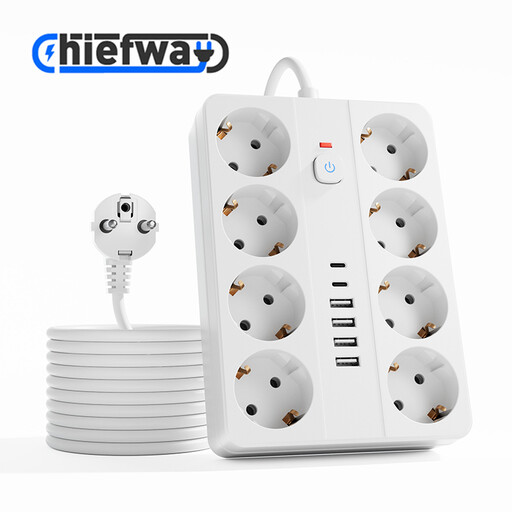
14-in-1 extension lead with 8 AC sockets, 4 USB-A and 2 USB-C ports, switch, 2500W MAX, white, 3 m
An option if you want to connect several USB devices and devices with mains plugs beside your bedside table.
The product description lists eight AC sockets, four USB-A ports, two USB-C ports and a 3 m cable. The product title states 2500W MAX.
Check the USB output your radio needs and make sure the extension lead will fit in the space available.
View at Joybuy
 No image available
7-in-1 cube-shaped extension lead with 3 AC sockets, 3 USB-A and 1 USB-C port, switch, 2500W MAX, white, 1,5 m
An option if you want to combine USB connections with a few extra mains sockets in your charging area.
The product description lists three AC sockets, three USB-A ports, one USB-C port and a 1,5 m cable. The product title states 2500W MAX.
Check that the port output is suitable for your radio and that the shape leaves enough space on your bedside table.
View at Joybuy
 No image available
OnePlus 80W Dual Ports SUPERVOOC Adapter, USB-A and USB-C, white
A compact wall charger option if you want to be able to use both USB-A and USB-C connections.
The product title states up to 80 W and two outputs: USB-A and USB-C.
Check which output and power supply your radio requires; the stated maximum doesn’t confirm that the adapter is suitable for every radio model.
View at Joybuy
 No image available
65W power adapter with 2 USB-C ports and 70 cm retractable USB-C cable
An option if you want USB-C connections and a built-in retractable USB-C cable for your charging setup.
The product description lists two USB-C ports and a 70 cm retractable USB-C cable.
Check that the connector and output meet the requirements in your radio’s manual.
View at Joybuy
Frequently asked questions about charging a USB radio beside the bed
Can I use any USB-C charger with my USB-C radio?
No. Don’t assume it’s suitable based on the shape of the plug alone. Compare the power requirements in your radio’s manual with the output of the port you plan to use. For example, the Roberts Revival Petite 2 manual specifies a 5 V and 1 A USB source; this isn’t a universal requirement for radios.
Where should I put the charger while it’s charging?
Place the charger and radio somewhere unobstructed. Don’t charge them under a pillow or duvet, and don’t use damaged cables or chargers. This is fire safety advice from the Fire Service, not product-specific approval.
Is there a fixed statutory guarantee period in the Netherlands?
No. According to the Dutch government, there’s no fixed statutory guarantee period in the Netherlands. What you can expect from a product depends on factors including the product itself and how it’s used.


