First, check the manual or the radio itself to find out which connection and USB power supply it needs: a USB port may also be an output. A compact charger may be enough for the radio alone. If you also charge other work devices, look for accessible ports and check the power available from each port when they’re used at the same time. For a mains-powered charger, also check the product identification and applicable safety marking.
Who is this charging solution suitable for?
Someone with one USB radio
Primarily wants a power supply that matches the radio’s connection and has little use for spare ports. Philips Netherlands shows that the TAR1659/00 radio has a USB-C charging input and a USB-A output for other devices. Check the manual for your own model.
Someone working from home with several devices
Wants to connect the radio and other devices in one place, and looks at the combination of USB-A and USB-C ports and how power is shared when they’re used at the same time. Belkin Netherlands and Hama Netherlands list these features for their specific charging stations.
A buyer who wants safe, organised charging
Wants an accessible spot on the desk and considers the applicable safety marking, clear space for heat to escape and undamaged cables. The Netherlands Food and Consumer Product Safety Authority outlines the applicable safety requirements, while the Netherlands Fire Service advises placing chargers in an unobstructed spot.
What should you consider when choosing?
Start by checking the radio’s connection. Then decide whether you’ll also be charging other devices and where the charger can sit on your desk.
| What to consider |
What to look for when buying |
Who is this important for? |
| Connection and power supply |
Check the charging input, cable and required power specifications in the manual for the exact radio model. |
If I first want to check whether my radio can charge through the port I’ve chosen, I’ll check the exact model and cable; around 33% of consumers prioritise this compatibility. |
| Safety and marking |
Check the product identification and applicable CE marking. Don’t use a damaged cable, and place the charger in an unobstructed spot. |
Anyone who considers the safe connection of a mains-powered charger more important than extra ports will want to be able to check the specific product; around 27% of consumers prioritise safety. |
| Charging several devices |
Count the USB-A and USB-C ports you need and check the power available from each port when they’re used at the same time. |
If I want to connect work devices as well as my radio, I’ll check that the ports and power distribution meet my needs; around 20% of consumers put simultaneous charging first. |
| Desk positioning |
Consider the distance to the socket, the length of the power cable, how easy the ports are to reach and the space needed for heat to escape. |
Anyone who wants a tidy, accessible charging spot should consider the available desk space and cable length; around 20% of consumers make positioning their top priority. |
Common mistakes when choosing
-
Mistaking a USB output for a charging input
On the Philips TAR1659/00, USB-C is the charging input, while the USB-A port is designed to charge another device from the radio. These port functions aren’t automatically the same on other radios.
Before choosing a charger or cable, check the labelled input and the manual for your exact radio model.
-
Mistaking the total wattage for the power available from each port
Manufacturers may list both the total power and the power available from individual ports, or how it’s shared when ports are used at the same time. So the total wattage alone doesn’t tell you what each port supplies when several devices are connected.
Check how power is shared across the combination of ports you want to use at the same time.
-
Confusing a USB hub with a standalone charger
Anker Support explains that many USB hubs draw power from a computer and don’t charge devices independently.
Check the documentation to make sure the hub has the charging function you need and uses its own power supply for it.
-
Covering the charger or continuing to use a damaged cable
A covered charger may not be able to release heat as effectively. A damaged charger or cable can pose a safety risk.
Place the charger in an unobstructed spot and replace damaged cables. The Netherlands Fire Service advises charging devices with batteries in a room with a working smoke alarm.
Brands and models for reference
Belkin
The BoostCharge Pro P-WCH010 is a desk charger for anyone who wants several USB-A and USB-C ports in one place.
- Belkin lists two USB-A ports, two USB-C ports, up to 108 W total and a 2 m power cable for this model.
- The total power doesn’t confirm what power a specific radio needs. Also check the product identification for the version you’re considering.
Hama
Model 00201978 is a charging station with several USB-C and USB-A ports.
- Hama lists three USB-C ports, two USB-A ports and up to 140 W total for this model.
- Hama states that the first USB-C port supplies up to 65 W when other devices are also connected. That higher total power doesn’t automatically make the charging station more suitable for one radio.
Anker
The European Anker Prime Charger A2683 is a desktop model with several USB-C and USB-A ports.
- Anker lists up to 200 W total and separate USB outputs for model A2683.
- Check Anker’s information on how power is shared when ports are used at the same time. The total power alone doesn’t tell you what a radio needs.
Xtorm
The compact Xtorm adapter mentioned has one USB-A port and one USB-C port.
- Xtorm states that the output is shared when both ports are used at the same time.
- With two devices connected, the power available from each port is therefore different from when only one port is used. Check that the power distribution suits your devices.
Joybuy products for USB radios and home offices
These products are for anyone who wants to charge a USB radio at their home office, possibly alongside other devices. Before buying, check that the output and cable suit your radio model, and that the applicable safety marking and product identification are correct.
 No image available
OnePlus 80W Dual Ports SUPERVOOC Adapter, Type A + Type C, White
The adapter has USB-A and USB-C outputs for a radio with a compatible cable, as well as a second device.
Power according to the product name: 80 W. The description states that up to two devices can be connected at the same time; check the power supply required by your radio.
Joybuy
 No image available
65 W charger, 2 USB-C + USB-A
The three outputs may suit a desk setup with several devices, provided the radio has a compatible connection.
The product name lists 65 W, two USB-C ports and one USB-A port. Check how power is shared when they’re used at the same time.
Joybuy
 No image available
30 W charger, USB-A + USB-C
The two ports may suit you if you want to connect the radio and one other device, provided the port and power supply are suitable for the radio.
The product name lists 30 W, one USB-A port and one USB-C port. Check how power is shared when you use both.
Joybuy
 No image available
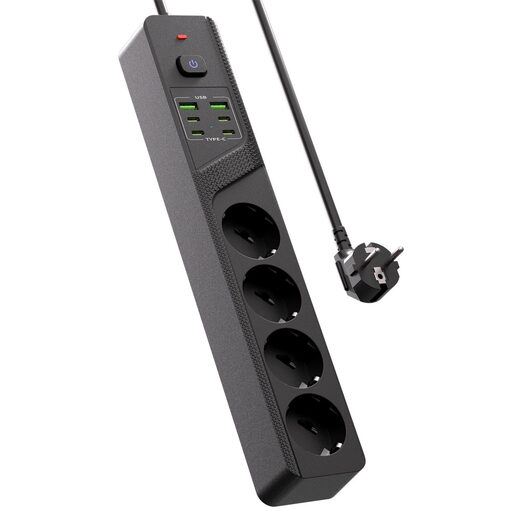
Desktop power strip, 4 Schuko sockets, 4 USB-C + 2 USB-A
This desktop power strip provides several USB connections for a desk setup with a radio and other devices.
The product name lists four Schuko sockets, four USB-C ports and two USB-A ports. Check that the size and position suit your desk, and leave the charger unobstructed so heat can escape.
Joybuy
 No image available
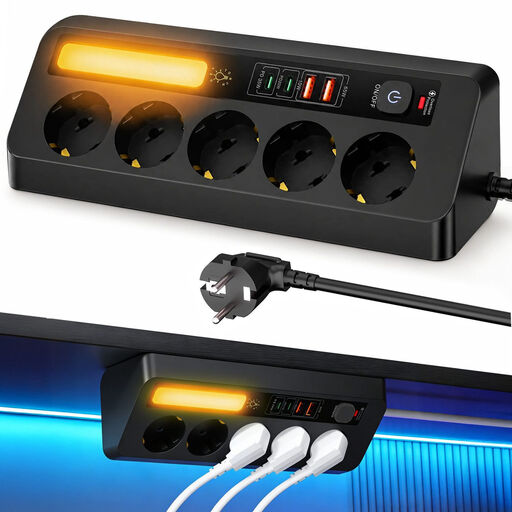
Corner power strip, 5 sockets, 4 USB ports, 2 m cable
The combination of USB ports and sockets is designed for a desk setup with several connections.
The description lists two USB-C ports, two USB-A ports, five earthed sockets and a 2 m cable. The product name lists PD 35 W; check the power distribution your devices need.
Joybuy
Frequently asked questions
Can I tell from the USB label which port charges my radio?
No. Check the manual for your radio model. On the Philips TAR1659/00, USB-C is the charging input and USB-A is for charging another device from the radio. This arrangement isn’t automatically the same on other radios.
Is a higher total power always better for a USB radio?
No. The total power alone doesn’t tell you how much power an individual port supplies or what your radio needs. Hama lists up to 140 W total for model 00201978, and up to 65 W from the first USB-C port when other devices are also connected. Check the power available from each port for your setup.
How can I place a charger safely at my home office?
Place the charger in an unobstructed spot so heat can escape, and don’t use a damaged cable. The Netherlands Fire Service advises charging devices with batteries in a room with a working smoke alarm.
Does a mains-powered USB charger need a CE marking in the Netherlands?
Electrical equipment that falls under the applicable Dutch electrical safety requirements must carry the required CE marking. The Netherlands Food and Consumer Product Safety Authority and Business.gov.nl describe these requirements; check the product identification and whether they apply to the specific product. A CE marking on its own isn’t an independent performance test.
Can a standard USB hub charge my radio independently?
Not necessarily: many USB hubs draw power from a computer and don’t charge devices independently. Anker Support advises checking the documentation for the charging function and whether a separate power supply is needed.


