What should you look for when buying?
First, find out which charging input your radio has and check its power requirements. Then work out how many other devices need charging at the same time, and whether a plug-in adapter or a charging station with a lead would suit the location better.
| What to consider |
What to look for |
Who is this important for? |
| Radio connection |
Check the manual for your exact radio model to find its charging input, cable and specified power requirements. Compare these with the charger’s output type. |
If I’m not sure whether my radio’s USB port is an input or an output, I want to find the right connection first. Around 33% of consumers prioritise radio compatibility. |
| Number and type of ports |
Count the devices that need charging at the same time and compare their cable connectors with the outputs. USB-A and USB-C are different types of connection. |
When I want to plug my radio and other devices into one socket, I look for enough suitable outputs. Around 27% of consumers focus mainly on connecting several devices at once. |
| Power per port |
Compare the output ratings with your radio’s requirements, and check how power is distributed when you use several ports at once. The total power is not automatically the power available from each port. |
If I want to charge several devices at once, I want to know what the combination of ports I choose can deliver. Around 20% of consumers focus mainly on how power is distributed. |
| Positioning and use |
Check the lead length and where you can position the charger. Electrical equipment covered by the applicable low-voltage rules must carry a CE mark; the Netherlands Food and Consumer Product Safety Authority (NVWA) outlines the rules for equipment with a nominal AC voltage of 50 to 1000 V. Position the charger in an open space, as advised by the Fire Service. |
If the socket is difficult to reach, I want to position the charging ports conveniently and give the charger room to release heat. Around 20% of consumers pay most attention to where they charge. |
Products on Joybuy
This selection includes USB adapters and extension leads with USB ports, for setting up a charging spot when you have few spare sockets. Always check your radio’s charging input, specified power supply and the power available from each port you use.
 No image available
10-in-1 extension lead, 4 sockets, 3 USB-A, 2 USB-C, 2500 W, 3 m
Several USB ports and a 3 m lead could suit a charging spot where you use a number of devices from one connection.
The product name lists a maximum power of 2500 W; check the connection and output specifications for each of your devices separately.
Joybuy
 No image available
7-in-1 cube-shaped extension lead, 3 USB-A, 1 USB-C, 2500 W, 1.5 m
The cube shape and 1.5 m lead are worth considering when deciding where to position your charging station.
The product name lists USB-A and USB-C ports and a maximum of 2500 W. The description warns against using it with high-power appliances such as heaters, and against connecting extension leads in a chain.
Joybuy
 No image available
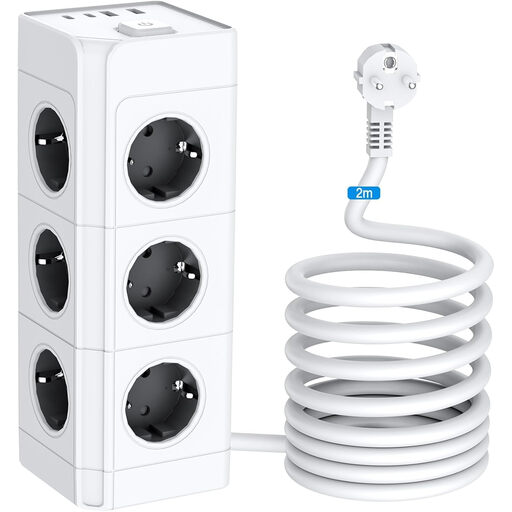
Power tower, 12 Schuko sockets, 2 USB-A, 2 USB-C, 4000 W, 2 m
The vertical design and 2 m lead could be useful if you want to combine several sockets and USB connections in one place.
The description gives a total USB output of 5 V/3,4 A; this is different from the extension lead’s stated power of 4000 W.
Joybuy
 No image available
65 W USB adapter, 2 USB-C ports and 1 USB-A port
This adapter has several USB outputs for charging devices from one mains connection. Check whether an output is suitable for your radio’s charging input and power requirements.
The product name lists 65 W. The description says the adapter should only be used indoors and in dry conditions.
Joybuy
 No image available
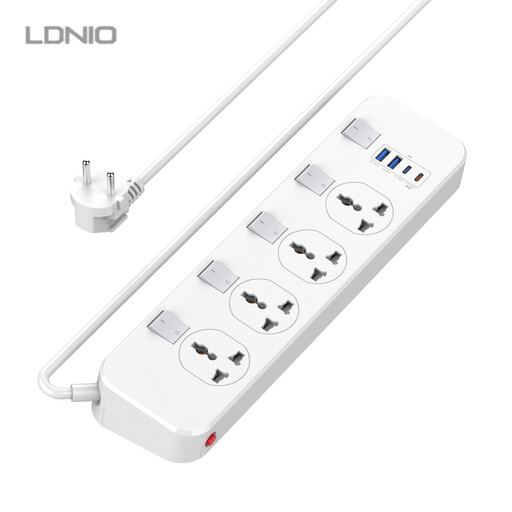
LDNIO extension lead, 4 sockets, 2 USB-A, 2 USB-C, 6.5 ft lead
The combination of USB ports, sockets and a lead could suit a dedicated spot where you plug in several devices.
The product name lists one 20 W USB-C PD output (5 V, 3 A) and individual switches. Compare this output with your radio’s requirements.
Joybuy
Frequently asked questions
Can I use any USB port on my radio to charge it?
No, it depends on the function of the port on your radio model. On the Philips TAR1659/00, USB-C is the charging input and USB-A is intended for charging other devices from the radio; check the manual for your own model.
How can I safely set up a charging spot when sockets are scarce?
Choose a spot where the ports are easy to reach and the charger can sit in an open space. The Fire Service advises leaving room for heat to escape and using undamaged cables.
What if a charger breaks too soon during normal use?
In the Netherlands, your statutory rights may apply alongside any manufacturer’s warranty. According to ACM ConsuWijzer, the retailer is responsible for offering a suitable solution if the product doesn’t meet your reasonable expectations. This doesn’t mean that every charger has the same fixed statutory warranty period.
Does a charging station that plugs into the mains need a CE mark?
Electrical equipment covered by the applicable low-voltage rules must carry a CE mark. The Netherlands Food and Consumer Product Safety Authority (NVWA) outlines these rules for equipment with a nominal AC voltage of 50 to 1000 V, among other things; a CE mark alone is not proof of independent product testing.
Do I need to replace my existing USB radio because of the USB-C rules?
No, the rules for the new devices they cover don’t mean you have to replace your existing radio. The Dutch government gives 28 December 2024 as the date the rules came into force for the devices concerned, and April 2026 for laptops. You should still check your radio’s connection and manual.


