What should you look for when buying?
First decide between a standalone wall charger and a power strip with USB, based on the connections you’ll actually use. Then check your radio’s port, cable and charging requirements.
Compact USB wall charger
Choose this if: you mainly charge one radio and don’t need extra mains sockets on the worktop.
Bear in mind: a wall charger doesn’t add any mains sockets; check that its port and cable are suitable for your radio.
Power strip with USB
Choose this if: you genuinely need extra USB ports or mains sockets as well as charging your radio.
Bear in mind: a desktop model takes up space, and the output from each port may vary when several devices are connected.
| What to consider |
What should you check? |
Who is this important for? |
| Connection and charging requirements |
Check the input, cable and charging requirements in your radio’s manual. Also check whether the charger comes with the cable you need. |
If I only want to charge my radio, I want to make sure the connection and cable are compatible first. Around 31% of consumers prioritise radio compatibility. |
| Safe place to charge |
Choose a dry spot and leave the charger uncovered. Don’t use damaged cables or chargers. For a product connected to the mains, check that it carries the applicable CE marking. |
If my worktop is near a source of moisture, I want to be able to keep the radio and charger dry and in an open space. Around 31% of consumers give a safe location top priority. |
| Charging several devices at once |
Check the number of USB-A and USB-C ports, and the output from each port when several devices are charging at once. |
If I want to charge another USB device as well as my radio, I check how the ports share power when used simultaneously. Around 19% of consumers choose with this need in mind. |
| Space and cable |
Measure the available space and check the cable length. If it has a clamp, make sure it will fit the edge of your worktop. |
If there’s little free space on my worktop, I want to know where the charger and cable will go. Around 19% of consumers focus on how it will fit and how the cable can be arranged. |
The Dutch Food and Consumer Product Safety Authority states that electrical equipment covered by the Dutch Commodities Act Decree on Electrical Equipment must carry a CE marking. Check the marking and whether the requirement applies to the product you’re considering.
Joybuy products
This selection includes USB wall chargers and power strips with USB, including models designed to sit on or be fitted into a worktop. Before buying, check that the port is suitable for your radio and that the product and its setup will work for your worktop.
 No image available
7-in-1 cube-shaped power strip, white, 1.5 m cable
An option if you need extra sockets as well as USB charging; keep the power strip away from moisture.
Lists three AC sockets, three USB-A ports, one USB-C port and a 1.5 m cable.
View at Joybuy
 No image available
30W two-port USB-A and USB-C wall charger
A compact wall charger option if you don’t need extra mains sockets. Check which port and cable your radio uses.
The product title lists USB-A and USB-C, with a maximum output of 30 W. The description says it’s for indoor use in dry conditions.
View at Joybuy
 No image available
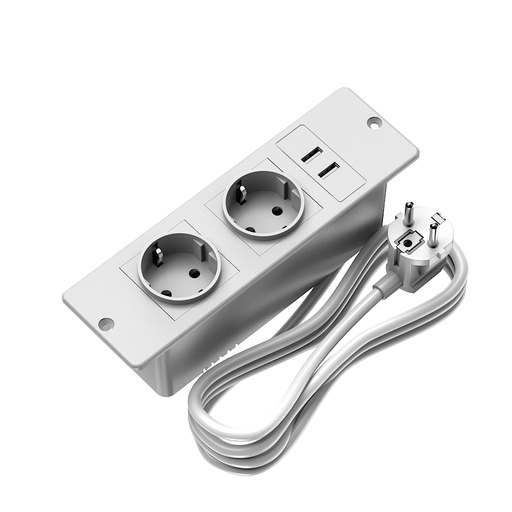
Recessed power strip with 2 AC sockets and 2 USB-A ports
A fixed, recessed option if you want a charging point in your worktop; this isn’t a standalone wall charger.
Lists two AC sockets, two USB-A ports, a 1.5 m cable and a maximum USB output of 10.5 W. The description says it’s for indoor use in a dry place.
View at Joybuy
 No image available
Neomounts DS22-840BL6 desktop socket with clamp
A desktop model for anyone who needs extra sockets as well as USB connections; the clamp needs a suitable worktop edge.
The description lists three Schuko sockets, two 20 W USB-C ports, one 18 W USB-A port and a 1.4 m cable.
View at Joybuy
 No image available
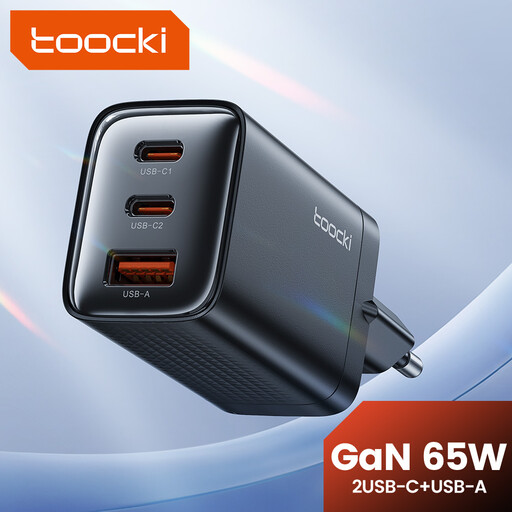
toocki 65W GaN wall charger with 3 ports
A multi-port option if you want to charge other devices as well as your radio; check how the power is shared when you use several ports at once.
The product title lists a maximum output of 65 W, and the description mentions charging three devices at once. The model has two USB-C ports and one USB-A port.
View at Joybuy
Frequently asked questions
Will any USB-C charger work with my USB radio?
No. First check your radio model’s input, cable and charging requirements. For example, Philips Netherlands says radio TAR1659/00 charges using the USB-C cable supplied with it; this doesn’t tell you which connection other radios use.
How can I use a charger safely on the worktop?
Follow your radio’s manual, don’t use a damaged cable or charger, and leave the charger uncovered so heat can escape. Keep the radio and connections away from moisture, and move them before cleaning the area with water.
Do I need a power strip with mains sockets for a USB radio?
Not if you only need a suitable USB output. Extra sockets are useful mainly if you’ll actually use them. The Netherlands Fire Service advises plugging high-power appliances, such as a deep fryer, directly into a wall socket instead.
What are my rights when I buy a charger online in the Netherlands?
For online consumer purchases, you generally have a statutory cancellation period of up to 14 days after delivery, subject to legal exceptions. The Netherlands Authority for Consumers and Markets says that the seller is also responsible for providing a solution if a product doesn’t meet your reasonable expectations; a commercial guarantee doesn’t replace this statutory responsibility.
Is a CE marking required on a mains charger or power strip?
The Dutch Food and Consumer Product Safety Authority states that electrical equipment covered by the Dutch Commodities Act Decree on Electrical Equipment must carry a CE marking. Check the marking and whether the requirement applies to the specific product you’re considering.


