
Makers demonstrating wood grain
You want visitors to see a recognisable area of the wood’s structure. So decide in advance how much of the surface you need to show at once.


To show wood grain at a craft market with a USB microscope, start at the lowest magnification that keeps the area you want to show in view. Then choose between viewing the image on a connected computer or using a model with its own screen. A stable stand and adjustable lighting are well suited to a static demonstration. A handheld model makes it easier to move along a piece, but focusing and keeping it steady require more attention. Manufacturer specifications describe what a model can do, but they are not an independent comparison of image quality on wood.
You want visitors to see a recognisable area of the wood’s structure. So decide in advance how much of the surface you need to show at once.
You want to move the camera between different pieces or view the image without a computer permanently set up. Check how your chosen model displays the image and gets its power.
You want to save images of the grain or finish. Check the photo and video specifications separately, along with the software and options for keeping the image steady.
First decide which part of the grain visitors should be able to see. Then choose your screen setup and check which recording features you need.
| What to consider | What to look for when buying | Who is this important for? |
|---|---|---|
| Getting the grain pattern in view | Start at the lowest usable magnification and compare the visible field of view on a real piece. Check how the manufacturer defines magnification. | If I want to show a grain pattern rather than one tiny detail, I need to see enough of the surface at once. Around 36% of consumers say the visible grain pattern is their top priority. |
| Showing the image to visitors | Decide which screen you’ll bring and check the USB port, operating system, software and power supply for the exact model. | If I want visitors to view the image, I need an easy way to show it at my stall. Around 29% of consumers say a practical demonstration for visitors is their top priority. |
| Stable positioning and lighting | Check whether a stand is included and whether the lighting is adjustable. Consider a polarising filter only if reflections are a problem on your surface. | If I use the microscope in one place, I want to keep the image steady and adjust the lighting. Around 21% of consumers prioritise stable positioning and adjustable lighting. |
| Capturing details | Compare the photo and video resolutions separately and check which parts are included. Test the software on the computer you plan to use. | If I want to save images, I need to know the photo and video resolutions and what comes in the set. Around 14% of consumers say saving images and having a complete setup are their top priorities. |
At high magnification, the area of grain you want to show may disappear from view. The stated magnification can also depend on the screen display.
Compare the lowest usable setting and the visible area on one of your own pieces, and check how magnification is defined.
If a model sends the image to a computer, you’ll also need that computer to show the live view.
Before buying, check whether the exact model has a built-in screen or needs to be connected to a computer.
The stated photo resolution doesn’t automatically tell you what video resolution is available.
Check both specifications separately if you want to save images or show them during a demonstration.
An alternative with a similar name may have a different screen setup or different specifications.
Check the full model number and current product information before deciding what to buy.
The models below differ in how they display images, how they’re positioned and how they’re used. Assess each model’s specifications individually; the brand name alone won’t tell you which setup is best for your stall.
The DST-1028 5MP is a USB microscope for viewing on a computer, with an adjustable working distance.
The DigiMicro Profi is designed for computer viewing and has an adjustable stand; the DigiMicro Mobile has its own screen.
The AM4113ZT is a handheld model with a polariser, designed to inspect surfaces that may reflect light.
The USB2-MICRO-250X is a handheld model with a flexible arm for inspection with the image displayed on a computer.
The Handheld Digital Microscope Pro combines handheld use with an adjustable stand for viewing on a computer.
This Joybuy selection focuses on a digital microscope with a detachable built-in screen, so you can view the image directly during a wood-grain demonstration.
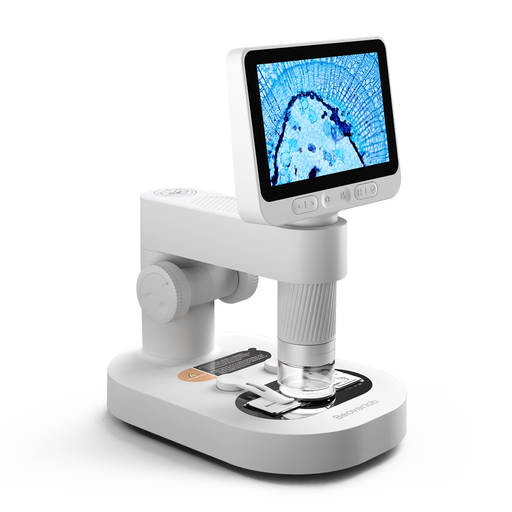 No image available
This version may suit you if you want to view the image directly on its own screen while demonstrating. The product name lists a detachable screen, slides and accessories.
Keep the camera and small accessories out of reach of children under 3 years old, and use the device under the direct supervision of an adult.
Electronic equipment covered by EU rules that require CE marking must meet the applicable requirements. The European Union’s Your Europe website explains that CE marking is only mandatory for products covered by relevant harmonised rules; a CE mark on its own does not prove that an individual item complies. Check the product information for the version on offer.
No. If you want to show a grain pattern, start with a wide enough view and zoom in only to show a detail. For wood identification, the US Forest Service points to features of wood cells that can be seen with a magnifying glass or microscope. So, showing visible grain doesn’t automatically identify the wood species reliably.
Connect the exact model to the computer and screen you plan to bring, then test the software, focusing and lighting on one of your own pieces. BRESSER lists Windows 10 and 11 as compatible with the DST-1028; don’t assume this applies to other models.
Place the piece and any stand on a stable surface, focus on the area you want to discuss and adjust the lighting. Before cleaning the microscope, check the instructions for your chosen model, as the recommended approach may vary from one device to another.
Contact the seller if a product is faulty. According to the Dutch government, a manufacturer’s warranty does not replace your statutory rights. The Netherlands has no fixed statutory warranty period, and what you can reasonably expect depends, among other things, on the product and the sales information.
CE marking is compulsory when the applicable EU rules require it for the product. The Dutch government and the European Union’s Your Europe website explain this requirement. If in doubt, ask for information about the specific version, and don’t treat a CE mark on its own as proof that it meets all the requirements.