
Solo narrator in a quiet room
You’re recording a spoken strategy guide and want a simple USB setup that’s easy to position.


If you’re mainly recording spoken explanations, choose a microphone based on the sound in your room and how close you can position it. Then consider whether you want to monitor your voice and adjust the level as you record. A compact USB model keeps your setup simple, while USB/XLR is worth considering if you speak close to the mic or might want to use an audio interface later.
You’re recording a spoken strategy guide and want a simple USB setup that’s easy to position.
You’re recording while gaming or with the game running nearby, and want to check how much keyboard, fan or room noise makes it into your recording. A microphone designed for close-miking may be an option, but it doesn’t guarantee a noise-free recording.
You’re recording longer voice-overs and want to monitor through headphones or adjust the level and monitor mix as you go.
Start with your speaking distance and the sound in your room, then consider the monitoring, controls and connections you need for your recording.
| What matters when buying | What should you check? | Who will find this important? |
|---|---|---|
| Keeping your voice clear | Check the pickup pattern and speaking side of the exact model. Make a test recording from where you’d normally speak, using your usual gaming setup. | If keyboard or room noise is audible, I want to know how my voice sounds from the position I plan to use. Around 36% of consumers prioritise voice clarity when there’s room or gaming noise. |
| Monitoring and adjusting the level | Check whether it has a headphone output and direct monitoring, and whether you adjust gain, mix and volume on the microphone or in software. | When recording a long voice-over, I want to hear any level issues in time and be able to adjust them if needed. Around 29% of consumers give monitoring and direct level control top priority. |
| Connecting and positioning | Check the USB connection and included cable, the space available on your desk, and whether the stand suits your preferred speaking distance. | If I want to get started quickly and have limited desk space, I want a connection and positioning that suit my setup. Around 21% of consumers prioritise easy connection and positioning. |
| Adding XLR later | Check whether the exact model has both USB and XLR, and which features work with each connection. Don’t assume an audio interface is included. | If I want to build a different recording setup later, I want to know whether the microphone will work with it. Around 14% of consumers choose future XLR expansion as their main reason. |
A microphone’s pickup pattern doesn’t tell you how much keyboard, fan or room noise will make it into your recording. RØDE and Shure also describe the features of specific microphones, not measured results in your room.
Make a test recording with your usual desk setup and keep the same speaking position while recording.
USB and XLR don’t automatically offer the same features. RØDE says that software won’t detect a PodMic USB as a digital device if it’s connected via XLR only.
Use USB for a direct recording to your computer; choose XLR only if you also want to put together a compatible recording setup.
The Sennheiser Profile USB with a desk stand is a different version from the Profile Streaming Set with an arm. RØDE lists a USB-C-to-USB-A cable for the NT-USB Mini; don’t assume other models come with the same accessories.
Before buying, check the exact version, what’s in the box and whether the connection is compatible with your computer.
These examples cover specific microphone ranges; a brand mention alone says nothing about the availability or suitability of every model.
The NT-USB Mini is a compact USB option for one speaker. The PodMic USB is a separate USB/XLR option for anyone who may want to expand their setup later.
The MV7+ is a dynamic USB/XLR microphone for close-miking, with the option of using an XLR setup later.
The Profile USB is designed for creators who want to adjust gain, monitor mix and headphone volume while recording via USB-C.
The SoloCast 2 is a straightforward USB microphone for speech, while the QuadCast 2 offers more pickup patterns and controls.
The Seiren V3 Mini is a compact USB microphone with an on-device mute control.
This selection includes compact USB microphones for desk recording and a wireless lavalier option. The latter is only suitable if you’re looking for a portable clip-on microphone rather than a desk microphone.
 Image unavailable
An option for recording spoken explanations via USB; the product name mentions plug-and-play, cardioid pickup and a black finish.
 Image unavailable
A compact USB option for anyone who wants a mute control on the microphone; the product name mentions tap-to-mute and the Quartz finish.
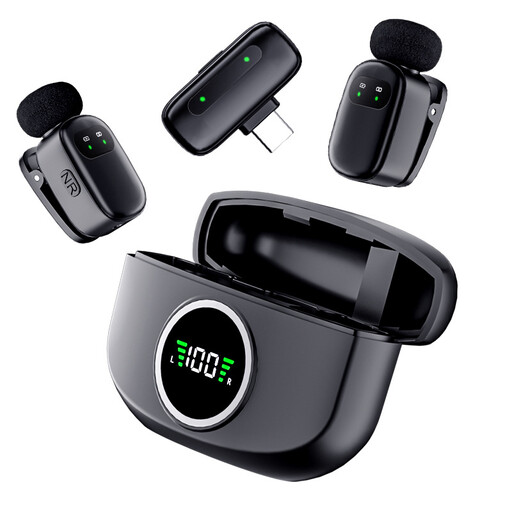 Image unavailable
A portable clip-on microphone if you’re not looking for a desk mic. The product name mentions two microphones and a Type-C interface; check that the connection is compatible with the device you want to record on.
Not for the direct USB connections mentioned here. RØDE says the NT-USB Mini can connect to a compatible computer, while Sennheiser describes the Profile USB as plug-and-play. Still, check your computer port, cable and recording settings.
Before a long session, make a short test recording using your normal speaking volume and gaming audio. Select the USB microphone as your input and monitor through the headphone output if the model has one.
According to the Dutch Government, you’re entitled to a product that works as it should in the Netherlands; there’s no fixed statutory guarantee period. If the seller is responsible for a fault, you may be entitled to an appropriate remedy at no cost. Normal wear and tear or damage you’ve caused yourself aren’t automatically covered.
For eligible distance sales from a business, the Dutch Government says you generally have a 14-day cooling-off period. According to its guidance, an online purchase from a private individual doesn’t count as a distance sale. So check who the seller is and which terms apply to your order.
The Dutch Government states that electronic products placed on the EU market must carry a CE marking. Check the marking and product information for the specific version; a general brand description doesn’t prove that every version meets the applicable requirements.