In a student room with noticeable background noise, focused pickup and positioning the microphone close to your mouth matter more than having extra pickup patterns. If desk space is limited, a compact stand is important too. Check the connection and mute controls work with your computer and chat app. None of these microphones can guarantee that housemates or keyboard noise will disappear.
Who is this relevant to?
Gamer in a noisy room
You play while there are sometimes other sounds in or around your room, and want your teammates to hear you clearly. Pay attention to where you position the microphone and to the limitations of software-based noise reduction. FIFINE and Discord outline relevant features and things to bear in mind.
Student on a tight budget
You don’t want to buy a full recording setup just for voice chat. Compare what comes with the microphone before deciding whether you need a boom arm or another accessory. FIFINE, Trust and HyperX describe different included or integrated setups.
Gamer with limited desk space
You’re looking for a compact USB setup that fits alongside your laptop, keyboard and study materials, with controls you can reach while gaming. Trust, Razer and HyperX offer compact options with controls on the microphone.
What should you look for?
Start by deciding what matters most to you: clear speech despite background noise, a small desk setup or quick muting. Then check that the connection and controls work with your chat app.
Dynamic USB microphone with cardioid pattern
Suitable for: if there’s background noise and you can position the microphone close to your mouth, this could be a good option. The FIFINE AM8 is one example, with USB and a stand.
Bear in mind: FIFINE claims that the capsule rejects background noise more effectively, but this hasn’t been independently verified for your room.
Compact USB condenser microphone with directional pickup
Suitable for: if desk space and on-mic controls are important, compare the Trust GXT 234 Yunix, Razer Seiren V3 Mini and HyperX SoloCast 2.
Bear in mind: the stand, pickup pattern and platform support vary by model. A directional pattern doesn’t guarantee that housemates’ voices will be filtered out.
| What to consider |
What should you check? |
Who is this most important for? |
| Clear speech despite background noise |
Check the pickup pattern and microphone position. Test the result with the sounds you hear in your room. |
If there’s noise in or around my room while I’m gaming, I want my teammates to hear me clearly. Around 36% of consumers prioritise clear speech despite background noise. |
| Included components and setup |
Check what’s included with the exact model and whether the supplied stand suits the place where you want to use the microphone. |
I want to use voice chat without adding lots of unnecessary separate parts to my setup. Around 29% of consumers prioritise included components and the setup. |
| Desk space and positioning |
Check the stand, its adjustability and the space available in front of your keyboard. |
With limited space beside my laptop, keyboard and study materials, the microphone still needs to fit. Around 21% of consumers prioritise desk space and positioning. |
| Quick, clear muting |
Check whether the model has a mute control and a visible status indicator. Test it in your chat app. |
During a lobby, I want to be able to mute quickly without opening a software menu first. Around 14% of consumers make direct mute controls their main priority. |
Common buying mistakes
-
Taking ‘noise reduction’ to mean housemates will be inaudible
A directional pickup pattern or software filter doesn’t guarantee that other people’s voices will disappear from your chat. Discord also warns that Krisp can reduce voice quality in a quiet environment.
Test the microphone where you play, and try your chat settings with the sounds that actually occur in your room.
-
Comparing only the microphone and forgetting about the setup
According to their manufacturers, the AM8 and SoloCast 2 are designed for use on a desk, but their features differ. You may need a separate boom arm if the supplied setup doesn’t fit your desk.
Check the exact model, what’s included and how much space you have before choosing accessories.
-
Assuming USB works the same way on every gaming platform
Platform support varies by model. HyperX’s official product page lists PC compatibility; don’t assume this means it supports other platforms too.
Check support for the exact model and test the microphone in your chat app and on the device you plan to use.
Brands to compare
FIFINE
The AmpliGame AM8 is a dynamic cardioid microphone with USB and XLR, designed for use close to your mouth.
- FIFINE lists a desktop stand, USB cable, mute control and monitoring in USB mode.
- The claim that it rejects background noise comes from the manufacturer and hasn’t been independently verified in a student room.
Trust
The GXT 234 Yunix is a compact USB gaming microphone with an adjustable angle.
- Trust lists a cardioid pattern, built-in pop filter, mute button and headphone socket.
- These specifications don’t tell you how much background noise it will pick up in a shared room.
Razer
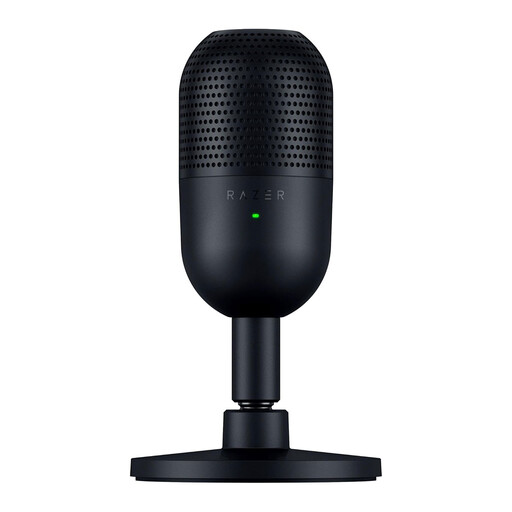
The Seiren V3 Mini is a compact USB condenser microphone with a supercardioid pattern.
- Razer lists a 14 mm capsule and tap-to-mute with an LED.
- A directional pattern doesn’t mean that all surrounding voices will be filtered out. Check the connection on the exact model too.
HyperX
The SoloCast 2 combines USB and cardioid pickup with a compact desktop setup for PC use.
- HyperX lists a built-in pop filter, shock absorption, tilting stand and tap-to-mute.
- The official product page lists PC compatibility; don’t assume it supports other platforms without checking.
Joybuy products
These products are suited to compact USB microphone setups for voice chat and gaming, with controls and desk space in mind.
 No image available
Razer Seiren V3 Mini Black
Suitable if you’re looking for a compact USB microphone with on-mic controls.
Supercardioid pickup pattern; 14 mm condenser capsule; tap-to-mute with an LED.
Joybuy
 No image available
HyperX SoloCast 2
Suitable if you’re looking for a compact desktop setup with on-mic controls.
Cardioid pickup pattern, built-in pop filter, shock absorption, tilting stand and tap-to-mute. The official product page lists PC compatibility.
Joybuy
Frequently asked questions
How do I set up my microphone for a Discord lobby?
Select the USB microphone as your input device, then test that speaking and muting both work. If you can hear non-human background noise, you can try Krisp under Voice & Video. Discord notes that it can reduce voice quality in a quiet environment.
Will a cardioid microphone help if someone else is talking in my room?
A cardioid or other directional pickup pattern doesn’t guarantee that someone else’s voice won’t be picked up in the chat. Test the microphone where you play and check the result in your chat app.
Can I return a microphone bought online if the setup doesn’t fit?
For online purchases from a business in the Netherlands, you usually have a 14-day cooling-off period; the Dutch government lists some exceptions. Check the terms and conditions that apply to your purchase.
Am I only entitled to the manufacturer’s warranty after buying?
No. In the Netherlands, purchases are also covered by a statutory guarantee: you’re entitled to a product that works as it should. The Dutch government says there’s no fixed statutory guarantee period; what you can expect depends on the product and the purchase. If there’s a problem, the seller must provide a solution.


