Who is this buying guide for?

Creator with a crowded desk

You want to record a character voice without having to clear a lot of space permanently. The stand or boom arm mount, and the distance from your mouth, determine whether the setup will work on your desk. Razer and RØDE describe different compact setups for their microphones.

Creator in a noisy room

You can speak close to the microphone and want to account for keyboard and background noise. Compare the polar pattern and possible positioning, but don’t assume a directional pattern will make the room quiet. Razer and RØDE describe different pickup and positioning features.

Creator who wants to monitor their voice

You may vary your volume or pronunciation while recording, and want to check for plosives and review your recording. Look for built-in pop protection and, if you want to hear yourself directly, a headphone output. RØDE and HyperX describe these features on specific models.

What should you look for when choosing?

Factor to consider What to look for Who is this important for?
Desk space and positioning Consider the complete setup, including the stand or boom arm, cable and speaking direction. If your desk is already full, you’ll want to know whether the microphone can sit in front of your mouth without obstructing your keyboard or screen. Around 33% of consumers say positioning is their main concern.
Background noise Check the polar pattern, recommended speaking distance and whether that position is practical. If you record in a noisy room, you’ll want to be able to position the microphone close enough and know which side picks up your voice. Around 27% of consumers say background noise is their main concern.
Plosives and vocal volume Check whether a pop filter is built in or included, and make a test recording. If you record character voices at varying volumes, you’ll want to check how plosives sound from your speaking position. Around 20% of consumers give this their top priority.
Connection and monitoring Compare the cable with your device’s port, and check for a headphone output if you want direct monitoring. If you want to hear yourself while recording or connect the microphone to your computer, check which connection you need beforehand. Around 20% of consumers prioritise connection or monitoring.

Avoid common buying mistakes

  • Looking only at the microphone’s dimensions

    A compact body won’t necessarily fit if the stand, boom arm or recommended speaking distance isn’t right for the space available. For the PodMic USB, RØDE recommends a distance of around 5–10 cm; Shure doesn’t list a desktop stand for the MV7+ version reviewed.

    Before buying, map out where the microphone, mount and cable will go, and allow space for your keyboard.

  • Assuming a directional polar pattern cancels out all noise

    A polar pattern won’t make a noisy room quiet; positioning and background noise still matter.

    Check the recommended speaking distance and make a test recording where you plan to use the microphone.

  • Assuming USB-C on the microphone means the cable will fit

    The microphone’s connection doesn’t automatically tell you whether the included cable will fit your computer’s port.

    Before ordering, check the connections on the microphone, cable and your device.

Brands to compare

Razer

The Seiren V3 Mini is a compact USB condenser microphone designed for a simple desk setup.

  • Razer lists a supercardioid polar pattern, tilting stand and tap-to-mute sensor for this model.
  • Check that the stand and speaking position will fit on your desk. The claim about reducing typing noise comes from the manufacturer and isn’t based on an independent test.

HyperX

According to HyperX, the SoloCast 2 combines a compact USB setup with features for voice recording.

  • HyperX lists a built-in pop filter, shock absorption and mounting thread for the SoloCast 2.
  • Check the exact model name and which mount is included with your version; features of this model don’t necessarily apply to other HyperX microphones.

RØDE

The NT-USB Mini is designed for a compact desk setup with monitoring, while the dynamic PodMic USB is suited to close-mic speaking and also offers XLR.

  • RØDE lists a removable stand and headphone output for the NT-USB Mini. For the PodMic USB, the brand recommends speaking from around 5–10 cm away.
  • The two models need different setups. For the PodMic USB, check whether a stand or boom arm and the short speaking distance will work on your desk.

Shure

The MV7+ is a USB/XLR option for anyone who wants controls and may connect an audio interface later.

  • Shure lists headphone monitoring and digital settings for the MV7+.
  • A desktop stand isn’t listed for the version reviewed. Allow for a suitable mounting solution; claims about voice isolation come from Shure.

USB microphones at Joybuy

This selection focuses on USB microphones for recording speech at a small desk, with an emphasis on positioning and voice monitoring.

USB condenser microphone with cardioid pattern

USB condenser microphone with cardioid pattern

Could work if you want to position the microphone on a boom arm rather than use extra desk space for a stand. Check that the mount and available space on your desk are suitable.

View at Joybuy

HyperX SoloCast 2 USB gaming microphone

HyperX SoloCast 2 USB gaming microphone

Could work if you’re looking for pop protection and mounting options in a compact USB setup. HyperX lists a built-in pop filter, shock absorption and mounting thread for the SoloCast 2; check which mounting option will suit your desk.

View at Joybuy
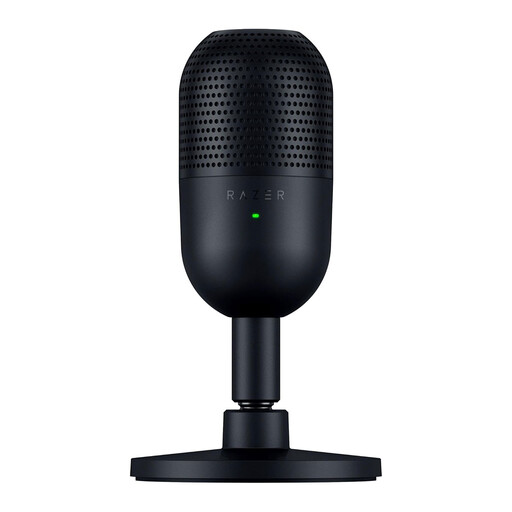
Razer Seiren V3 Mini - Black

Razer Seiren V3 Mini - Black

Could work if you’re looking for a compact desk setup. Razer describes this model as having a tilting, detachable stand, a supercardioid polar pattern and a tap-to-mute sensor; check that the stand will fit on your desk.

View at Joybuy

Frequently asked questions

How do you position a microphone when your desk is nearly full?

Start with the speaking direction and distance from your mouth, rather than looking only at the size of the microphone body. The NT-USB Mini has a detachable desk stand; for the PodMic USB, RØDE recommends speaking from around 5–10 cm away, with the microphone mounted on a stand or boom arm.

Do you need an audio interface for these USB microphones?

Not if you’re recording via USB with a compatible device and the right cable. XLR is a separate connection option on the PodMic USB, for example, for use with an audio interface.

How can you reduce plosives and monitor your recording?

Speak towards the microphone’s intended pickup area and make a short test recording using the loudest character voice you plan to use. According to RØDE, the NT-USB Mini has a built-in pop filter and headphone monitoring; the PodMic USB also has a filter and headphone output, according to RØDE.

What rules apply to online shopping and product safety in the Netherlands?

For online purchases from a business, you generally have 14 days to change your mind, according to the Dutch government. According to the European Union’s Your Europe website, CE marking is only required for products covered by applicable EU rules.
