
Recording alongside colleagues
You mainly want to capture your own ideas while others are talking nearby. Microphone positioning and managing background noise are important considerations when choosing.


At a shared desk, a directional USB microphone that you can position close to your mouth is a sensible starting point if you mainly want to record your own voice. However, no recording pattern or noise feature will make colleagues’ voices inaudible. Shure clarifies that real-time noise reduction on the MV7 series does not remove background voices, so check the positioning, stand and connection, then make a test recording at your own workstation.
You mainly want to capture your own ideas while others are talking nearby. Microphone positioning and managing background noise are important considerations when choosing.
You want to record hands-free and move the microphone easily when you’ve finished. So, pay attention to the base, mounting options and controls.
You want to get started quickly on different computers and check straight away what the microphone is picking up. The connection and headphone monitoring are important here.
A good fit if: you can position the microphone in front of your mouth and want to record your own voice. The Audio-Technica ATR2100x-USB and Samson Q2U are examples with USB, a cardioid pickup pattern and an included desktop stand.
Bear in mind: you’ll need to position the microphone carefully and find a practical place for the stand. This won’t guarantee that nearby conversations disappear.
A good fit if: you want to set it up quickly and keep your desk arrangement compact. RØDE lists a detachable desktop stand and headphone monitoring for the NT-USB Mini.
Bear in mind: a cardioid microphone still picks up sound in the room, so check that you can position it close enough to your voice.
A good fit if: you sometimes want to record one speaker and at other times deliberately capture several people around the microphone. According to Logitech G, the Logitech G Yeti Nano offers cardioid and omnidirectional modes.
Bear in mind: according to Logitech G, omnidirectional mode picks up sound from all around the microphone, so it won’t keep colleagues out of your recording.
Start by considering where you can place the microphone and how close it can be to your mouth. Then check the connection, included stand and whether you can monitor the recording as you speak.
| What to consider | What should you check? | Who is this most important for? |
|---|---|---|
| Background noise | Check the pickup pattern, whether you can position the microphone in front of your mouth, and the result of a test recording. | When colleagues are talking nearby, I want to record my own voice clearly without deliberately picking up theirs; around 36% of consumers put reducing background noise at the top of their list. |
| Hands-free setup | Check what’s included, how much desk space the base takes up and whether the microphone can be positioned at the distance you want. | I want to record without holding the microphone and move it easily when I’ve finished; around 29% of consumers give a simple hands-free setup top priority. |
| Connecting to different computers | Compare the connection on the microphone, the connectors on the included cables and compatibility with your recording device. | When switching between computers, I want to check quickly whether the connection will fit; around 21% of consumers say easy connectivity is their main consideration. |
| Monitoring your recording | Check whether the model has a headphone output and suitable monitoring features. | When I record ideas, I want to hear straight away what the microphone is picking up; around 14% of consumers put immediate recording monitoring first. |
Shure says that the real-time noise reduction on the models discussed can tackle continuous noise, but does not remove background voices.
First, find a practical position for recording your voice and make a test recording with the kind of noise you hear at your workstation.
The Audio-Technica ATR2100x-USB comes with a desktop stand; the Dutch version of the Shure MV7+ reviewed here does not include one.
Check the exact version and what’s in the box, rather than relying on a picture of a complete recording setup.
Depending on how you want to position it, you may need a separate stand, boom arm or suitable cable.
According to Logitech G, the Yeti Nano’s omnidirectional mode picks up sound from all around the microphone.
Use this mode only if you deliberately want to capture several voices. For personal notes, start with cardioid mode and check the recording.
The NT-USB Mini is a compact desktop option; the NT-USB+ is a separate version with different included accessories.
The ATR2100x-USB is a dynamic USB/XLR microphone for anyone who can position the microphone close by.
The Q2U is a dynamic USB/XLR microphone with an included desktop stand, designed for voice recording.
The MV7+ is a dynamic USB-C/XLR option for use close to the speaker.
The Yeti Nano is worth considering if you want to switch between recording one speaker and capturing sound from all around the microphone.
This selection includes compact USB desktop microphones and portable Type-C lavalier microphones for hands-free voice recording. Choose based on how you want to position the microphone, and check that the connection is compatible with your computer.
 No image available
The desktop stand is designed for hands-free use; check whether you can position the microphone close enough to your mouth on your desk.
The product description lists a stable, tilt-resistant stand, a cardioid pickup pattern and a mute function. The connection is described as USB-C to USB-A.
 No image available
Its compact design is an option if you want to save desk space; check whether you can position the microphone in the right place for your voice.
The product name specifies USB and tap-to-mute controls. The product description lists a supercardioid pickup pattern and a small footprint.
 No image available
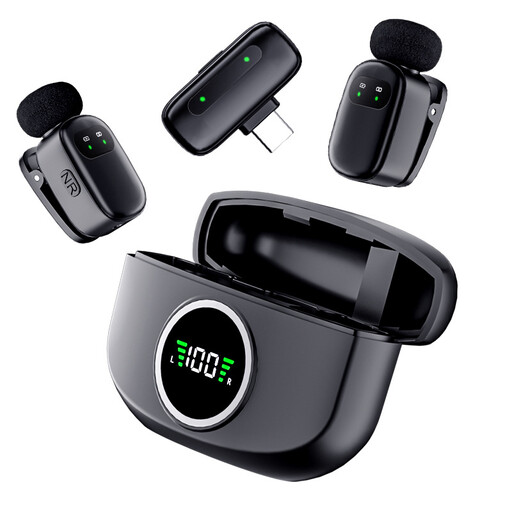
The portable lavalier design is an option if you want to record hands-free without a microphone stand on your desk; check that the Type-C connection is compatible with your computer.
The product description lists two microphones, a Type-C interface and a stated battery life of 3–6 hours. It also mentions a magnetic charging case.
 No image available
The wireless lavalier design is an option if you want to record hands-free without a fixed desktop stand; check that the Type-C connection is compatible with your computer.
The product name specifies a Type-C interface. The product description mentions recording with computers and a stated battery life of 3–6 hours.
Speaking close to and directly in front of a directional microphone is a useful starting point if you want to reduce background noise. For the dynamic USB model discussed, Audio-Technica recommends a distance of under 200 mm; this isn’t a universal distance for every model.
That depends on the microphone and computer. RØDE says the NT-USB Mini works with supported computers without a separate driver. Once connected, select the microphone as the input device in your recording software.
Check whether the stand, any required USB cable and headphones are included. For online consumer purchases in the Netherlands, ACM ConsuWijzer generally describes a 14-day cooling-off period from delivery, with some exceptions. ACM ConsuWijzer also explains that statutory guarantees depend on what you could reasonably expect from the product under normal use; don’t assume these consumer rules automatically apply to a business purchase.
Agree the purpose, workplace arrangements and recording environment in advance, especially if identifiable colleagues or work conversations may be recorded. If an organisation processes personal data in such recordings, the Dutch Data Protection Authority says it must establish an applicable GDPR lawful basis before processing; additional conditions apply to monitoring employees.