
Solo presenter
You practise your presentation at a desk and mainly want to hear your words, pace and clarity when you listen back. The microphone’s distance and direction are important considerations.


For solo practice, a USB microphone you can position close to you and point towards you is a practical place to start. A directional pickup pattern won’t fix echo if the microphone is too far away. If you want to hear yourself as you speak, check that the microphone has a headphone output with direct monitoring. If you also practise with classmates, look for a microphone with different pickup patterns and listen back to check that voices are clear from every position.
You practise your presentation at a desk and mainly want to hear your words, pace and clarity when you listen back. The microphone’s distance and direction are important considerations.
You want to hear yourself through headphones during a rehearsal and listen back to a test recording afterwards. Look for direct monitoring and check your computer’s audio settings.
You sometimes practise with classmates and want to record voices from different positions. The pickup pattern and microphone placement need a different approach than when recording one speaker.
A good fit if: you mainly practise alone at a desk; according to Razer, the Seiren V3 Mini has a supercardioid pattern and tap-to-mute, while the HyperX SoloCast 2 has a cardioid pattern.
Bear in mind: a directional pickup area requires you to position yourself appropriately and won’t automatically prevent echo.
A good fit if: you want to monitor your voice through wired headphones as you practise; RØDE lists a headphone output and monitor mix for the NT-USB+, while Shure lists a 3.5mm output for the MV6.
Bear in mind: check that the connection is compatible with your computer; direct monitoring won’t change the acoustics of the room.
A good fit if: you take turns practising alone and with classmates around one microphone; according to Logitech, the Logitech G Yeti Nano has cardioid and omnidirectional modes.
Bear in mind: omnidirectional mode picks up sound from every direction; test the positioning and listen back to each voice separately.
| What to consider | What should you check? | Who is this important for? |
|---|---|---|
| Clarity of one voice | Make a test recording from your actual speaking position and compare a nearby position with one further away. | When I practise my presentation, I want to hear my words and pace without distance or echo affecting my judgement. Around 36% of consumers say clarity for one voice is their main reason for buying. |
| Being able to hear yourself | Check whether there’s a headphone output and whether you can monitor your microphone signal directly. | I want to hear how my voice sounds as I speak and check my recording afterwards. For around 29% of consumers, direct monitoring is the top priority. |
| Recording multiple speakers | Check which pickup patterns are available and test the microphone from each speaker’s position. | When classmates join in, I want to hear their voices from different positions too. Around 21% of consumers say group recording is their main reason for choosing a microphone. |
| Connection and set-up | Compare your computer’s USB ports with the cable, stand and audio input you need. | I want to be able to connect and record before the rehearsal without awkward positioning or a missing cable. For around 14% of consumers, a complete set-up that works is the main priority. |
Even with a directional pattern, distance and reflections in the room can make your voice sound less clear.
Test the microphone where you’ll actually be presenting. First compare the distance and the room before treating extra digital processing as the deciding factor.
Allow time to adjust the positioning or practice space.
Distance and direction can affect the recording level for each speaker. An omnidirectional mode also picks up sound from other directions.
Decide in advance whether you’ll rehearse alone or with classmates, and listen back to each voice separately during a group test.
The connection and included accessories won’t necessarily suit every computer or practice set-up.
Check your device’s ports, the cable, the stand and the headphone connection before choosing a microphone.
Some set-ups may need a compatible cable or a different positioning solution.
The NT-USB+ is designed for a desk set-up with direct monitoring; the NT-USB Mini is a more compact alternative with this feature.
The Seiren V3 Mini is a compact USB option for solo presentations.
The Yeti Nano may be worth considering if you practise both alone and with multiple speakers.
The MV6 is a USB option for solo speaking if monitoring and on-microphone controls are important to you.
The SoloCast 2 is a compact desk option for one speaker.
These Joybuy picks are suited to practising on a computer, alone or with another speaker. Check that each model’s connections and controls work with your set-up.
 No image available
This set may suit practising on a computer with two speakers.
Includes two transmitters; according to the product description, the USB-C receiver can be used as a USB audio device with a computer.
 No image available
A desk set-up with a scissor arm may suit you if you mainly record your own presentation.
The product description lists a cardioid pattern, a 3.5 mm headphone connection for direct monitoring, a scissor-arm stand and a pop filter.
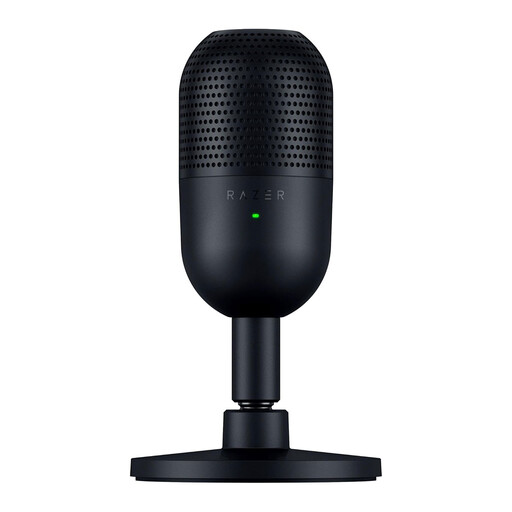 No image available
This compact model may suit solo practice over USB, with the microphone pointed towards you.
Razer lists a supercardioid pattern and tap-to-mute.
Select the microphone in your computer’s audio settings and in your recording software. Point the pickup side towards you, record a short passage and listen back for clarity and echo. According to RØDE, a gold dot marks the front of the NT-USB+.
Don’t assume so: Shure explains that a microphone can’t effectively separate direct speech from reflected speech. First try a different microphone position or a room with less echo, then assess a test recording.
Compare your computer’s USB port with the included cable and check whether you need a stand and a compatible headphone connection. RØDE recommends a USB-C-to-USB-A cable for the NT-USB+ if your computer has USB-A only.
Online consumer purchases generally come with a statutory 14-day cooling-off period after delivery, subject to legal exceptions; ACM ConsuWijzer explains this period. A product must also meet the standards you could reasonably expect under normal use. If a product is faulty, contact the seller for an appropriate solution; this is separate from any commercial or manufacturer’s warranty.
A sound recording that makes someone identifiable may contain personal data. The Dutch Data Protection Authority states that processing requires a lawful basis under the GDPR. Before recording or sharing, check the purpose, the relevant privacy rules and any school policies. Consent is one possible lawful basis, but it isn’t automatically the only one.