
Players who want to chat in the lobby straight away
Want to connect a USB microphone, select it as the input and mute it easily while gaming.


For everyday lobby chat, a USB microphone with the right connections, a good position on your desk and an easy-to-use mute function is a practical choice. If you can hear your keyboard or fan, you should also consider the microphone’s direction, positioning and chat service settings; a directional pickup pattern doesn’t guarantee a quiet lobby. If you want to hear yourself directly, or also stream and record, check whether the exact model offers monitoring or mixing features.
Want to connect a USB microphone, select it as the input and mute it easily while gaming.
Want to keep their voice clear when keyboard, fan or other room noise is present, and are happy to assess both microphone placement and chat settings.
May need to monitor their voice through headphones or control multiple audio sources, as well as chat in the lobby.
Choose this if: you mainly chat at your desk on your own and easy controls are important to you.
Bear in mind: a mute function doesn’t tell you whether you can hear yourself directly through headphones.
Choose this if: you want to hear your microphone signal through connected headphones while chatting or recording.
Bear in mind: check your computer’s cable and connection; monitoring is different from how your teammates hear your voice through the chat service.
Choose this if: you also record or stream, as well as chatting in the lobby, and want to manage your audio sources.
Bear in mind: check the exact model generation and software; features on a newer version aren’t automatically available on an older model.
| What to consider | What should you check? | Who is it for? |
|---|---|---|
| Connecting and muting | Check the connection and supplied cable, select the microphone as the input in your chat programme or game, and see how to tell when it’s muted. | If I want to connect quickly and use the right microphone in the lobby, easy controls are my priority. Around 40% of consumers mainly have this need. |
| Background noise | Consider the pickup pattern and the microphone’s position relative to your mouth and keyboard. Also test the sensitivity setting or push-to-talk in your chat service. | If my keyboard or fan is audible, I want to keep my voice clear without assuming that a microphone will remove all background noise. Around 30% of consumers prioritise reducing background noise. |
| Monitoring and recording | Check whether the exact model has a headphone output, direct monitoring or the mixing software you need. | If I want to hear myself directly, or also record and stream, I look for features beyond everyday lobby chat. Around 20% of consumers mainly have this need. |
| Size and placement | Check the dimensions, stand and any mounting options for the specific version. | With limited desk space, I want to know in advance where the microphone can go and how it should be positioned. Around 10% of consumers mainly prioritise the desk space available. |
A microphone can pick up both your voice and background noise. Discord Support warns that automatic input sensitivity doesn’t always work as expected when there’s a lot of background noise.
Test the microphone with your own keyboard and speaking volume, point the correct side towards your mouth, then adjust your chat settings. You could also try push-to-talk.
Elgato describes the Wave:3 MK.2; that model name and its features don’t confirm what the older Wave:3 version offers.
Check the full model name and generation when reviewing the specifications and making a purchase.
The RØDE manual lists a USB-C to USB-A cable supplied with the NT-USB Mini, and a separate USB-C to USB-C cable for connecting to a USB-C port.
Compare your computer’s ports with the cable supplied with the exact version.
The SoloCast 2 is a compact USB option for one speaker looking for built-in mute controls.
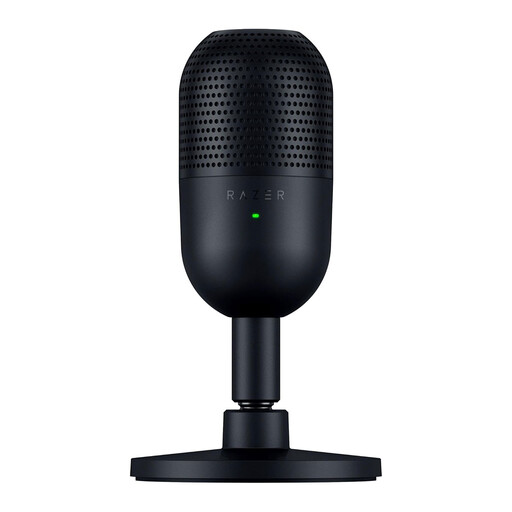
The Seiren V3 Mini is a compact USB microphone with supercardioid pickup and a mute sensor for one speaker.
The NT-USB Mini is a compact option for anyone who wants to monitor their own voice directly through headphones.
Elgato positions the Wave:3 MK.2 for users who also record or stream and want to manage audio sources with Wave Link.
These USB desk microphones are designed for lobby chat with easy-to-use mute controls; check which features and connections suit your setup for each model.
 No image available
A compact USB desk microphone for lobby chat, with mute controls when you need them.
HyperX lists cardioid pickup, an internal shock mount and a built-in pop filter for this model. The product description also mentions mute controls with an LED indicator; point the HX logo towards the sound source.
 No image available
A compact USB microphone for one speaker who wants to mute easily during lobby chat.
Razer lists a supercardioid pickup pattern, a mute sensor and an LED to show mute status. The pickup pattern doesn’t guarantee that nearby keyboard noise will be filtered out.
Select the USB microphone as the input device in your chat programme and run a microphone test there. Discord Support explains how to test your mic on desktop or in a browser; Steam Support also recommends checking your selected voice input and any push-to-talk key.
Follow the manual and point the microphone’s pickup side towards your mouth, then test its position. In Discord, you can then adjust the input sensitivity manually or use push-to-talk; set the sensitivity so your voice doesn’t cut out.
Compare your computer’s connection with the cable supplied with the exact version. The RØDE manual lists a USB-C to USB-A cable for the NT-USB Mini, and a separate USB-C to USB-C cable for a USB-C connection.
According to ACM ConsuWijzer, for a standard online product purchase you generally have a 14-day cooling-off period from delivery, although there are exceptions you should check before buying. If a product doesn’t meet what you could reasonably expect under normal use, you also have statutory rights against the seller; there isn’t simply a fixed two-year period that applies to every product.