For recording words and sentences from a fixed location, it’s practical to choose a microphone you can use at the same distance and angle every time. A directional USB condenser microphone with a desk stand may suit a quiet room. If there’s background noise, consider a tighter pickup pattern or a dynamic microphone for close-up recording. Make a test recording and listen for clarity, echo and plosive sounds. Also check that the monitoring and pop protection features suit the model you choose.
Who is this for?
Creator of repeatable language lessons
You record lots of individual words and example sentences from the same spot, and want to compare volume and sound between recordings. A stable setup and listening back are therefore important. RØDE and Audio-Technica product information describes models with desk stands and headphone monitoring.
Recording in a noisy home office
You speak from one position but are affected by keyboard noise or other sounds in the room, for example. Consider the pickup pattern, microphone placement and test recording, rather than relying solely on claims about isolating your voice. Shure explains why a microphone can’t fix a room’s acoustics.
Beginner with a fixed desk setup
You want to get started without a complex audio setup, and need to know in advance whether the stand, connection and any pop protection will suit your recording space. Audio-Technica and RØDE describe which accessories are included with specific models.
What should you look for?
Start by choosing a consistent speaking distance, then check your recording in the room where you’ll actually record the words. Next, see which setup, monitoring and pop protection features suit the way you work.
| What to consider |
What should you check? |
Who is this important for? |
| Clear, consistent speech |
Make test recordings of short and long words from the same spot, then listen for volume, echo and clarity. |
I want to record individual words and example sentences without unnecessary changes in volume and sound; around 36% of consumers say clear, consistent speech is their top priority. |
| Background noise and room echo |
Listen at your recording spot with your usual computer and room sounds on; compare the direction and distance from the microphone. |
If keyboard noise is likely to be picked up, for example, I want to hear what the microphone captures before choosing a pickup pattern; background noise is the main concern for around 29% of consumers. |
| Stable setup and plosive sounds |
Check the included stand and mounting options. Test words with p and t sounds to see whether you need a pop filter. |
I want to keep the microphone in the same place for a series of words and assess plosive sounds; around 21% of consumers prioritise a repeatable setup. |
| Monitoring and connectivity |
Check the connections on the microphone and computer, the included cable, and whether headphone monitoring is available. |
While recording, I want to check that the sound is being captured properly and that the connection is compatible with my computer; around 14% of consumers put this first. |
Common buying mistakes
-
Assuming a directional pickup pattern will eliminate all noise or echo
A pickup pattern affects the directions from which a microphone captures sound, but a microphone can’t fix a room’s acoustics.
Record in your own room and listen to the result before choosing a model based on a claim about isolation.
-
Comparing microphones alone and forgetting about the setup
Models vary in the stand, cable, mounting hardware and pop protection included. You may need to buy a boom arm, mount or pop filter separately.
Check what comes in the box with the exact version you’re considering, and whether you can mount the microphone where you want it.
-
Assuming every USB microphone offers direct monitoring
Not every USB model has a headphone output and mix control.
Check specifically whether a model offers headphone monitoring if you want to listen back while recording.
Brands to compare
RØDE
According to RØDE, the NT-USB+ is a USB condenser microphone with a desk stand, removable pop filter and direct headphone monitoring.
- RØDE says the stand and pop filter are included; the model offers direct monitoring.
- These specifications don’t predict how recordings of Dutch words will sound in your room. Consider the placement and make a test recording.
Audio-Technica
European product information describes the AT2020USB-X as a cardioid USB condenser microphone with a desk stand, headphone output and mix control.
- The listed cable and USB adapter may make it easier to connect the microphone at your recording spot.
- A shock mount is listed as an optional accessory. Also consider whether you’d like to add a pop filter.
Razer
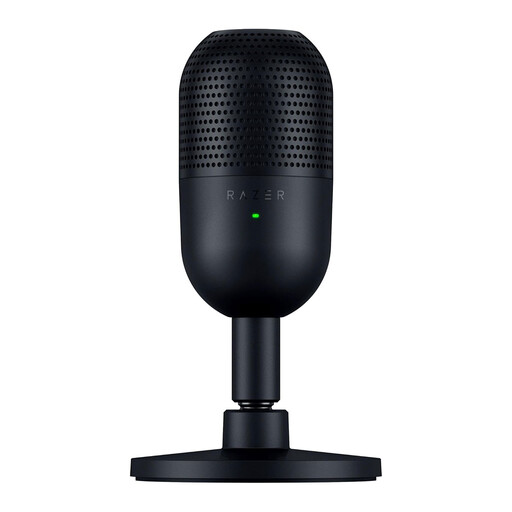
According to Razer, the Seiren V3 Mini is a compact USB condenser microphone with a supercardioid pickup pattern, mute button and tilting stand.
- The manufacturer lists a built-in shock absorber and the option to mount it on a boom arm.
- A more directional pattern doesn’t guarantee that all background noise or room echo will disappear. Check the result with a test recording.
Shure
According to Shure, the MV7+ is a dynamic microphone with USB-C and XLR connections. It may suit you if you use a USB setup and might want to try a different audio setup later.
- Shure lists headphone monitoring and adjustable processing.
- The standard version described includes a USB-C-to-USB-C cable, but no stand. Check the mounting options and connection for your computer.
Products at Joybuy
This selection includes USB microphones and a wireless USB-C lavalier microphone system for recording speech. Decide whether you need a microphone for a fixed desk setup or a portable system, and check that each model’s connection and setup are right for you.
 No image available
Moman M1CXT wireless lavalier microphone system, USB-C, 2TX+1RX, 150m Range
May suit you if you want to record speech with a lavalier microphone system and need a USB-C connection. Check that this setup is right for your recording space.
Wireless system with USB-C designation and 2TX+1RX. The product name lists a 150m range.
View at Joybuy
 No image available
USB condenser microphone
Could be an option if you’re looking for a USB condenser microphone for recording speech. Check the connections and included setup for your fixed recording spot.
The product name lists a USB condenser microphone.
View at Joybuy
 No image available
HyperX SoloCast 2 USB Gaming Microphone, Plug & Play, Cardioid, Black
May suit you if you’re looking for a USB microphone with a cardioid pickup pattern. Check that the included setup is suitable for keeping your speaking position consistent.
The product name lists USB, a cardioid pickup pattern and the colour Black.
View at Joybuy
 No image available
Razer Seiren V3 Mini - Black
May suit you if you speak from a fixed direction and want a compact USB microphone. Razer lists a supercardioid pickup pattern and a tilting stand, but these won’t automatically prevent room echo or eliminate all background noise.
The product name lists the Black version. The manufacturer describes this model as a compact USB microphone.
View at Joybuy
Frequently asked questions
How do you get started with a fixed recording position?
Set up the microphone securely, speak from the same marked spot each time and start with a short test recording. Adjust the distance or angle if you can hear echo, plosive sounds or inconsistent volume. The same distance won’t suit every model or room.
Do you need a pop filter for short word recordings?
A pop filter may help if you can hear bursts of air, for example with p sounds. Check whether one is included with the version you’ve chosen: according to RØDE, the NT-USB+ has a removable pop filter, while Audio-Technica doesn’t list one for the AT2020USB-X version described.
What if your USB microphone doesn’t work properly after purchase?
For consumer purchases in the Netherlands, the product must be of satisfactory quality, and the retailer is your point of contact if there’s a fault. The Dutch government says there is no fixed statutory guarantee period in the Netherlands. Online purchases from a business also usually come with a 14-day cooling-off period, although exceptions apply.
Can you publish someone else’s voice in your Dutch learning materials?
That depends on how the recording is used and the applicable legal basis under the GDPR. The Dutch Data Protection Authority lists consent as one possible legal basis and says that, in most cases, consent is needed to publish other people’s personal data online. Consider the recording and its intended publication separately.


