If you speak softly and can stay close to the microphone in a noisy room, compare a directional dynamic USB microphone with a headphone output. In a quiet room, a compact condenser microphone may also suit you. Make short test recordings at the same speaking distance and with the same settings: product specifications alone don’t prove which microphone is best for accurately recording Dutch vowel contrasts.
Who is this setup for?
A soft voice in a noisy room
You practise in one fixed spot and can position the microphone close to your mouth. Pay particular attention to its placement and polar pattern; Shure and RØDE describe their cited dynamic models as suitable for use close to the speaker.
Listening back to vowel sounds repeatedly
You record the same vowels several times and want to listen to the clips or view them in recording software. The Praat manual explains how to record and play back speech, and how to analyse vowel formants.
Simple practice at your computer
You want to make and play back short recordings without a complicated desk setup. Check that the connection, cable and playback method are compatible with your computer.
What should you consider when choosing?
Start by considering where you’ll speak and how far you’ll be from the microphone. Then check how you’ll listen back to your recording and whether the microphone is compatible with your computer.
Directional dynamic USB microphone
A good fit if: you speak softly, can stay close to the microphone and want to take sounds in the room into account.
Bear in mind: positioning yourself correctly is still important; check that the mount helps you achieve this.
USB condenser microphone for a quiet workspace
A good fit if: you practise in a quiet room and want a desk setup.
Bear in mind: desk and computer noise may be picked up in your recording. Check the system requirements for the Elgato Wave:3 MK.2 too.
| What to consider |
What should you check? |
Who should pay particular attention? |
| Soft voice and room noise |
Check the polar pattern and whether you can position the microphone securely and close to you. Test it where you’ll be speaking. |
If I speak softly in a room with background noise, I want to be able to position the microphone close to my mouth. Around 36% of consumers are most concerned about soft speech and room noise. |
| Comparing vowel recordings |
Keep the position and recording settings the same. Compare recordings with processing on and off rather than assuming it will make the vowels easier to distinguish. |
If I repeat vowel sounds, I want to assess the differences without recording conditions changing. Around 29% of consumers prioritise being able to compare similar vowel recordings. |
| Listening back |
Check whether the exact model has a headphone output and direct monitoring. Listen back to the saved recording too. |
If I want to check what I’m hearing during and after practice, being able to listen back is essential for me. Around 21% of consumers say this is their main need. |
| Connection and positioning |
Check your computer port, cable, system requirements and the stand included or required for the specific model. |
If I want to practise at my computer straight away, I need the connection and desk placement to suit my workspace. Around 14% of consumers are most concerned about having a simple computer setup. |
Which buying mistakes can you avoid?
-
Assuming noise reduction will automatically make vowels easier to compare
Processing can affect how speech sounds. A claim that a microphone delivers a clear voice doesn’t prove that it will record vowel contrasts more accurately.
Record the same practice sounds with processing on and off. Keep the distance and recording volume the same.
Allow time to make test recordings with different settings.
-
Confusing a desk stand with a suitable speaking position
A microphone placed too far away may pick up more sound from the room. A review of the RØDE NT-USB+ also mentions desk vibrations and computer noise in that particular setup.
First decide where the microphone needs to be for your soft speech. Then check that the supplied mount lets you position it there.
-
Assuming every USB microphone has direct monitoring
A USB connection alone doesn’t guarantee that the microphone has a headphone output or direct monitoring.
Check these features for the exact model, and play back the saved recording as well.
Which brands are worth considering?
Shure
Shure describes the MV7+ as a dynamic USB-C/XLR microphone for speaking close to the microphone.
- Shure lists automatic level adjustment and digital noise processing as features.
- These features don’t prove that Dutch vowel contrasts will be recorded more accurately. Check the mount too, and compare recordings with different processing settings.
RØDE
The PodMic USB is a dynamic USB/XLR microphone, while the NT-USB Mini is a more compact USB condenser microphone for desk use.
- RØDE lists a headphone output for both models. For the NT-USB Mini, RØDE specifies a USB-C to USB-A cable.
- Check which cable and mount you need for each version. The PodMic USB packaging list names only the microphone.
Elgato
The Wave:3 MK.2 is a USB condenser microphone with a headphone socket and adjustable software features.
- Elgato lists a desk stand and USB-C cable as included accessories.
- Elgato specifies Windows 11 or later, or macOS 14.2 or later, and a USB-C port as system requirements. The effects are adjustable features, not proof of better vowel practice.
Razer
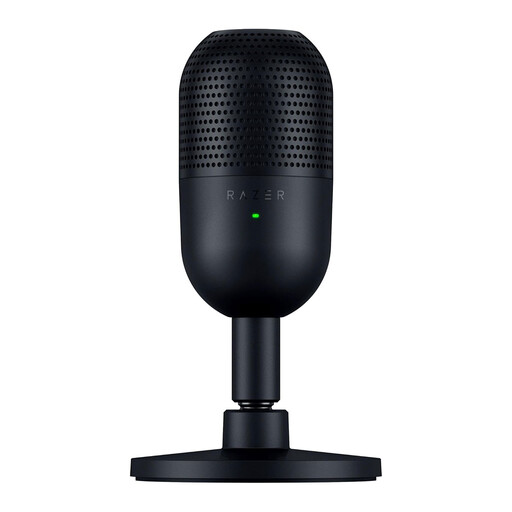
The Seiren V3 Mini is a compact USB condenser microphone for a desk setup.
- Razer lists a supercardioid polar pattern and tap-to-mute controls.
- Check how you can monitor audio directly with the exact model. Also make sure your computer setup lets you play back the saved recording.
Joybuy microphones for practice and playback
These Joybuy products are USB microphones for a fixed desk setup. Check how the connection, positioning and playback suit your practice routine for each model.
 No image available
USB condenser microphone with cardioid pattern and monitoring
May suit you if you’re looking for a USB condenser microphone for a fixed recording spot and want to monitor audio directly.
The product information lists a cardioid pattern, latency-free monitoring and a scissor-arm stand.
Joybuy
 No image available
HyperX SoloCast 2 USB microphone, cardioid, black
May suit you if you’re looking for a USB microphone for a desk setup. Check in advance how you plan to listen back to your recordings.
The product description lists a cardioid pattern, an adjustable stand, an integrated shock mount, a pop filter and a mute button.
Joybuy
 No image available
Razer Seiren V3 Mini USB microphone, black
May suit you if you’re looking for a compact USB microphone for a small desk setup.
The product information lists a supercardioid pattern and tap-to-mute controls. Check how to monitor audio directly with this version and play back the saved recording.
Joybuy
Frequently asked questions
Should I always choose a dynamic microphone for soft vowel sounds?
No. If you can speak close to the microphone and the room is noisy, a directional dynamic USB microphone may suit you. In a quiet room, you can also compare it with a condenser microphone. Make test recordings where you’ll be speaking; the available information doesn’t show that one type is best for Dutch vowel contrasts.
How can I check whether my vowels have been recorded well?
Record short clips and play back the saved recordings. When repeating them, keep the microphone position and settings the same. The Praat manual explains both how to record and play back speech and how to analyse vowel formants.
Which connections and accessories should I check before buying?
Compare the microphone connection with your computer’s port and check the box contents for a suitable cable and stand. RØDE specifies a USB-C to USB-A cable for the NT-USB Mini; Elgato lists a USB-C port as a system requirement for the Wave:3 MK.2. Also check whether your setup needs a separate pair of headphones or a mount.
What are my rights when buying online in the Netherlands?
According to the Dutch government, when you buy online from a business, you’re often entitled to a 14-day cooling-off period; check the terms that apply to your specific purchase. You’re also entitled to a product that meets reasonable expectations. In the Netherlands, there is no fixed statutory warranty period, and the retailer is your point of contact if something goes wrong.


