What should you look for?
First, choose a position where the microphone can sit close to your mouth and point towards your voice. Then check your available desk space, connection and dictation software requirements.
| Buying concern |
What should you check? |
Who is this important for? |
| Voice and booth noise |
Check the pickup pattern and whether you can point the microphone towards your mouth from where you sit. Make a test recording with your usual ventilation and desk noise. |
If I dictate in a small booth, I want to be able to point the microphone towards my voice without expecting background noise to disappear. Around 36% of consumers rank reducing booth noise as their main buying concern. |
| Positioning in a small workspace |
Compare the base with your available desk space, and check that the mount will fit if you’re using a boom arm. |
I want to position my microphone without it getting in the way of my study space. Around 29% of consumers prioritise limited desk space and positioning as their main buying concern. |
| Connection to dictation software |
Check the USB port and included cable, select the correct input microphone and test your chosen dictation feature in Dutch. |
I want to dictate my words straight into a text box, so I also need to set up my computer and software. Around 21% of consumers prioritise having a working microphone and dictation software setup. |
| Mute and recording controls |
Check whether the exact model has a mute button, status indicator or headphone output if you need those controls. |
When dictating longer notes, I want to be able to pause or listen back to the recording without confusing these features with better speech recognition. Around 14% of consumers rank easy access to controls as their main buying concern. |
Joybuy product picks
This selection of Joybuy products includes USB microphones and wireless lavalier microphones for recording speech. For each model, check that its connection and any wireless link work with your computer and dictation software.
 Image unavailable
HyperX SoloCast 2, black
May suit you if you want to position a compact USB microphone in front of you and value easy-to-reach mute controls; check that the base fits your workspace.
The product description lists cardioid pickup, an adjustable stand, boom arm mounting, shock mounting, a pop filter and mute controls with an LED indicator.
View product at Joybuy
 Image unavailable
Razer SEIRÉN V3 MINI Quartz
May suit you if you’re looking for a compact USB microphone for recording speech; test its positioning and connection with your own computer.
The product description lists a supercardioid pickup pattern and tap-to-mute.
View product at Joybuy
 Image unavailable
Verbex K9-Black
May suit you if you’d prefer a portable lavalier microphone to a desktop model. Before buying, check how the Type-C connection and wireless link work with your computer.
The product name lists a Type-C interface; the product description states a battery life of 3–6 hours.
View product at Joybuy
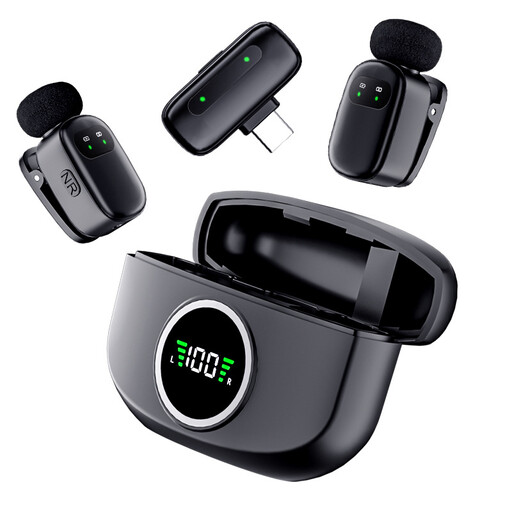 Image unavailable
Verbex K21, dual microphone set
This set may be useful if you need two wireless microphones; the second microphone may be unnecessary for solo dictation. Check that it connects to your computer and dictation software.
The product description lists two microphones and a magnetic charging case; the product name lists a Type-C interface.
View product at Joybuy
Frequently asked questions
Can I automatically create Dutch study notes with just a USB microphone?
No, you’ll also need speech-to-text software. According to Microsoft Support, Windows voice typing supports Dutch (Netherlands) and requires an internet connection, a working microphone and a text box. Microsoft 365 Dictate also requires a reliable internet connection. Test your chosen feature with your own subject-specific terms.
How do I set up the microphone after connecting it?
Select the connected microphone as the input device in Windows and make a short test recording. Microsoft Support also describes a recording test and an input volume setting; listen back to the result before dictating a long note.
What if the microphone I bought online isn’t suitable or develops a fault?
For online purchases from a business, consumers in the Netherlands generally have a 14-day cooling-off period, subject to applicable exceptions, according to the Dutch government. You’re also entitled to a product that meets statutory quality requirements. Contact the seller if there’s a problem; there is no single statutory guarantee period that applies to all products in the Netherlands.
Can I also record other people’s identifiable voices in the booth?
An identifiable voice may count as personal data. If you record other people, the privacy rules depend on the purpose and circumstances; the Dutch Data Protection Authority describes six possible legal bases for processing, including consent. Consider the situation before recording or using someone else’s voice.


