
Dictating in an echoey booth
You mainly speak on your own and want your voice to remain clear despite reflections and ventilation noise. A speaking distance you can maintain comfortably is an important factor when choosing a microphone.


For voice notes in a small booth, a microphone you can position close to your mouth is a sensible starting point; a directional pickup pattern alone won’t eliminate echo. Then choose between a fixed microphone, a compact desk setup or handheld controls, and check that it works with your computer and dictation software.
You mainly speak on your own and want your voice to remain clear despite reflections and ventilation noise. A speaking distance you can maintain comfortably is an important factor when choosing a microphone.
You want to make voice notes without holding the microphone. So consider the stand, the space available and how it connects to your computer.
You often pause, resume or navigate while dictating. Check that the microphone’s controls work with your dictation software.
A good fit if: you’re dealing with reflections or ventilation noise and can position the microphone close to your mouth.
Bear in mind: you’ll need to be comfortable maintaining the speaking distance and using the mount; a dynamic capsule won’t make the booth quiet or eliminate echo.
A good fit if: desk space is limited and you can use a test recording to decide whether the booth noise is acceptable.
Bear in mind: a directional pattern won’t remove reflections; check how it sounds in your own setup.
A good fit if: recording and navigation buttons matter more to you than having a fixed microphone on your desk.
Bear in mind: check whether your software supports the buttons, and position the microphone correctly while speaking.
| Buying concern | What to look for | Who is this important for? |
|---|---|---|
| Clear speech in the booth | Consider the pickup pattern and microphone placement together. Shure explains that speaking close to the microphone can make your voice louder relative to noise and reflections; also check that the stand or mount allows you to position it that way. | If I’m dictating in an echoey booth, I want my voice to remain clear despite reflections or ventilation noise. Around 36% of consumers prioritise clear speech over booth noise. |
| Connection and speech-to-text | Check the connection, microphone access and input language on your computer and in your app. For Microsoft Voice Typing, Microsoft Support lists an internet connection, a working microphone and a cursor in a text box among the requirements. | I want to turn voice notes into text straight away, and I want to know in advance whether my computer and dictation app work with the microphone. Around 29% of consumers put a working connection and speech-to-text at the top of their buying concerns. |
| Positioning on a small desk | Check the space needed for the stand, your preferred speaking distance and the cable. Audio-Technica lists a table stand for the ATR2100x-USB; Razer describes a tilting stand for the Seiren V3 Mini. | With limited desk space, I want to be able to position the microphone without it getting in the way of my workspace. Around 21% of consumers prioritise fitting a microphone on a small work surface. |
| Controls while dictating | Check whether your dictation app supports the buttons you want to use. Philips documents control buttons for the SpeechMike Premium Touch; if you want to monitor the recording, also check whether the microphone has a headphone output. | If I often pause, resume or check my recording, I want the controls within easy reach while dictating. Around 14% of consumers put those controls first. |
Reflections come from the room itself. Shure emphasises that the distance from the microphone affects the balance between your voice and unwanted noise.
First, consider the microphone’s position and make a test recording in the booth. Only then compare additional recording features.
A microphone records sound, but it won’t convert speech into text on its own. For Microsoft Voice Typing, Microsoft Support lists a working microphone, an internet connection and a text box among the requirements.
Test your chosen app and input language with a microphone you already have before deciding you need extra microphone features.
RØDE says that the NT-USB has been discontinued and points to the NT-USB+ as its newer version. The model names don’t refer to identical products.
Check the full model name, connection and included accessories for each listing.
The ATR2100x-USB is an example of a dynamic cardioid microphone with USB and XLR connections, designed for a fixed speaking position.
According to RØDE, the PodMic USB offers dynamic USB and XLR recording with headphone monitoring; the NT-USB+ is a separate condenser option.
The MV7+ is a dynamic USB microphone for close-up speech, with adjustable processing.
The SpeechMike Premium Touch series is designed for dictation with handheld controls.
The Seiren V3 Mini is a compact USB condenser microphone for a small desk space.
This selection includes USB microphones for desk use and portable microphones with a Type-C connection. For each model, check that the connection and controls work with your computer and dictation app.
 No image available
A desk setup to consider if you want a fixed position and the stated USB connection is compatible with your computer.
Cardioid pickup pattern; USB-C to USB-A cable; mute button, pop filter and integrated shock mount.
 No image available
A compact desk option if space is limited and muting via the microphone suits the way you work.
Supercardioid pickup pattern, USB connection and tap-to-mute controls.
 No image available
A portable, clothing-mounted microphone is a different setup from a fixed desk microphone; check that this style suits the way you dictate.
Wireless mini microphone with a Type-C interface. Check that the connection works with your intended device and dictation app.
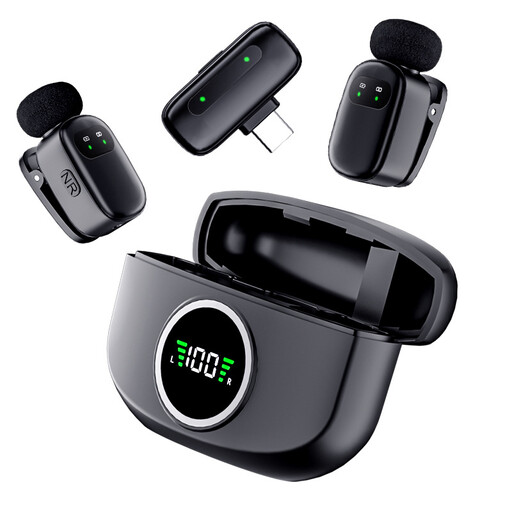 No image available
This portable setup is designed to be worn on your clothing, so it’s different from a microphone on a fixed desk position.
The product name specifies two microphones and a Type-C interface. Check that the connection works with your computer and dictation app before choosing.
Yes, you’ll also need a suitable speech-to-text feature. For Microsoft Voice Typing, Microsoft Support lists a working microphone, an internet connection and a cursor in a text box as requirements; also check the input language and microphone access. These requirements apply to that Microsoft feature and not automatically to every dictation app.
Start with a short speaking distance you can maintain while writing, and make a test recording with the ventilation on. Shure explains that positioning the microphone close can make your voice louder relative to noise and reflections, so don’t rely on the pickup pattern alone.
First, check that the USB microphone is connected and selected as the input device, that the app has microphone access and that your preferred language is available. Microsoft Support lists these checks for Voice Typing in Windows.
For eligible online consumer purchases from a business, the Dutch government generally provides a 14-day cooling-off period; check the terms and exceptions for the specific purchase. You also have statutory rights if a product is faulty. The Dutch government states that there is no fixed statutory guarantee period covering all products in the Netherlands.
Don’t assume that having a microphone automatically gives you permission to record other people. If you record other people’s voices or conversations, the assessment depends on the purpose and context; according to the Dutch Data Protection Authority, an organisation processing personal data needs a lawful basis under the GDPR.