
Creator recording in a noisy room
You record an explanation while a housemate may be in the room. Positioning a microphone close to your mouth and making a test recording will help you assess what it picks up in your space.


Prioritise clear speech: position a directional microphone close to your mouth and test it with the usual sounds in your bedroom. A dynamic USB microphone may suit you if you can speak close to it. Placement, controller clicks and your chosen stand or mount still matter, as noise processing is no guarantee that a housemate will disappear from the recording.
You record an explanation while a housemate may be in the room. Positioning a microphone close to your mouth and making a test recording will help you assess what it picks up in your space.
You use the controller while speaking and want to avoid movements on the same desk affecting your recording. Consider the microphone’s position and any shock isolation, and test it with your own controller.
You want to get started without a complicated audio setup and check during a test recording that your voice is coming through clearly. Check the connection and whether the microphone has a headphone output or monitoring.
Start by considering the microphone’s position in relation to your mouth and controller. Then compare how you want to monitor your recording and whether the connection and mount will suit your desk.
| What to consider | What should you check? | Who is this important for? |
|---|---|---|
| Voice alongside room noise | Check the pickup pattern and whether you can speak close to the microphone; make a test recording with the usual sounds in the room. | If I’m recording an explanation while a housemate may be present, I want my voice to be clear without expecting other voices to disappear. Around 36% of consumers say reducing room noise is their top priority. |
| Controller clicks and vibrations | Check the included stand or shock mount, and whether you can position the microphone away from where you use the controller. | When I use the controller while speaking, I want to check whether clicks and contact with the desk can be heard in my recording. Around 29% of consumers prioritise reducing controller noise. |
| Monitoring your voice while recording | Check whether there’s a headphone output and, if you want to hear both signals, a control for microphone and computer audio. | If I want to hear whether my explanation is coming through clearly while recording, I want to be able to monitor the microphone directly. Around 21% of consumers make direct recording monitoring their top priority. |
| Connection and desk space | Compare the connection on your recording device with the included cable, and check that the stand will fit without getting in the way of your hands or camera view. | If I want to get started quickly and have limited desk space, I want to know whether the microphone will fit without interfering with how I use the controller. For around 14% of consumers, ease of connection and positioning is the most important priority. |
A microphone picks up sound in a real room; distance and direction both affect how your voice and room noise come through in the recording. Digital voice isolation is a model-specific feature, not a guarantee for your bedroom.
Before relying on digital processing, test the microphone close to your mouth with the usual sounds in the room.
If the microphone and controller are on the same desk, movement and contact noise can affect your recording. An included stand on its own doesn’t tell you how your controller clicks will sound.
Check what comes with the model and make a test clip while pressing buttons and putting the controller down.
A boom arm or shock mount may be an extra purchase. Check what’s included with your chosen model and which mount will suit your desk.
Connections and cables can vary between microphones and recording devices, so choosing a suitable microphone doesn’t mean it will automatically work with every port.
Before buying, compare your device’s port with the cable supplied with the specific model, then select the microphone as the audio input in your recording settings.
Depending on the connection, you may need a suitable cable or adapter.
Samson describes the Q2U as a dynamic USB microphone for speech, including in untreated rooms.
The PodMic USB is a dynamic USB/XLR microphone; the NT-USB Mini is a compact USB condenser microphone.
Shure describes the MV7+ as a dynamic USB microphone for close-up speech, with adjustable digital processing.
The AT2020USB-X is a cardioid USB condenser microphone with a headphone output and mix control.
The QuadCast 2 S is designed for a desk setup and comes with a stand and shock mount.
These Joybuy products include USB microphones for a compact desk setup and wireless lavalier microphones to compare for explaining things while using a controller.
 No image available
A USB microphone to compare for a compact desk setup; test the recording while using your controller.
The product name specifies a cardioid pickup pattern and the colour Black.
 No image available
The compact design may suit a small desk; use a test recording to assess how the microphone sounds alongside room noise and controller clicks.
The product name specifies USB, an ultra-compact design and tap-to-mute controls.
 No image available
A wireless lavalier microphone to compare if you hold the controller while speaking; check that the connection is compatible with your recording device.
The product name specifies a Type-C interface.
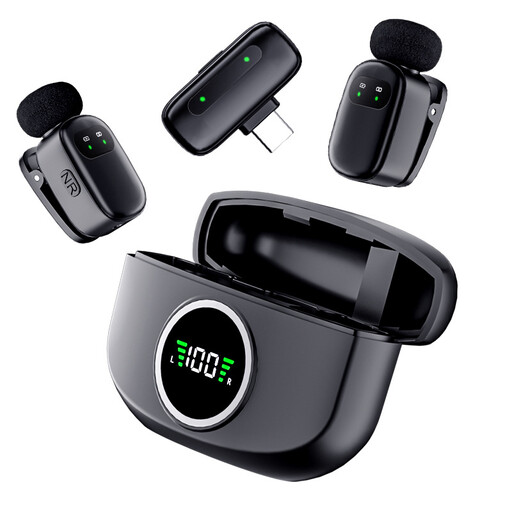 No image available
A wireless lavalier microphone to compare for explanations while holding the controller; check the connection to your recording device in advance.
The product name specifies dual microphones and a Type-C interface.
For spoken explanations, point the microphone towards your mouth and try different distances. Shure’s technical guide recommends adjusting the position and distance to achieve the balance you want between your voice and room noise. Also make a short recording while using the controller as you normally would.
No. Check the connection, cable and device specifications for each model. For example, RØDE says the NT-USB Mini comes with a USB-C to USB-A cable and recommends a USB-C to USB-C cable for a device with a USB-C input. Then select the microphone as the audio input in your settings.
Check whether you need a suitable cable, boom arm or shock mount. Audio-Technica, for example, lists an optional shock mount for the AT2020USB-X. Check what’s included with the specific model and which mount will suit your desk.
Don’t assume you can do this without permission. According to the Dutch Data Protection Authority, recognisable people in images count as personal data; the exception for purely personal or household use doesn’t apply when you share footage publicly or with a wider audience. Whether you can publish it in your situation depends, among other things, on how it will be used and the applicable legal basis under the GDPR. Keep your housemate out of shot or get this sorted before publishing; choosing a microphone doesn’t give you permission to film someone.