What should you look for when buying?
When choosing a microphone for a spoken diary in a shared space, start by considering how close it will be to your mouth and whether you’ll be moving while you dictate.
USB headset with boom microphone
A good fit if: you move around or don’t want to keep pointing a microphone on the table towards you. For the Jabra Evolve 20, check the exact connection and whether it’s the mono or stereo version.
Keep in mind: a headset doesn’t replace dictation software, and it can’t guarantee that other people’s conversations won’t be recorded.
Directional USB handheld microphone
A good fit if: you sit in one spot and can hold the microphone close to your mouth. The ATR2100x-USB and Q2U are handheld microphones with USB.
Keep in mind: Audio-Technica Europe explains that the cardioid pattern reduces sound from the sides and rear, but that doesn’t mean all background noise will disappear.
USB microphone on a stand
A good fit if: you have a fixed spot for speaking and can position the microphone close to you. RØDE recommends placing the PodMic USB about 5–10 cm away.
Keep in mind: Shure says the MV7+ denoiser can tackle continuous noise, but won’t remove background voices.
Handheld USB dictation microphone
A good fit if: having physical controls on the microphone matters to you. Philips makes the SpeechMike Premium Touch SMP3700/3800 for dictation.
Keep in mind: Philips says that using dictation software other than SpeechExec may require additional software.
| What to consider |
What to look for |
Who is this most important for? |
| Clarity |
Check how close you can position the microphone, the direction of its pickup pattern and whether you can play back the recording. |
If you’re recording among conversations or echoes, you’ll want to hear whether your voice is clear from your seat. Around 36% of consumers prioritise clarity in a noisy room. |
| Moving and setting up |
Compare a headset that moves with you against a handheld microphone or the included stand and cables. |
If you change seats, you’ll want to be able to use the microphone again quickly without having to reposition it each time. Around 29% of consumers give portability top priority. |
| Connecting and dictating |
Check whether it uses USB-A or USB-C, your device’s input settings and whether your dictation feature supports Dutch. |
If you want to save your diary as text straight away, you’ll need to know what software and connection are required. Around 21% of consumers prioritise their dictation workflow. |
| Privacy |
Check how your chosen software processes speech, what area the microphone picks up and which rules apply at the venue. |
If you’re recording personal content, you’ll want to be able to judge where your voice is going and avoid picking up other people’s voices as much as possible. Around 14% of consumers prioritise privacy. |
USB microphones and headsets at Joybuy
This selection includes USB headsets for a set-up that moves with you, plus a standalone USB microphone for a fixed speaking spot. Choose based on how you want to wear or position it, and check the connection and dictation software. Neither option on its own can guarantee that other people’s voices will stay out of the recording.
 No image available
Logitech USB Headset H540 Wired
A wired USB headset for anyone who wants a wearable headset set-up while recording.
Joybuy
 No image available
Jabra Evolve2 75 USB-A MS Teams Black
A headset for anyone looking for a portable microphone set-up; check that the USB-A and MS Teams version listed is compatible with your device and dictation workflow.
Joybuy
 No image available
Logitech PC 960 USB Wired Headset
A wired USB headset for anyone who wants to wear a headset while recording; check that the connection is compatible with your device.
Joybuy
 No image available
Logitech H340 USB Headset Black Wired
A wired USB headset for anyone who wants to keep the microphone close while recording; check the connection and compatibility with your chosen software.
Joybuy
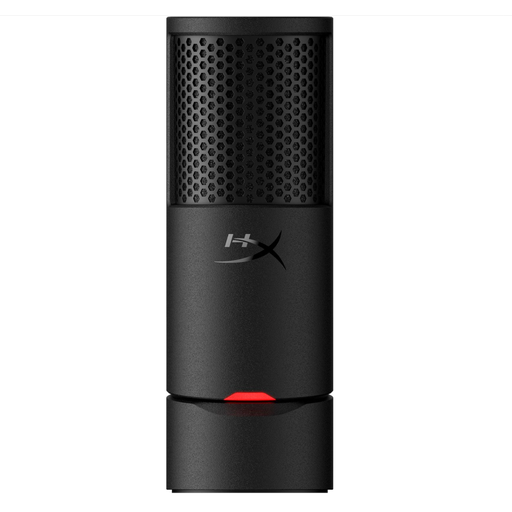 No image available
HyperX SoloCast 2 USB Gaming Microphone Black
A standalone USB microphone to consider for a fixed speaking spot; check the connection and whether you can position it close enough to your mouth.
Joybuy
Frequently asked questions
Will a USB microphone automatically turn my diary into Dutch text?
No. The microphone provides audio; you’ll also need a recording or dictation programme to create text. Microsoft says that Windows Voice Typing supports Dutch (Netherlands) through online speech recognition.
How do I check that the right microphone is recording after I connect it?
In Windows, select the microphone under sound input, start a test, speak normally and play back the sample. Microsoft Support explains how to test a microphone in Windows. Then make a test recording in the place where you plan to record your diary.
Will the Philips SpeechMike work with any dictation app without extra installation?
Not necessarily. Philips says that using dictation software other than SpeechExec may require additional software, such as SpeechControl. Check that it works with the software you want to use.
Can I record other people at a community centre without asking them?
There isn’t a simple yes or no that applies to every situation. The Dutch Data Protection Authority considers identifiable audio recordings to be personal data. Check the community centre’s rules and, where possible, avoid recording other people’s conversations.
What cooling-off period usually applies to an online purchase in the Netherlands?
According to ACM ConsuWijzer, online consumer purchases generally come with a statutory 14-day cooling-off period after delivery; check whether any exceptions apply to your purchase. The cooling-off period is separate from your statutory guarantee rights if a product is faulty.


