
Presenters with housemates who talk
You want your audience to hear your research summary clearly. Check the microphone position and mute control, and make a test recording with speech in the background.


If your housemates are talking, start by choosing a wired USB headset with a well-positioned microphone and an easy-to-reach mute button, so you can control your voice during your presentation. If background noise is what distracts you most, also look for passive isolation or active noise cancellation for the listener. Check the USB connection too, and test the microphone in your meeting app.
You want your audience to hear your research summary clearly. Check the microphone position and mute control, and make a test recording with speech in the background.
You want to follow questions and comments even when there’s noise around you. Compare the passive isolation provided by ear cushions with active noise cancellation for your own ears.
You want to get started without connection problems. Check whether the headset uses USB-A or USB-C, and which input and output are selected in your meeting app.
First, work out whether background speech is more of a problem for your audience or whether you want to listen in greater comfort. Then check the connection and test the headset with the app you’ll use for your presentation.
| What to consider | What to look for | Who it matters most to |
|---|---|---|
| Clear speech | Check the microphone position and mute control; make a test recording with speech in the background. | If you want your audience to hear you clearly despite your housemates talking, the microphone should be your priority. Around 33% of consumers say speech clarity is their top buying priority. |
| Listening in peace | Compare the passive isolation provided by ear cushions with active noise cancellation for the listener. | If noise in your shared space distracts you while you’re listening to questions, focus on what you can hear. Around 27% of consumers put listening comfort at the top of their list. |
| Connection and app | Check whether you need USB-A or USB-C, whether an adapter is required, and which microphone and speaker are selected in the app. | If you want to get started without connection problems, check your computer’s port and your meeting app’s audio settings. Around 20% of consumers prioritise a hassle-free connection. |
| Wearing comfort | Check whether it’s mono or stereo, as well as the adjustability and fit; the stated weight won’t tell you how comfortable a headset will feel. | If you’ll wear the headset during your preparation and Q&A session too, a good fit is most important. Around 13% of consumers rank wearing comfort above other buying priorities. |
| Purchase and aftercare | Don’t automatically pay for features you won’t use; check your rights if the product is faulty too. | If you’re buying a headset mainly for occasional presentations, weigh up its features and aftercare. Around 7% of consumers put value for money and aftercare first. |
A clearer microphone signal and a quieter listening experience are two different things: one affects what your conversation partners hear, while the other affects what you hear.
First, work out whether the noise is more of a problem for your audience or for you. Don’t pay extra for a feature that doesn’t address the problem.
USB-A, USB-C, mono, stereo, UC and Teams versions may differ from one another.
Before ordering, check the full version name and the included connection against your computer and meeting app.
Your meeting app may still have a different microphone or speaker selected.
Select the intended input and output, then test both with realistic background noise. Microsoft Support explains how to select and test audio devices in Teams; Zoom Support also offers a microphone and speaker test.
Logitech’s wired H390 is a computer headset designed for use at a desk, and is available with USB-A or USB-C.
The wired Evolve2 30 SE is available in several versions, including mono or stereo and USB-A or USB-C.
Poly offers wired Blackwire headsets. The Blackwire 8225 is aimed at users who also want active noise cancellation for the listener.
The wired IMPACT 100 series includes stereo versions with USB-C and a USB-A adapter.
The wired VoIP Headset 5000 is a USB-C headset designed for use with Teams; Lenovo says it comes with a USB-A converter.
This selection includes wired USB headsets and wired USB earbuds for calls and presentations. The models differ in their microphone controls, connections and how they deal with background noise.
 No image available
These wired earbuds may suit you if you’re looking for a USB-C connection and call controls, and want to hear less background noise yourself.
The product information mentions an in-line microphone and QuietControl noise cancellation for the listener. These are earbuds, not an over-ear headset.
 No image available
This wired headset may suit you if you want microphone controls during calls and would like to be less distracted by background noise.
The product information mentions two microphones, a mute control and memory foam ear cushions with passive sound isolation. This version has USB-A; according to the product information, you’ll need a compatible adapter for a USB-C port.
 No image available
This USB headset may suit you if you present from a computer and want an adjustable microphone boom with a mute control.
The product information mentions a noise-cancelling microphone, a mute indicator and an in-line mute control.
 No image available
This wired USB headset may suit you for computer calls if you want an adjustable microphone and a simple USB connection.
The product information mentions an adjustable noise-cancelling microphone and an adjustable headband.
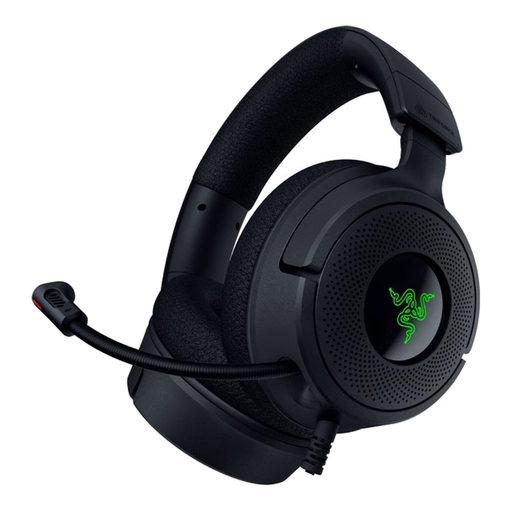 No image available
This wired headset may suit you if you want an adjustable microphone and an easy-to-reach mute control for computer calls.
The product information mentions USB-C and USB-A connections, a fold-away cardioid microphone and a mute control on the earcup.
It depends on the feature: microphone noise reduction affects what your conversation partners hear, while sound-isolating ear cushions and active noise cancellation affect what you hear. HP lists these features separately for the Poly Blackwire 8225.
Select the intended microphone and speaker in your meeting app, and test both before you start. In Teams, you can select and test your audio devices; Zoom also offers a microphone and speaker test. Try it with background noise similar to what you’ll encounter during your presentation.
For online consumer purchases in the Netherlands, you generally have a cooling-off period of up to 14 days after delivery, according to ACM ConsuWijzer. Some products are exempt, so check the product and returns terms before assuming you can cancel your purchase.
No. According to ACM ConsuWijzer, your legal guarantee depends on what you could reasonably expect from the product with normal use. If a product is faulty, the seller is responsible for providing an appropriate solution; a commercial warranty period doesn’t replace your legal rights.