Who are these audio setups suitable for?

Individual online participant

If you’re listening through your own computer and want to be able to ask questions, a personal USB headset with easy-to-reach controls is an obvious choice. Microsoft Teams lets you select the speaker and microphone you’re using separately.

Participants gathered around one computer

If several people at the same table need to talk to online participants, compare a tabletop speakerphone with a headset designed for one wearer. The speakerphone’s position and distance from participants are important to your setup.

Participant sitting with others

If you want to follow the online lecture while still being able to hear someone next to you, a mono headset can leave one ear free. You’ll also hear more of the surrounding noise.

What should you look for in a USB headset for a group lecture?

Personal stereo headset

A good fit when: you’re joining from a computer on your own and want to focus on the online audio.

Keep in mind: two earcups are less convenient if you also want to follow a conversation nearby; the microphone is designed for the wearer.

Personal mono headset

A good fit when: you’re speaking online yourself but also want to stay in touch with people in the room.

Keep in mind: with one ear free, you’ll hear more background noise too; mono doesn’t make the microphone suitable for multiple speakers.

Tabletop speakerphone

A good fit when: several people using the same computer want to take turns speaking and hear the online participants.

Keep in mind: shared audio offers less privacy than listening through a headset. For the Jabra Speak2 40, Jabra recommends a distance of 0.5 to 2.3 m from each participant; this recommendation applies to this model.

Consideration What to check when buying Who is this important for?
Being clearly heard when you speak Check the microphone position, mute controls and microphone test in your meeting app. If I want to ask questions myself, online participants need to hear me clearly. Around 33% of consumers say being clearly heard when taking part is their top buying priority.
Several speakers using one computer Check the range of the specific device and test the setup from every seat. If several people at the same table are speaking, the audio setup needs to work for them. Around 27% of consumers say multiple local speakers are their top buying priority.
Staying in touch with people in the room Check whether the model is described as mono; don’t assume this from the product range name alone. If I want to be able to hear someone next to me during the lecture, a headset with one earcup can leave room for that. Around 20% of consumers say staying in touch with people in the room is their top buying priority.
Connection and controls Check whether the exact model has USB-A or USB-C, whether any adapters are included, and which speaker and microphone are selected in the app. If I want to connect quickly and set up the audio correctly straight away, the plug and meeting app need to work with my computer. Around 20% of consumers say connection and controls are their top buying priority.

Common buying mistakes

  • Confusing noise cancellation with a microphone for the whole table

    A personal headset is designed to pick up the wearer’s voice. A microphone described as noise-cancelling doesn’t mean it will pick up several people around one table clearly.

    First, work out how many people will be speaking from the same computer, then test the setup you have in mind.

  • Treating USB-A, USB-C and an adapter as interchangeable

    Connections and included adapters vary by model and version. If the plug doesn’t fit your computer, you won’t be able to use the headset straight away without a suitable connection.

    Compare your computer’s ports with the exact model and check what’s included. You may need a suitable adapter or a different version.

  • Assuming the meeting app will automatically use the right audio devices

    Microsoft Teams and Zoom let you select the speaker and microphone. Even when the right USB headset is connected, the app may be using a different audio input or output.

    Select both audio devices and run the available test before the meeting; also check that the microphone isn’t muted.

  • Assuming the manufacturer’s warranty replaces your full statutory rights

    A manufacturer’s warranty doesn’t replace your statutory rights if a product is faulty. ACM ConsuWijzer points out that the seller must put right a product that breaks too soon under normal use, free of charge.

    Read any additional warranty terms and contact the seller if the product is faulty.

Relevant brands for personal headsets and tabletop audio

Logitech

The H390 is a personal USB headset; Zone Wired is a separate range that Logitech positions for busier work environments.

  • For the USB-A version of the H390, Logitech lists an adjustable microphone, in-line controls and a 1.9 m cable.
  • The noise cancellation Logitech describes for Zone Wired doesn’t indicate whether several people at one table will be picked up clearly by the headset.

Trust

Ayda USB is a personal headset for online calls; Ayda Max USB has a separate over-ear design.

  • For the Ayda USB, Trust lists on-ear controls, muting by lifting the microphone, a 1.8 m cable and an included USB-C-to-A adapter.
  • Trust’s description of the fit isn’t an independent comfort test. Check the exact version and whether it feels comfortable for you.

HP Poly

The Blackwire 3310 is a mono version; the Blackwire 3320 8X220AA is a stereo version with a USB-C cable and a connected USB-A adapter.

  • HP lists microphone and volume controls for the 3320 8X220AA.
  • Check whether the exact version is available from the seller; its status with one retailer doesn’t tell you about other sellers.

Jabra

The Evolve2 40 SE is a personal headset range; the Speak2 40 is a different product type for shared audio around a table.

  • Jabra describes the Evolve2 40 SE as having passive noise isolation and lists a separate Teams version.
  • The 0.5 to 2.3 m positioning recommendation applies to the Speak2 40, not automatically to other models or larger rooms.

EPOS

The PC 8 USB is a personal stereo headset for computer calls.

  • EPOS lists a USB connection, a directional microphone, and in-line volume and mute controls.
  • EPOS’s description of noise cancellation doesn’t show that the headset can pick up several people speaking locally.

Joybuy products for this use case

These products include personal wired headsets for individual participation and a speakerphone for calls with several people around one computer.

Logitech PC 960 USB Wired Headset

Logitech PC 960 USB Wired Headset

A personal wired USB headset for joining from a computer on your own; the microphone is designed for the wearer, not for several people speaking around a table.

View at Joybuy

Logitech H340 USB Headset, Black, Wired

Logitech H340 USB Headset, Black, Wired

A wired USB headset for individual online participation; check that the connection and audio settings work with your computer and meeting app.

View at Joybuy

Jabra SPEAK 510 MS Conference Room Loudspeaker, Bluetooth, USB-A

Jabra SPEAK 510 MS Conference Room Loudspeaker, Bluetooth, USB-A

A speakerphone is the type of product to consider when several people are speaking from one computer; test the positioning and audio from the seats in the room.

View at Joybuy

Trust Ayda USB-A Wired Headset

Trust Ayda USB-A Wired Headset

A personal wired USB-A headset for online calls; check that your computer has a suitable USB-A port.

View at Joybuy
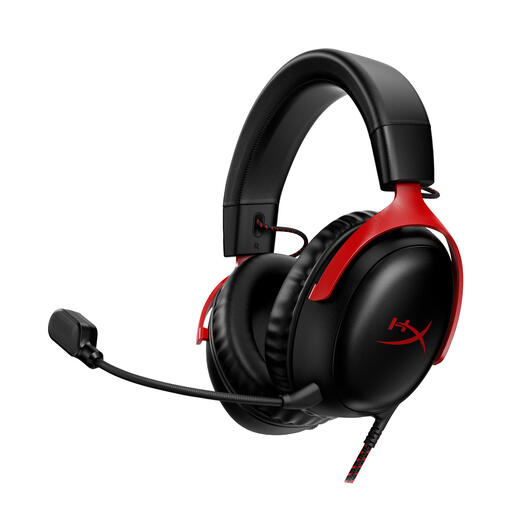
HyperX Cloud III Gaming Headset, PC, PS5, Xbox Series X|S, Black/Red

HyperX Cloud III Gaming Headset, PC, PS5, Xbox Series X|S, Black/Red

You could consider this wired headset for individual participation; before buying, check that the connection on the exact version works with your computer and meeting app.

View at Joybuy

Frequently asked questions

How can you check that your headset works before the lecture?

In Teams or Zoom, select the speaker and microphone you want to use separately, then run the available audio test. Simply plugging in the USB connector doesn’t confirm that the meeting app is using both audio devices.

Can one headset let everyone around the table join in?

Don’t count on it: a personal microphone is designed for the wearer. If several people are speaking from one computer, consider a tabletop speakerphone and test the setup from every seat. For the Jabra Speak2 40, the manufacturer gives model-specific positioning advice: 0.5 to 2.3 m from each participant.

What should you do if the headset breaks too soon under normal use?

Contact the seller. According to ACM ConsuWijzer, the seller must put right a product that breaks too soon under normal use, free of charge; depending on the circumstances, this could mean a repair, replacement or refund. A manufacturer’s warranty doesn’t replace this statutory right.

Can you simply record the lecture with the other participants?

It depends on the circumstances; the available guidance does not give general permission or impose a general ban on every recording. If an organisation processes personal data, the Dutch Data Protection Authority says a GDPR lawful basis is required and people must be informed. Ask the organiser about the arrangements and privacy conditions before recording.
