What should you look for?
First, decide whether speaking, listening, wearing the headset for long periods or connecting it is your main concern. The percentages below show which of these factors is the top priority for consumers in this workshop context.
| What to consider |
What to look for when buying |
Who is this important for? |
| Speaking clearly |
Check the boom microphone and microphone noise cancellation on the exact model. Logitech recommends positioning the boom at mouth level. |
If I read aloud or give feedback often during the workshop, I want my colleagues to be able to follow what I’m saying. Around 36% of consumers put speaking clearly first. |
| Hearing the workshop |
Compare the passive seal with ANC on the exact model. Also check whether any transparency mode suits the way you use the headset. |
When I need to follow instructions in a noisy office, I want to hear contributions clearly. Around 29% of consumers prioritise being able to hear the workshop. |
| Comfort during long sessions |
Check the adjustability and ear cushions. If possible, try the headset on to see how it feels. |
During a long session, I don’t want the fit to distract me. Comfort is the top priority for around 21% of consumers. |
| Connection and controls |
Check that the USB connection works with your computer and that your workshop app supports the button functions you need. Microsoft describes Teams features for compatible peripherals. |
I want to connect the headset to my work computer and use the mute control in my workshop app. Connection and controls are the top priority for around 14% of consumers. |
Joybuy products
The Joybuy products below are wired headsets for taking part by speaking. For each model, check the connection, microphone features and controls for your workshop app.
 Image unavailable
Logitech PC 960 USB Wired Headsets
An option if you’re looking for a wired USB headset for taking part in the workshop. Check that the connection works with your computer.
The product name specifies a wired USB headset.
View product at Joybuy
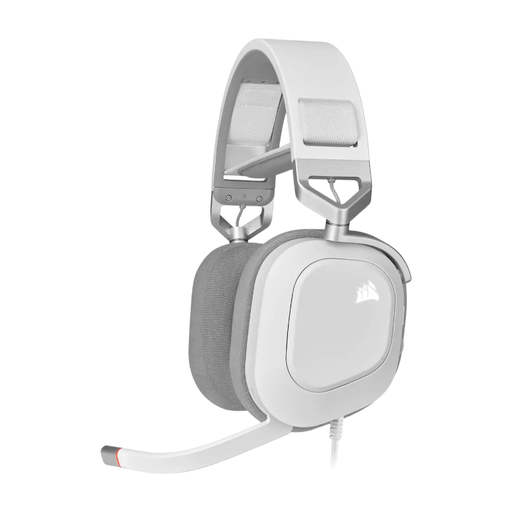 Image unavailable
CORSAIR HS80 RGB USB Wired Gaming Headset, White, Dolby Audio 7.1 Surround Sound
A wired USB headset to consider if you’re looking for a headset with a microphone. Check that this version and its features suit the way you’ll use it for your workshop.
The product name specifies USB, the colour white and Dolby Audio 7.1 Surround Sound.
View product at Joybuy
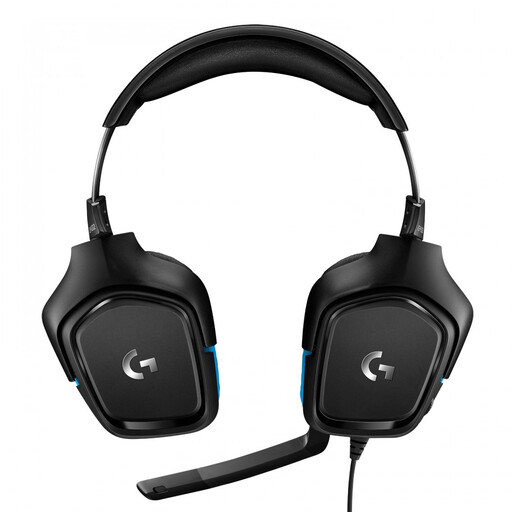 Image unavailable
Logitech G G432 7.1 Surround Sound Wired Gaming Headset
A wired headset to consider as part of your options. Check the connection on the exact version before you order.
The product name specifies a wired gaming headset with 7.1 Surround Sound.
View product at Joybuy
 Image unavailable
Kingston USB Hi-Fi headphones with microphone
An option if you’re looking for wired USB headphones with a microphone for speaking during the workshop.
The product name specifies USB, Hi-Fi and a microphone.
View product at Joybuy
 Image unavailable
Trust Ayda wired headset, USB Type-A
An option if your computer has a compatible USB Type-A port. Check the microphone features and controls for your workshop app.
The product name specifies a wired headset with USB Type-A.
View product at Joybuy
Frequently asked questions
For a workshop, should I prioritise ANC or a noise-cancelling microphone?
If other people find it hard to hear you, start by checking the microphone and boom position. If you find it hard to hear contributions, compare the ear-cushion seal and any ANC for the listener. These are different features.
How do I connect a USB headset, and what should I check before the workshop?
Check that the USB-A or USB-C connection on your version works with your computer. Select the headset as your speaker and microphone on your computer and in the workshop app, then test the volume and mute function. Microsoft describes specific Teams features for compatible peripherals.
What can I do if the fit or microphone recording isn’t right?
Adjust the headband and boom, then make a test recording in your own working environment. When you buy online from a business, you’re usually entitled to a 14-day cooling-off period under the law, according to the Dutch government; exceptions may apply.
What warranty applies to a headset bought in the Netherlands?
When you buy as a consumer, you’re entitled to a product that works as it should. According to the Dutch government, there’s no fixed statutory warranty period in the Netherlands for all products. If a product is faulty, contact the seller to arrange a solution. An additional warranty doesn’t replace your statutory rights.


