
A mentor or participant who does a lot of talking
You want to be clearly heard during a confidential one-to-one conversation and be able to mute quickly. Logitech lists an adjustable microphone boom and in-line controls for the H390.


Choose a wired USB headset with a connection that matches your computer, then check that your calling app has selected its microphone and speakers before the call. If you do a lot of talking, an adjustable microphone boom and easy-to-reach mute controls are useful. For longer calls, comfort and the choice between mono and stereo also matter. A headset won’t change the backlighting in your camera image: adjust your position or the lighting instead.
You want to be clearly heard during a confidential one-to-one conversation and be able to mute quickly. Logitech lists an adjustable microphone boom and in-line controls for the H390.
You want to get started without connection issues, so check the USB type and which microphone and speakers are selected. Microsoft Support explains how to choose audio devices in Teams.
You weigh comfort and the choice between mono and stereo against the option of keeping one ear free. The available wearing style varies by model and version.
First, check the connection and test the audio. Then compare the wearing style and controls to find what suits your call.
| What to consider | What should you check? | Who should give this more consideration? |
|---|---|---|
| Making your voice clear | Check whether the microphone is adjustable, then test the microphone input in your calling app before the call. Zoom offers a microphone and speaker test. | If I do a lot of talking during a mentoring call, I want to be able to position the microphone properly and check in advance that the right input is active. Around 36% of consumers put voice clarity first. |
| Getting the right USB connection | Check whether the exact headset version has USB-A or USB-C and compare it with your computer’s port. Then check the audio selection in your calling app. | When I’m working on a different laptop, I want to know that the headset will plug straight in and be selected as an audio device. Around 29% of consumers give connection reliability top priority. |
| Comfort and background noise | Compare mono and stereo, and check the fit and ear cushions of the exact version; comfort is personal. | During a long call, I want to choose whether to keep one ear free and whether the headset feels comfortable to wear. Around 21% of consumers put comfort first. |
| Muting quickly | Check where the mute control is, then test in your calling app that the microphone is actually muted. | If I need to mute quickly during a call, I want to find the control without searching through menus. Around 14% of consumers consider an easy-to-reach mute control the most important feature. |
A description of microphone processing doesn’t tell you how much background noise you’ll hear yourself. These features have different purposes.
Check the microphone features separately from the mono or stereo wearing style and any noise reduction for what you hear, for the exact version you’re considering.
USB connections, mono or stereo styles and platform-specific versions can vary between models.
Before buying, compare the full version name, plug and wearing style you want.
If the connection isn’t compatible, you may need an adapter or a different version.
Bright light from a window is a matter of camera positioning and lighting, not a headset’s audio performance.
Check your camera image and adjust your position or the lighting if needed. Logitech advises against pointing the camera at a bright window.
The features listed apply to the product lines and versions mentioned; always check the exact model.
The H390 is designed for individual calls, while Logitech positions the Zone Wired range for busier working environments.
The Evolve ranges include USB headsets with call controls and a choice of mono or stereo, USB and platform-specific versions.
HP positions the wired Blackwire 3200 series for business calls, with mono and stereo styles available.
EPOS describes the IMPACT 100 series as a wired option for office and home calls.
These wired USB headsets are designed for online calls. Compare the microphone controls, connection and wearing style with what you need.
 No image available
A wired option that keeps the microphone and mute control close to hand during an online call.
USB-A connection, stereo earcups and memory foam ear cushions. The description lists two integrated microphones and in-line controls for muting and calls.
 No image available
A wired USB option if you want to position the microphone and mute quickly during a call.
The description lists an adjustable microphone boom, in-line volume control and a mute control with an indicator. It also mentions soft ear cushions.
 No image available
A wired headset for online calls where you want to adjust the microphone boom.
The description lists stereo audio, an adjustable, rotating microphone boom and an adjustable headband.
 No image available
A stereo version for calls when you want to use a USB controller with your computer.
The description lists a 3.5 mm connection and a LINK MS USB controller for connecting to a computer.
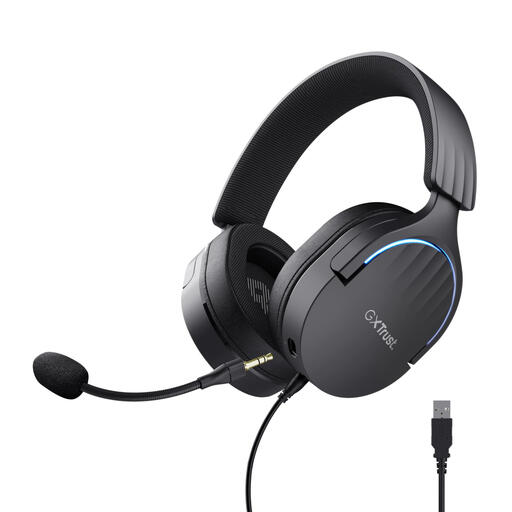 No image available
A USB headset for calls, with a positionable microphone and a mute control on the earcup.
The description lists a flexible, detachable microphone, soft ear cushions and volume and mute controls on the earcup.
No, a headset won’t change the camera image. For video conferencing, Logitech advises against pointing the camera at a bright window, as backlighting can make your face look dark and strong side lighting can create harsh contrast. If possible, adjust your position or the lighting.
Select the headset as your microphone and speakers in your calling app, then run a test. Microsoft Teams offers a test call, while Zoom lets you test the microphone and speakers. Say a sentence and check that the mute status is correct too.
Adjust the headband and microphone boom, and check that the cable reaches your seat comfortably. Compare mono and stereo, and see how the fit feels for yourself; a manufacturer’s comfort claim can’t predict how the headset will feel to you.
No. According to ACM ConsuWijzer, the statutory guarantee in the Netherlands depends on what you could reasonably expect from the product under normal use. If a product is faulty, the seller is responsible for providing an appropriate solution free of charge; a manufacturer’s guarantee doesn’t replace this right.
For many eligible consumer purchases made at a distance, you have a 14-day cooling-off period. There are exceptions and the circumstances of the purchase matter, so check the seller’s information before ordering.