
Individual listener
You’re following the online lecture on your own computer and want to hear the speaker clearly without setting up audio for the whole classroom.


A USB headset is a good choice when one participant is listening or asking questions on a computer. First, check that the connector is compatible with the computer and that the microphone is easy to control. If the whole class needs to hear the online speaker or be heard themselves, you’ll need room audio rather than one personal headset. A microphone’s noise-cancelling claim doesn’t guarantee that it will pick up voices throughout the classroom.
You’re following the online lecture on your own computer and want to hear the speaker clearly without setting up audio for the whole classroom.
You want to be able to respond from the classroom and easily mute your microphone in between.
First, decide whether the whole room needs audio: a personal USB headset is no substitute for a speaker and microphone for the classroom.
Suitable when: you listen and speak using your computer alone; the Logitech H390 is an example of a USB-A headset described by Logitech, with controls on the cable.
Trade-off: sound reaches both ears, but you may find it harder to follow conversations in the classroom.
Suitable when: you want to hear the online speaker while keeping one ear free; Jabra offers mono and stereo versions of the Evolve2 30 SE.
Trade-off: with one ear free, you’ll be less isolated from surrounding sounds.
Suitable when: several people are listening together or need to respond from the classroom. Microsoft describes room equipment for Teams meeting rooms.
Trade-off: you’ll need a speaker and microphone for the classroom, as well as the right settings in your meeting app.
| What to consider | What should you check? | Who is it important for? |
|---|---|---|
| Personal or whole-class audio | Decide who needs to hear the speaker and who needs to be heard from the classroom. | If I’m joining on my computer alone, I don’t want to choose a room set-up I don’t need. Around 31% of consumers prioritise choosing the right audio set-up. |
| USB connection | Check which port is available, the exact version and whether an adapter is included. | I want to connect the headset directly to my computer, rather than relying on the series name alone. Around 31% of consumers prioritise having a suitable computer connection. |
| Speaking and muting | Check the microphone and mute controls, then test them in the meeting app you’ll be using. | If I want to ask questions during the lecture, I need to be able to control and mute my microphone in between. Around 23% of consumers prioritise these microphone controls. |
| Fit and awareness of the classroom | Compare mono and stereo options, and try the fit where possible. | When I’m listening for longer, I want to choose how much of the classroom I can still hear and make sure the headset is comfortable. Around 15% of consumers prioritise fit and awareness of the room. |
The microphone worn by one person and the earcups for that person won’t automatically serve everyone in the room.
Before buying, decide whether one person or the whole class will be taking part. If it’s a group session, set up and test room audio.
The Ayda range includes different connections: as well as USB versions, there’s also a model with a 3.5mm connection.
Compare the full model version and connection, not just the series name.
Features listed for a range or in a general product description don’t necessarily confirm which connection and controls come with the version you’ve chosen.
Check the full model number and compare the version with the manufacturer’s product information.
The H390 is a wired headset for individual computer use; Logitech lists USB-A and a USB-C option.
The Ayda range includes separate USB and USB-ENC headsets for personal calls.
The Evolve2 30 SE is worth considering if you’re looking for a specific mono or stereo version and USB variant.
The Blackwire 3200 series includes wired USB headsets in mono and stereo styles.
The ADAPT 160 USB II is a wired, dual-sided on-ear headset for one computer user.
These product picks are for one participant listening or speaking on a computer; separate room audio is needed for the whole class to take part.
 No image available
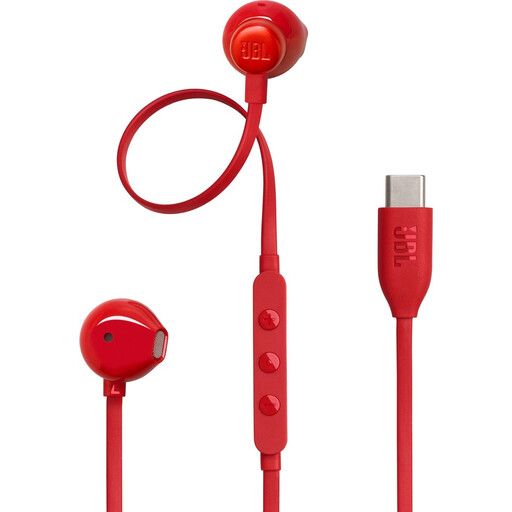
A personal in-ear option if your computer supports USB-C and you want to speak using the built-in microphone.
The product information lists USB-C, a built-in microphone and three-button controls.
 No image available
A personal stereo headset for listening and speaking on a computer, if USB-A suits your set-up.
The product information lists USB-A, stereo audio, two integrated microphones and controls on the cable, including mute.
 No image available
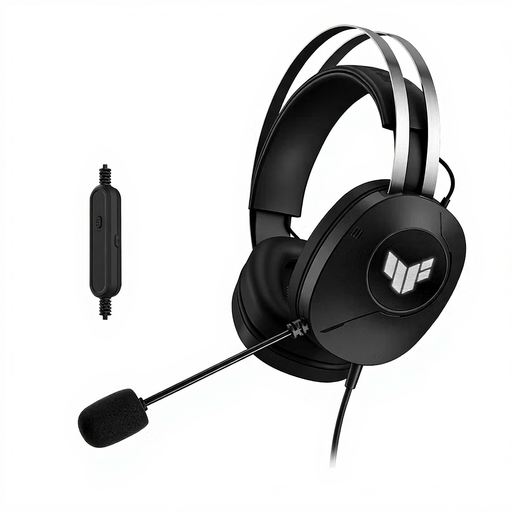
A personal wired headset for listening and speaking, if your computer has a compatible USB Type-A connection.
The product information lists stereo audio, a microphone boom and an adjustable headband.
 No image available
A personal USB headset for listening and responding; check that the connection is compatible with your computer.
The product information lists stereo audio, a microphone boom and controls on the cable for volume and mute, with a mute-status indicator.
 No image available
A personal headset for calls if USB-A is suitable, or if the USB-C adapter mentioned is compatible with your connection.
The product information lists a flip-up mute microphone and on-ear volume controls.
No, not as a personal headset set-up. If several people in the classroom need to hear the online speaker and be heard themselves, choose and test a speaker and microphone for the room. Microsoft explains this distinction for Teams meeting rooms.
Select the headset as your speaker and microphone in the meeting app’s settings, then test the connection. In Microsoft Teams, you can select your devices in the device settings and make a test call.
Start at a low volume and take listening breaks. The World Health Organization points out that both sound level and the length of exposure to loud noise matter. Don’t automatically turn up the volume to drown out surrounding sounds.
No. According to the Netherlands Authority for Consumers and Markets, there’s no fixed period for the legal guarantee: it depends on what you can reasonably expect from the product with normal use. If the product develops a fault sooner than you could reasonably expect, contact the seller.
European product safety rules apply to electrical and electronic devices placed on the Dutch market. Business.gov.nl explains that manufacturers must provide CE marking and a declaration of conformity when required by the applicable rules. CE marking doesn’t tell you whether a headset sounds good or is suitable as a microphone for an entire room.