
Active language learner
If you speak often during lessons, look for an easy-to-reach mute button and a microphone you can position comfortably. Logitech and EPOS describe models with in-line controls.


Start by checking the USB connection, then make sure the cable has enough slack when your desk is at its highest position. Next, look for an easy-to-reach mute control and a microphone you can position comfortably. Mono leaves one ear free, while stereo covers both ears. Cable length and fit alone say nothing about sound quality.
If you speak often during lessons, look for an easy-to-reach mute button and a microphone you can position comfortably. Logitech and EPOS describe models with in-line controls.
If your computer is under the desk, the key question is whether the cable has enough slack when the desk is at its highest position. Logitech, Jabra and EPOS list cable lengths for specific models.
If you want to stay aware of your surroundings during lessons, consider a mono model. If you prefer to cover both ears, look at stereo options. HP Poly describes both wearing styles in the Blackwire 3200 series.
| What to consider | What to look for | Who is this important for? |
|---|---|---|
| Clear speech and muting | Check that you can position the microphone, where the mute button is and whether your lesson app is using the right microphone. | If you speak often during lessons, you’ll want to mute your microphone quickly without having to search through menus. Around 29% of consumers prioritise clear speech and muting. |
| Cable slack when the desk is raised | Measure the route with the desk fully raised, leaving enough room to move your head. | If your computer is under the desk, you’ll want to stop the cable from becoming taut when you stand. Around 29% of consumers give cable reach the highest priority. |
| Fit and listening focus | Choose between mono and stereo, and check the specifications of the exact model. | If you sometimes want to stay aware of your surroundings during lessons, it’s worth considering whether you want one or both ears covered. Around 24% of consumers focus mainly on fit and listening style. |
| USB connection and lesson audio | Check the connector on the model you’re considering, then test the microphone and speaker in your lesson app. | If you want to join lessons without connection problems, you’ll need to know whether the headset works with your computer and in the app. Around 18% of consumers prioritise compatibility. |
The route from the USB port to your head changes when you raise the desk. A cable that seems long enough with the desk down could become taut when it’s raised.
Measure the full route with the desk at its highest position, and leave extra slack so you can move comfortably.
A description of noise reduction on the microphone doesn’t automatically mean that background noise will be reduced for you.
Assess the microphone features separately from the choice between mono and stereo.
A product range may include models with different USB connectors or wearing styles.
Before you buy, check the full model name, connector and whether it’s mono or stereo.
The H390 is a wired USB headset worth considering for interactive lessons.
The Evolve2 30 SE is available in mono and stereo, with different USB options, so you can compare the fit and connection for each model.
The wired Blackwire 3200 series is worth considering if you want to choose between mono and stereo.
The PC 8 USB, product 1000432, is a stereo on-ear model to compare if you need a longer cable route.
These wired USB headsets are options to compare for online language lessons. For each model, check whether the cable, connection and controls suit your desk set-up.
 No image available
An option if you’re looking for USB-A and stereo sound for lessons.
The product information lists two integrated microphones and in-line controls, including mute. Check that the USB-A connection is compatible with your computer.
 No image available
Could suit you if your computer isn’t right beside your standing work area; measure the cable route first.
The product information lists a 240 cm cable, stereo sound, an adjustable microphone boom, and in-line volume and mute controls.
 No image available
A wired USB option for online calls if you want an adjustable microphone.
The product information lists a 180 cm cable, stereo sound and an adjustable microphone.
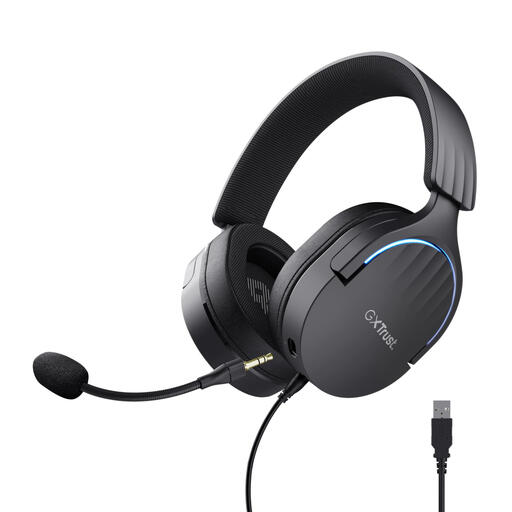 No image available
An option if you’re looking for a wired headset with a control to mute the microphone during lessons.
The product information lists a 200 cm cable, USB 2.0, stereo sound, a flexible detachable microphone and a mute control on the ear cup.
 No image available
An option if you want microphone controls with a USB-A connection or the listed USB-C adapter cable.
The product information lists stereo sound, volume controls and a fold-up microphone with a mute function.
Select the headset as both the microphone and speaker in your lesson app, then run a test there. Zoom offers separate audio tests, and in Microsoft Teams you can also select your preferred microphone and speaker.
No. First measure the route from the USB port with the desk at its highest position, leaving room to move. Logitech lists 1.9 m for the H390 USB-A model described, Jabra lists 1.5 m for the Evolve2 30 SE, and EPOS lists 2 m for the PC 8 USB, product 1000432. These stated lengths don’t guarantee that a cable will suit your set-up.
For online purchases in the Netherlands, you generally have a statutory 14-day cooling-off period from delivery. ACM ConsuWijzer lists exceptions, including certain hygiene products with opened packaging. Check the terms for the specific product before opening the packaging.
You can contact the seller to claim your statutory guarantee; what you could reasonably expect from the product is taken into account. According to ACM ConsuWijzer, if a product breaks too soon during normal use, the seller must resolve the issue free of charge, for example by repairing or replacing it.
No. A Teams label isn’t a general requirement for online lessons. Jabra lists certification by model; check which app your course uses, then test the microphone and speaker in it.