
Working from home in a noisy room
You want colleagues to hear you clearly despite household noise. Look out for the difference between microphone filtering and ANC for your own ears.


Start with a wired USB headset that matches your computer’s connection, then test the microphone and mute button before a meeting. In a noisy room, it’s important to distinguish between noise reduction for your microphone and ANC for your own ears. For long meetings, fit and choosing mono or stereo also matter. If you need meeting controls, check that the exact version works with your app.
You want colleagues to hear you clearly despite household noise. Look out for the difference between microphone filtering and ANC for your own ears.
Consider the fit and whether you prefer mono or stereo. What feels comfortable depends on the person and their workspace.
Before buying, check that USB-A or USB-C, and the exact headset and app version, are compatible with the devices you use.
First choose based on your workspace and computer. Then decide whether you mainly need clear speech, a comfortable fit, compatible controls or less background noise reaching your own ears.
| What to consider | What to look for | Who should pay particular attention? |
|---|---|---|
| Being heard clearly over background noise | Check the microphone specifications for the exact version and test the headset in your own room. | If I’m working in a noisy room, I want colleagues to hear me clearly; around 33% of consumers prioritise being heard clearly over background noise. |
| Comfort during long calls | Check whether the version is mono or stereo, and whether the headband and ear cushions suit you. | For long or frequent meetings, I want a style I can wear comfortably for extended periods; around 27% of consumers give comfort their top priority. |
| Connection and meeting controls | Check whether USB-A or USB-C matches your computer, and confirm the exact platform version and app compatibility. | If I use several work laptops or a specific meeting app, I want the connector and controls to work with my devices; around 20% of consumers prioritise connection and meeting controls. |
| Hearing less background noise | Look specifically for ANC if you want to hear less noise yourself; don’t confuse it with a noise-cancelling microphone alone. | If household noise distracts me while listening, I want to know whether a headset also reduces noise for my ears; around 20% of consumers prioritise reducing background noise on the listening side. |
Microphone filtering is designed to reduce the noise other people hear through your microphone; ANC is designed to reduce the noise you hear. HP describes these as separate features on the Blackwire 8225.
Decide whether you want your colleagues to hear less background noise, you want a quieter listening experience, or both. If you also want to hear less noise yourself, you may need a version with ANC.
Jabra offers separate USB-A and USB-C versions of the Evolve2 30. For the Poly Blackwire 3300 series, the 3.5 mm option is available only on the 3315 and 3325.
Check the full model name, connection and platform version before ordering. The wrong connection could mean you need an adapter or a different version.
ACM ConsuWijzer explains that statutory consumer protection in the Netherlands does not have a fixed duration of exactly two years. What you can reasonably expect from a product depends, among other things, on normal use.
Keep your proof of purchase and contact the seller if a fault occurs sooner than you could reasonably expect.
The H390 is a wired USB-A headset for straightforward calls; the Zone Wired is a separate business model with in-line call controls.
The Evolve2 30 is a wired business range with different connections and platform versions.
The Blackwire 3300 series includes mono and stereo models; the Blackwire 8225 is a separate model with hybrid ANC.
The UH44 is a wired business USB headset with a USB-C cable and USB-A adapter.
The wired IMPACT 400 series includes versions with and without ANC.
This selection includes wired USB headsets for team meetings and a wireless Teams version. Check how each model’s connection and meeting app will work with your setup.
 Image unavailable
An option if you’re looking for a Teams version and wireless use suits your workspace; this is not a wired-only headset.
The model name specifies USB-A and MS Teams. Check how this version works with your computer and meeting app.
 Image unavailable
A wired USB headset for anyone looking for a direct USB connection for team meetings.
Check that the USB connection works with the computer you use for meetings.
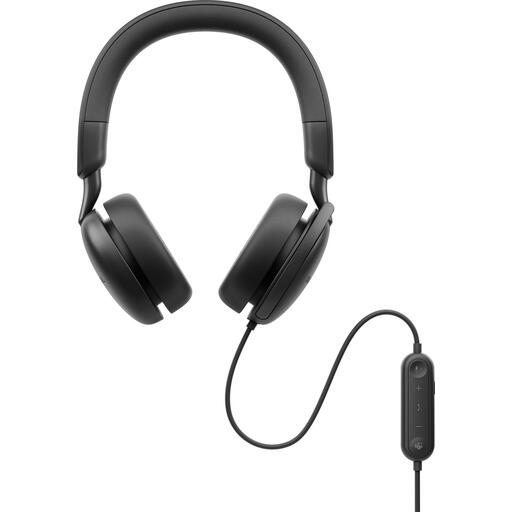 Image unavailable
A wired version with ANC for anyone who wants to reduce background noise while listening.
Before buying, check that the connection and controls work with your computer and meeting app.
 Image unavailable
A wired USB Type-A headset for online meetings. Check that the connection works with your computer.
The product name uses the term noise-cancelling; check whether the feature on your chosen version applies to the microphone or to the sound you hear.
 Image unavailable
A wired USB headset with one earpiece for anyone who wants to keep one ear free during calls; this is not a stereo headset.
Check that a single-sided fit suits your meeting space and how you use the headset.
Not necessarily. Microsoft describes call controls for certified devices in the installed Teams app on Windows and Mac. According to Microsoft, the button controls on the Modern USB headset don’t work in the same way during Teams calls in a web browser. Check your exact setup.
Connect a version with a compatible connection and select the headset as both the speaker and microphone in your meeting app. Microsoft describes this selection for the Modern USB headset in Teams. Check the device settings and test your voice before the meeting.
Adjust the headband and microphone boom, then check the fit during a call that lasts about as long as your usual meeting. Follow the instructions for the exact version when cleaning it or replacing the ear cushions.
Generally, yes: ACM ConsuWijzer says it is usually 14 days from delivery and explains that exceptions apply. Before buying, check which terms apply to your order.
No. ACM ConsuWijzer explains that Dutch law does not set a fixed duration for the statutory warranty. With normal use, you can expect a product to last for as long as is reasonable. If a product is faulty, contact the seller to arrange an appropriate free remedy.