What should you look for when buying a USB headset for meetings?
Consider separately what your microphone sends to other people, what you can hear yourself, and how the headset connects to your device.
| What to consider |
What should you check? |
Who is this important for? |
| Speaking clearly |
Check whether the boom microphone is adjustable, where the mute button is and what microphone features the manufacturer specifies for the exact model. |
If I’m leading a meeting while my housemates are making noise, I want my voice to come across clearly and be able to mute quickly. Around 33% of consumers prioritise speaking clearly when there’s household noise. |
| Listening in a noisy room |
Compare mono and stereo models and consider the fit. A microphone feature doesn’t tell you how much noise you’ll hear yourself. |
If I want to keep up with the other participants but also hear what’s happening at home, I weigh up having two earcups against leaving one ear free. Around 27% of consumers prioritise being able to follow a meeting despite household noise. |
| Connection |
Check whether you need USB-A or USB-C, whether an adapter is included, and whether your device and app support USB audio. |
If I use my headset with different devices, I want to make sure in advance that the connection and audio support are compatible. Around 20% of consumers prioritise device compatibility. |
| Fit and controls |
Check the headband, ear cushions and button placement for the specific model. A Teams button is not available on every version. |
For a longer meeting or an unexpected interruption, I want a comfortable headset with a mute button I can find without searching. Around 20% of consumers prioritise wearing comfort and easy-to-reach controls. |
USB headsets at Joybuy
This selection includes wired USB headsets for meetings, with stereo and mono options. Check each model’s connection, controls and fit to make sure they suit your needs.
 No image available
Jabra Evolve2 30 SE
A stereo headset that keeps both ears on the conversation.
The product description lists USB-A, compatibility with a USB-C adapter and two integrated microphones.
It also mentions mute and call controls, memory foam ear cushions and an adjustable headband. If you plan to use it with a mobile device, check that your device and app support USB audio.
Joybuy
 No image available
Logitech PC 960 USB headset
A stereo headset with a boom microphone you can position for meetings.
The product description lists an adjustable boom microphone, a noise-cancelling microphone and an in-line mute control.
It also mentions an adjustable fit and soft ear cushions. Check that the connection on the exact version is compatible with your device.
Joybuy
 No image available
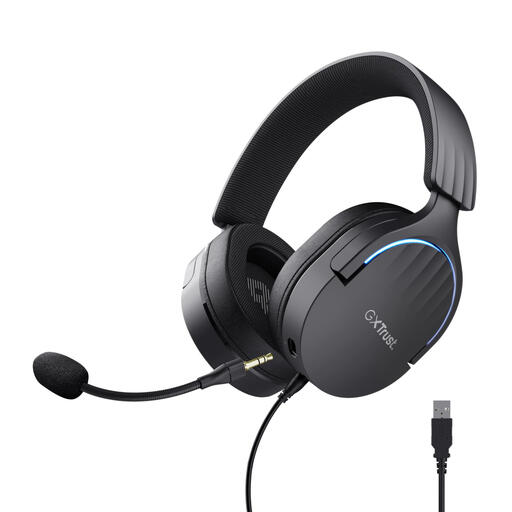
Trust GXT 490 FAYZO Over-Ear 7.1 USB Gaming Headset
A stereo headset with a USB 2.0 connection and a detachable microphone.
The product description mentions a flexible microphone, a noise-cancelling microphone feature and a mute control on the earcup.
It also lists soft ear cushions and adjustable, swivelling earcups. Consider whether the over-ear fit suits your meeting space.
Joybuy
 No image available
Trust Ayda wired headset, USB Type-A, Black
A stereo headset for anyone who wants to mute the microphone quickly during a call.
The product description lists USB-A with a USB-C adapter cable and a microphone that flips up to mute.
It also mentions a noise-cancelling microphone, an adjustable headband and breathable ear cushions. Check that the adapter supplied with this version is compatible with your device.
Joybuy
 No image available
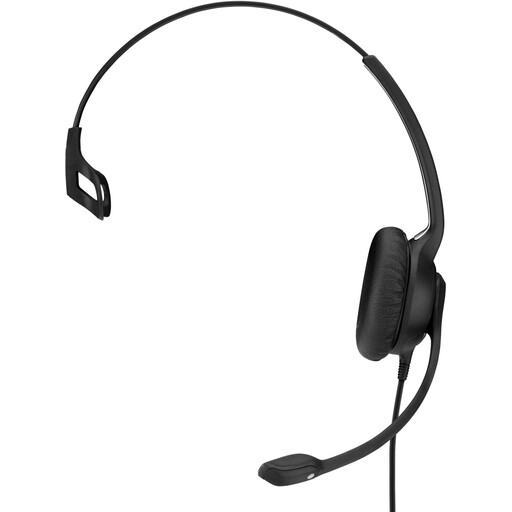
EPOS IMPACT SC 230 USB MS II
A mono headset for anyone who wants to keep one ear free to hear their surroundings during meetings.
The product description lists a USB connection, a flexible boom microphone and in-line controls for calls and volume.
It also mentions a noise-cancelling microphone. This is a mono version; the product description does not mention stereo sound.
Joybuy
Frequently asked questions about USB headsets for meetings
How do I set up a USB headset for a meeting?
Connect the headset to a compatible USB port, select it as the input and output device in your meeting app, and position the microphone close to your mouth. Test the sound and mute button beforehand. Jabra warns that not every mobile USB-C device or app supports audio via the Evolve2 30 SE.
Does a noise-cancelling microphone also block sound from reaching my ears?
Not necessarily. A noise-cancelling microphone describes a feature on the microphone side. Check separately which listening features are specified for the model. It doesn’t establish how the headset will handle noise from your housemates.
What are my rights if I buy a headset online from a business?
According to the Government of the Netherlands, when you buy from a business at a distance, you’ll often have a 14-day cooling-off period. You also have a statutory right in the Netherlands to receive a product that is fit for purpose, with no fixed statutory guarantee period. If there’s a fault, contact the seller and check the terms of your particular purchase.
Am I allowed to record a planning meeting?
That depends on who is making the recording and the context in which personal data is being processed. The Dutch Data Protection Authority says that an organisation needs a lawful basis under the GDPR to process personal data. Consent is one possible basis, but it is not automatically the only one. Check the circumstances and involve the participants before you record.


