What should you look for when choosing?
First check that the headset is compatible with your computer. Then decide whether clear speech, long-wearing comfort or staying in touch with people at home matters most to you.
Logitech, Jabra and EPOS offer different USB connectors and versions, so check the full product name against the ports on your computer. HP Poly offers mono and stereo models as different wearing styles.
| What to consider |
What to look for |
Who might value this most? |
| Being heard clearly |
Check the microphone boom and any mute button; make a test recording where you’ll be sitting. |
If I’m speaking at the table while there’s noise at home, I want others to hear me clearly. That’s why around 33% of consumers put clear speech first. |
| Connectivity |
Check whether the headset uses USB-A or USB-C, and whether the version includes any adapter you need. |
If I want to use the headset with different computers, the connector needs to fit or I’ll need the right adapter. Around 27% of consumers prioritise port compatibility. |
| Wearing comfort |
Compare the weight and materials of the exact version; comfort is a matter of personal preference. |
If I’m listening and responding throughout a workshop, I want the headset to feel comfortable. Around 27% of consumers put long-wearing comfort first. |
| Keeping in touch with people at home |
Choose deliberately between mono and stereo, and check the connector on that version too. |
If I want to keep hearing people around the kitchen table, leaving one ear free may suit my situation better. Around 13% of consumers prioritise staying in touch with people at home. |
USB headsets for taking part in a workshop
These Joybuy product picks are wired USB headsets for taking part in a workshop on a computer.
 Image unavailable
Logitech PC 960
A wired USB headset for joining in via your computer’s USB port.
The product name specifies a wired USB headset.
View at Joybuy
 Image unavailable
Logitech H340 USB Headset Black, Wired
A wired USB headset for joining an online workshop on a computer.
The product name specifies USB and a wired version.
View at Joybuy
 Image unavailable
Kingston USB Hi-Fi Headphones with Microphone
USB headphones with a microphone for taking part in a workshop on a computer.
The product name specifies USB and a microphone.
View at Joybuy
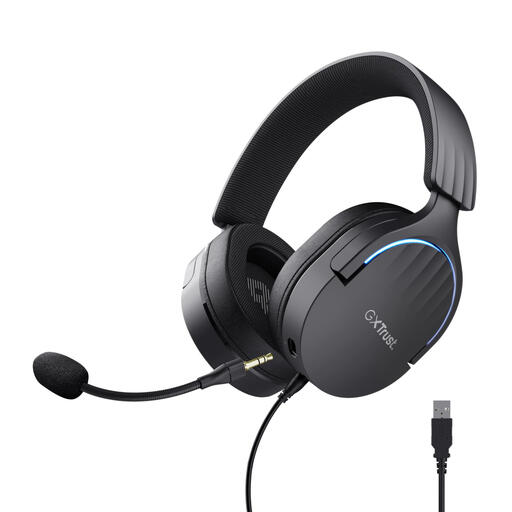 Image unavailable
Trust GXT 490 FAYZO Over-Ear 7.1 USB Gaming Headset
A USB headset to compare if you’re looking for a model described as over-ear.
The product name specifies over-ear, 7.1 and USB.
View at Joybuy
 Image unavailable
Trust Ayda Noise-Cancelling Wired Headset, USB Type-A
A wired headset to consider if your computer has a USB Type-A port.
The product name specifies USB Type-A and a headband for calls and music.
View at Joybuy
Frequently asked questions
What should I check before my first workshop?
Connect the headset and check that your computer is using it for both input and output. Windows explains how to test a microphone, while Zoom also offers a speaker and microphone test. If possible, make a test recording and check that the physical mute button is off.
Do I need a Teams version for a writing workshop?
Not based on the workshop description alone: it doesn’t specify which meeting app you’ll use. Jabra and EPOS offer different UC and Teams versions. Choose based on the platform you actually use, and check the full product number.
Where should I place the cable, and what volume should I use?
Position the cable so it won’t run near drinks or across a busy walkway, and check that the cable on your chosen version is long enough to reach where you’ll be sitting. The World Health Organization advises keeping the volume low when listening to personal audio.
What if the headset doesn’t fit properly or develops a fault?
For an online consumer purchase, you generally have a 14-day cooling-off period after delivery. Check the conditions and any applicable exceptions with ACM ConsuWijzer. You’re also entitled to a product that works as it should in the Netherlands. According to the Dutch government, there’s no fixed statutory warranty period; if a product is faulty, contact the seller. An additional warranty doesn’t replace this right.


