Who is it for?

Attendees listening online on their own

You follow the talk on your own computer and want to hear the speaker and ask a question if needed, without playing the audio through speakers in the room. Logitech describes the H390 as a personal headset with in-line controls.

Organisers of a hybrid event

You want several people to hear a remote speaker and for questions from the room to be heard. Microsoft Learn describes room setups with separate microphones and speakers, so first assess what the event needs in the room.

Users of a shared meeting-room computer

You connect the headset just before the event and want the computer and meeting app to use the right microphone and speaker. Microsoft Support recommends selecting the audio devices in the app.

What should you look for?

Personal USB headset

Choose this when: you are the only person listening and speaking through the computer; select and test the microphone and speaker in the meeting app.

Bear in mind: the sound will not automatically be shared with other people in the room.

Room microphone and speaker

Choose this when: several people want to listen together or take turns asking questions; position the equipment to suit the room.

Bear in mind: multiple computers with active audio in the same room can cause echo; Zoom Support recommends checking the audio setup to avoid this.

What matters What to look for Who will find this important?
Including everyone in the room Decide who needs to speak and listen remotely; test the position of the microphone and speaker. If several people in the room want to take part together, a personal headset may not be enough on its own. Around 28% of consumers prioritise group participation in the room.
Asking questions yourself Check whether the microphone is adjustable and how to mute it; test the microphone beforehand. If you plan to ask questions, you’ll want the microphone to be well positioned and easy to mute. Around 22% of consumers prioritise being clearly heard when asking questions.
Hearing the speaker clearly Consider whether you want to leave one ear free; set a comfortable volume and take breaks during long listening sessions. If the online talk is your main source of audio, consider how you wear the headset. Around 22% of consumers mainly want to hear the speaker clearly.
Connection and setup Check whether your computer has a USB-A or USB-C port, and select both audio devices in the meeting app. If you’re using a shared computer just before the talk starts, you’ll want to get going without connection or setup issues. Around 17% of consumers prioritise a quick, easy connection.
Wearing comfort Look for adjustability and a mono or stereo design; try the headset on if possible. Comfort can be especially important when you’re listening to a talk for a long time. Around 11% of consumers say wearing comfort is their main concern.

Common buying mistakes

  • Assuming a personal headset will work for the whole room

    A headset is designed for the person wearing it and does not automatically provide audio for everyone else in the room.

    First decide who needs to speak and listen in the room. Then choose between a personal headset and a room microphone and speaker setup.

  • Treating the Trust Ayda USB and Ayda USB-ENC as the same model

    Trust lists microphone noise cancellation for the separate Ayda USB-ENC model. This feature is not automatically included with the standard Ayda USB.

    Check the full product name and model number against Trust’s specifications.

  • Checking only that the plug fits

    Connecting a headset does not necessarily mean it has been selected as the microphone and speaker in the meeting app.

    Check both audio devices before the talk and, if the app offers one, make a test call.

  • Confusing the manufacturer’s warranty with your statutory rights

    A manufacturer’s warranty does not replace your statutory rights if a product is faulty. ACM ConsuWijzer explains the difference when discussing warranties.

    Keep your proof of purchase and contact the seller if you have a problem with a faulty product.

Brands to consider

Logitech

Logitech offers the H390, among other products, as a personal USB headset. The connection and control features mentioned apply to this specific model.

  • Logitech lists a positionable microphone and a 1.9 m cable for the USB-A version of the H390.
  • The USB-A version will not connect directly to a computer with only USB-C ports unless you use a suitable connection or another separately checked solution. Manufacturer information cannot predict how clearly speech will carry in your room.

Trust

The Ayda range includes several models, including the Ayda USB and the separate Ayda USB-ENC.

  • Trust lists a USB-C-to-A adapter for the Ayda USB, along with a microphone that mutes when you flip it up.
  • The noise-cancelling microphone is listed for the separate Ayda USB-ENC; don’t assume it’s included just from the range name.

HP Poly

The Blackwire 3200 and 3300 series include wired headsets with different wearing styles and connection options.

  • For the Blackwire 3320 Teams version, 8X220AA, HP specifies a USB-C cable with a USB-A adapter and mute and volume controls.
  • These features apply to that version and are not automatically included with other Blackwire models.

Jabra

The Evolve2 40 SE is available in different wearing styles and USB versions; check the full model name when choosing.

  • Jabra’s technical specifications distinguish between mono and stereo versions and the different USB connections.
  • In specifications dated 7 May 2025, Jabra said that separate USB-A and USB-C SKUs would be replaced by USB-C/A SKUs during 2025. This announcement does not say which versions are currently available. Claims about noise isolation on a brand page are not an independent measurement in your room.

Products at Joybuy

This Joybuy selection includes personal audio devices for listening and speaking individually during an online talk. Check that each model’s connection is compatible with your meeting computer.

JBL Tune 305C, blue

JBL Tune 305C, blue

The product information lists a built-in microphone for listening and calls; check that your computer has a suitable USB-C port.

Joybuy
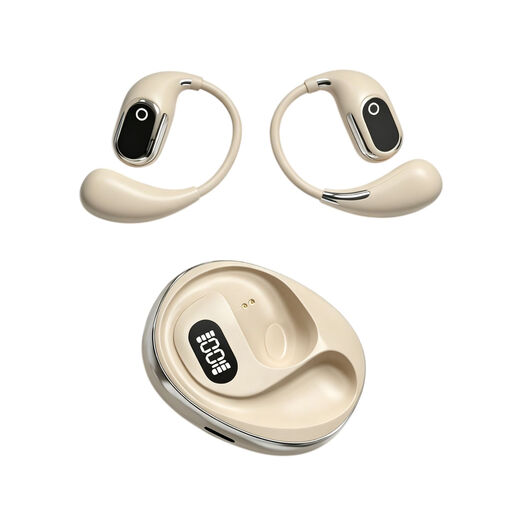
OWS on-ear headphones with built-in condenser microphone

OWS on-ear headphones with built-in condenser microphone

The product name mentions a built-in condenser microphone and a Type-C charging case. Before use, check that the audio connection is suitable for your computer.

Joybuy

Jabra Evolve2 30 SE headset

Jabra Evolve2 30 SE

For an individual online talk, the product information lists a USB-A connection and two built-in microphones.

The description also mentions in-line volume and mute controls, an adjustable headband and memory foam ear cushions.

Joybuy

Razer Kraken V3 X headset, black

Razer Kraken V3 X, black

The product information describes a wired headset with stereo sound and a microphone for voice communication. Check that the connection is compatible with your meeting computer.

Joybuy

Jabra Evolve2 75 headset

Jabra Evolve2 75

The product information lists a USB-C cable for wired use and a microphone for communication. Check that this connection is compatible with your computer.

Joybuy

Frequently asked questions

Is a USB headset enough if several people in the room want to ask questions?

Not as the only audio solution for the whole room. Consider a microphone and speaker positioned for group participation, and test whether people can be heard from different parts of the room.

How do you set up the headset before the talk?

Connect the headset to a suitable USB port and select the intended speaker and microphone in the meeting app. Microsoft Support explains how to select audio devices in Teams. If possible, make a test call and check that the microphone is muted when you’re not speaking.

What should you do if there’s echo when several computers are in the same room?

Check whether more than one device in the room has active meeting audio. For multiple devices, Zoom Support recommends disconnecting computer audio on the other devices; muting only the microphone may not be enough if the speaker is still active.

How should you use a headset during a long talk?

Start with a comfortable, low volume and take listening breaks. The World Health Organization notes that the risk to your hearing depends on the sound level, how long you listen and how often you are exposed to loud sounds.

How can you tell whether a Trust Ayda headset has a noise-cancelling microphone?

Check that the full product name includes Ayda USB-ENC. Trust describes the noise-cancelling microphone on that separate version; don’t assume it’s included just from the Ayda USB name.
