
Online meeting host
You’re discussing a proposal at the table, but you’re the one speaking to someone remotely. In this case, a personal microphone and a quick way to mute it matter more than audio for the whole room.


A USB headset works best when one person at the table is speaking or listening through a computer. Check the microphone, mute function and USB connection. If colleagues at the table also need to be heard by remote participants, consider audio equipment designed for the room instead; Microsoft Support explains that voice isolation can also filter out other speakers.
You’re discussing a proposal at the table, but you’re the one speaking to someone remotely. In this case, a personal microphone and a quick way to mute it matter more than audio for the whole room.
Everyone at the table needs to be heard by the remote participant. First decide whether audio equipment for the shared room would be a better fit than one personal headset.
You listen and respond during a longer meeting. Fit, connection and cable length can all affect how practical the headset is at the table.
Best suited when: one person is handling the online contribution or listening individually.
Bear in mind: the microphone is designed for the wearer and won’t automatically pick up everyone else at the table.
Best suited when: several colleagues at the table need to speak to and listen to remote participants.
Bear in mind: set the room equipment as the active microphone and speaker in your meeting app.
| What to consider | What should you check? | Who is this important for? |
|---|---|---|
| Everyone’s voice at the table | Decide who needs to speak online. Choose room audio if everyone at the table needs to take part. | If everyone at the table needs to be heard, I want to avoid a personal microphone filtering out voices; around 33% of consumers prioritise taking part as a group. |
| Your voice and muting | Check that the model has a microphone and an easy-to-reach mute function. Also check which microphone the meeting app is using. | If I’m speaking online, I want to be able to mute my microphone quickly and check which input is active; around 27% of consumers prioritise their own online contribution. |
| Style and fit | Check the style and adjustability. Also consider whether you need to keep hearing the colleagues beside you. | For a long meeting, I want a comfortable headset that lets me stay in touch with colleagues when needed; around 20% of consumers prioritise comfort over long periods. |
| Connection and controls | Check the USB port, the exact model and whether any required adapter is included. | If I want to plug in the headset straight away and use its controls during a meeting, I want to know whether the connection works with my laptop; around 20% of consumers start by checking connection and controls. |
A personal microphone is designed for the wearer. Voice isolation can reduce the voices of colleagues sitting nearby.
Before buying, decide who needs to be heard by remote participants. Choose room audio if several people at the table need to take part.
You may still need audio equipment for the room to enable group participation.
The Trust Ayda USB and Ayda USB-ENC are different models. Trust specifically lists a noise-cancelling microphone for the USB-ENC, not as a general feature of the whole range.
Compare the full model number and the features of the specific version.
USB-A and USB-C won’t plug directly into the same port. Connections and what’s included in the box can vary between models.
Check your laptop’s port and whether any adapter you need is included with the version you choose.
If the connections don’t match, you may need a separate adapter.
The H390 is a wired headset for an individual speaker. Check whether you’re choosing the USB-A or USB-C version.
The Evolve2 30 SE is designed for individual business calls and is available in UC and dedicated Teams versions.
The Blackwire 3200 series includes wired UC headsets with a range of connections and mono or stereo styles.
The IMPACT 100 series includes lightweight, wired mono and stereo versions for individual calls.
The Ayda range includes USB versions for video calls; the Ayda USB and Ayda USB-ENC are different models.
These are personal headsets for speaking or listening individually during online meetings.
 No image available
A personal headset for speaking online individually. Check that the version and connection work with your meeting app and laptop.
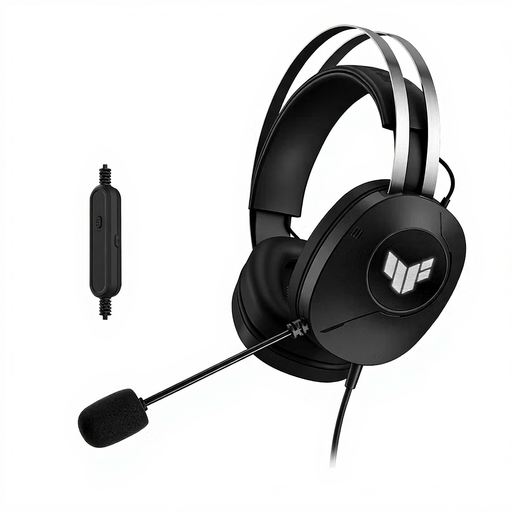 No image available
A wired headset for speaking online individually. Check that USB Type-A fits the port you’ll be using at the table.
 No image available
A personal headset for individual online calls. Before use, check which connection and microphone are selected in your meeting app.
 No image available
A personal headset for speaking online individually. Check that this USB-A version works with your connection and meeting app.
 No image available
A wired headset for speaking online individually. Check in advance that the connection and controls suit how you’ll use it at the table.
Don’t assume they can: a personal headset is designed for the wearer, and voice isolation may filter out other voices. If everyone needs to be heard, choose audio equipment for the room and select it as your meeting audio.
Check that the meeting app has access to your microphone, that the headset is selected as the audio source, and that the microphone hasn’t been muted on the headset or in the app.
No. Check your laptop’s port and the exact model. The Logitech H390 comes in USB-A and USB-C versions; EPOS’s technical datasheet lists a USB-C-to-USB-A adapter for the IMPACT 100.
When you buy as a consumer, the product must conform to the agreement. If it doesn’t, the seller must provide an appropriate solution. According to the Dutch government, the Netherlands has no fixed statutory guarantee period. For distance purchases, you’re also entitled to a 14-day cooling-off period in many cases; the applicable terms determine whether it applies.