Choose a USB headset by first checking the connection and the full cable route with your desk set at standing height. Then look for a microphone you can position and mute easily; for longer workshops, a comfortable personal fit matters too. A stated cable length or microphone feature alone doesn’t prove that the headset will give you enough freedom to move or sound clear in your space.
Who is this buying guide for?
People who work standing up
You change position during the workshop or raise your desk. Measure the cable route from the port, as the manufacturers covered here state cable lengths of 1.5 to 2.0 m. Logitech, Trust, Dell and Jabra give different cable specifications for the models mentioned.
Active speakers
You read aloud or give feedback and want to be able to mute the microphone easily. The models covered have different controls, and manufacturers list a range of microphone features. Logitech, Trust and Dell describe these features for specific models.
People who listen for long periods
You spend much of the workshop listening and want to know whether the on-ear cushions and headband will feel comfortable. Specifications can help you compare models, but they can’t tell you how a headset will fit your head.
What should you look for when buying?
| What to consider |
What to check |
Who should consider this? |
| Cable and USB connection |
Measure the entire route with the desk at its highest setting, including any bends. Check whether the model has USB-A, USB-C or a supplied adapter. |
If you work standing up, you’ll want to move around without the cable tugging at your headset. That’s why around 29% of consumers prioritise cable reach and the right USB connection. |
| How clearly your voice comes across |
Check whether the microphone is adjustable, then test a recording in your meeting app and the space you’ll be using. |
When you’re reading aloud or giving feedback, you’ll want others to follow what you’re saying clearly. Around 29% of consumers put voice clarity first when speaking. |
| Comfort for long listening sessions |
Check whether it’s a mono or stereo model and whether it’s adjustable; fit is still a personal matter. |
If you’ll be listening for much of the workshop, you’ll want the headset to stay comfortable over time. For around 24% of consumers, comfort during long listening sessions comes first. |
| Muting the microphone |
Check how muting works and test in your meeting app to make sure the microphone is actually silent. |
During writing exercises or a break, you’ll want to be able to mute the microphone quickly. Around 18% of consumers choose mainly based on easy-to-reach, clear mute controls. |
Avoiding common buying mistakes
-
Measuring only the distance to the edge of the desk
The USB port may be lower down, and the cable needs to follow the actual route to your head. For the models covered here, manufacturers state cable lengths of 1.5 to 2.0 m.
Measure the full route with the desk at its highest setting, and leave enough slack to move around. Don’t assume an extension cable will be compatible without checking first.
-
Assuming models with the same product family name are identical
The Trust Ayda USB 25088 and Ayda USB-ENC 25089 are different models. The Jabra Evolve2 30 SE comes in several USB, mono and stereo versions.
Compare the full model number and check the connection supplied against the details for that exact version.
-
Treating a noise-cancelling claim as proof of clear recordings
A manufacturer’s claim about the microphone doesn’t tell you how your voice will sound in your space or with the microphone in the position you choose.
Make a test recording in your meeting app, in the place where you’ll be taking part in the workshop.
Brands to consider
Logitech
The H390 model 981-001281 is worth considering if you’re looking for USB-A and in-line controls.
- For this pink model, Logitech specifies a 1.9 m cable, microphone mute and an adjustable microphone.
- Check that the cable is long enough for your route; these details don’t automatically apply to other H390 models.
Trust
The Ayda USB 25088 comes with a USB-C-to-A adapter; the Ayda USB-ENC 25089 is a separate model.
- Trust lists a 1.8 m cable for the 25088, with the microphone muted by flipping it upwards.
- The 25088 and 25089 are different models. The stated microphone feature isn’t an independent sound quality test.
Dell
The Pro Wired Headset WH3024 is a USB-C stereo model supplied with a USB-A adapter.
- Dell specifies a 200 cm cable, an adjustable microphone and in-line controls.
- The stated microphone noise cancellation is a manufacturer specification, not a comparative workshop test. Dell also lists a limited three-year hardware warranty for this model.
Jabra
According to its technical data sheet, the Evolve2 30 SE is available in various mono, stereo, USB and UC/Teams versions.
- Jabra specifies two microphones and a 1.5 m cable for the product family mentioned.
- Check the full model code and measure the cable route, especially if the USB port is further from your workstation.
EPOS
The IMPACT 100 series includes wired mono and stereo versions for calls.
- For the USB-C+A version described, EPOS lists a USB-C-to-A adapter and in-line controls.
- Check the full model and cable route; the brand description isn’t an independent performance test.
USB headsets at Joybuy
These USB headsets are suited to taking part in a writing workshop, with a focus on the USB connection, microphone controls and cable route.
 No image available
Jabra Evolve2 30 SE headset
The USB-A connection and in-line controls mentioned make this a good fit for calls where you want to mute quickly or adjust the volume during the workshop.
The product description lists stereo sound, USB-A, two integrated microphones, in-line controls and memory foam ear cushions. A compatible adapter is needed for a USB-C port.
View at Joybuy
 No image available
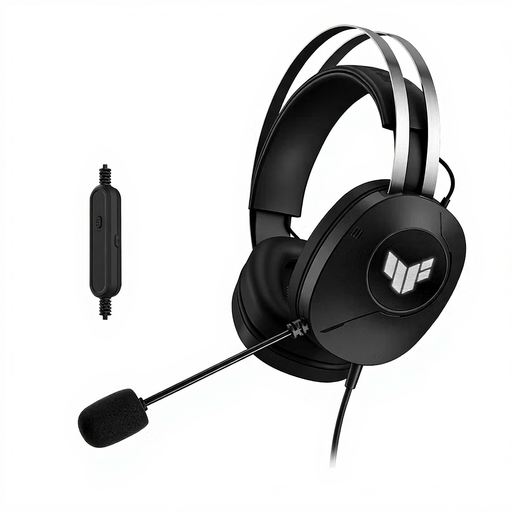
ASUS TUF Gaming H1 Gen II, USB Type-A, black
The USB Type-A connection and stated cable length make this model worth considering if you want to check the cable route at your standing desk.
The product description lists stereo sound, a 200 cm cable, a foldable microphone and an adjustable headband.
View at Joybuy
 No image available
Logitech PC 960 USB headset
The stated cable length may suit a longer route between the USB port and your head; measure the route before choosing.
The product description lists a 240 cm USB cable, an adjustable microphone boom, a mute indicator and in-line volume and mute controls.
View at Joybuy
 No image available
Logitech H340 USB headset, black, wired
This wired USB headset is one to compare if you’re looking for an adjustable microphone for taking part and giving feedback.
The product description lists stereo sound, a 180 cm cable, plug-and-play USB and an adjustable microphone.
View at Joybuy
 No image available
Trust Ayda wired headset, USB Type-A, black
The controls described may suit you if you want to mute quickly while giving feedback; try them out in your meeting app first.
The product description lists stereo sound, a 180 cm cable, a USB-C adapter cable, on-ear volume controls and a microphone that mutes when flipped upwards.
View at Joybuy
Frequently asked questions
How should you set up your headset before the writing workshop?
Connect the correct USB version and select the headset on your computer and in your meeting app as both the speaker and microphone. Make a short test recording, check the microphone position and test the mute function with your desk at its usual standing height.
Does a noise-cancelling microphone mean you’ll hear less background noise?
No. The microphone noise cancellation described by Trust for the Ayda USB-ENC 25089 concerns the sound received by the people you’re speaking to. You’ll need to assess separately how much background noise you can hear through the ear cups.
How can you listen during a long workshop without turning the volume up unnecessarily?
Choose a volume that lets you follow the workshop without turning it up more than you need to. VeiligheidNL notes that a good seal against background noise can help prevent listeners from increasing the volume; the effect depends on the headset and surroundings.
What can you do if a headset bought online doesn’t fit properly or turns out to be faulty?
For a distance purchase from a business, consumers in the Netherlands generally have a 14-day cooling-off period, although exceptions may apply. Your statutory rights for a faulty product are separate from any additional manufacturer’s warranty, according to the Rijksoverheid.


