What should you look for?
First check the cable route and connection. Then compare the microphone controls and make sure the fit is suitable for the length of your lecture.
| What to consider |
What should you check? |
Who is this most important for? |
| Cable clearance when adjusting desk height |
Measure the route from the computer port to your head while standing. Leave some slack and compare your measurement with the cable length of the exact version. |
When I’m standing at a raised desk, I want to move without the cable pulling on my headset. Around 33% of consumers put cable clearance when adjusting desk height first. |
| Speaking and muting quickly |
Compare how adjustable the microphone boom is and where the mute control is positioned. Test the microphone in your meeting app beforehand. |
When I ask a question during a lecture, I want to position my microphone and mute it quickly. Around 27% of consumers prioritise speaking and muting controls. |
| USB connection and settings |
Check whether your computer has a free USB-A or USB-C port and which connector or adapter comes with the version you’re considering. Then select the headset as your microphone and speaker. |
I want to connect the headset directly to a compatible port and set it up correctly straight away. Around 20% of consumers prioritise having the right USB connection. |
| Comfort during a longer lecture |
Compare the wearing style, adjustability and ear cushion materials. Check whether the fit remains comfortable during normal use. |
When I’m listening for a long time, I want a headband and ear cushions that feel comfortable to me. Around 20% of consumers name wearing comfort as their top consideration. |
USB headsets at Joybuy
These wired USB headsets are suitable for listening and speaking during an online lecture. Compare the connection, microphone controls, cable length and fit in particular.
 No image available
Jabra Evolve2 30 SE
Worth comparing if you speak regularly during lectures and an adjustable headband is important to you.
The product description lists USB-A with a USB-C adapter, two microphones and volume and mute controls. Memory foam ear cushions are also mentioned.
View at Joybuy
 No image available
Logitech PC 960 USB headset
An option worth comparing if you need a longer cable route and want to be able to mute the microphone.
The product details list a 240 cm USB cable, an adjustable microphone boom and in-line volume and mute controls.
View at Joybuy
 No image available
Kingston USB Hi-Fi headphones with microphone
Worth comparing if you’re looking for a wired USB headset with a microphone and adjustable headband.
The product details list a USB cable, flexible microphone boom, adjustable headband and over-ear design.
View at Joybuy
 No image available
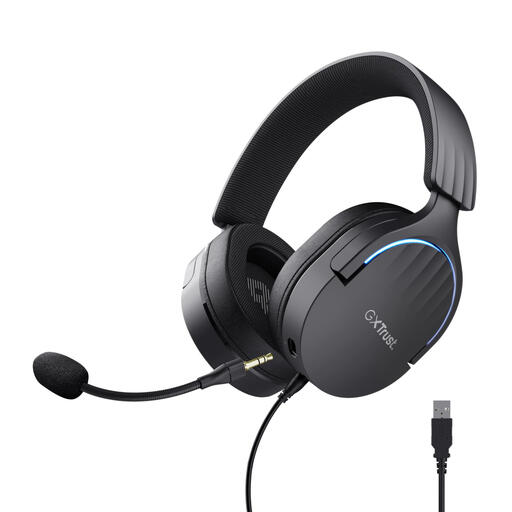
Trust GXT 490 FAYZO Over-Ear 7.1 USB Gaming Headset
A wired USB option worth comparing if you want a detachable microphone and mute controls.
The product details list a 200 cm USB cable, stereo sound, a detachable microphone and volume and mute controls.
View at Joybuy
 No image available
Trust Ayda USB headset
Worth comparing if you want to mute the microphone with a simple movement and need a USB-C adapter.
The product details list USB-A with a USB-C adapter, a 180 cm cable and on-earcup volume controls. Flip the microphone boom up to mute it.
View at Joybuy
Frequently asked questions
How can you check that your microphone is working before the lecture?
In Windows, select the right microphone under Input and use the microphone test. Also check that mute is off and that your meeting app has access to the microphone. Test separately whether you can hear the speaker through your headset.
How can you avoid problems with the cable and ear cushions?
Route the cable so the desk can rise without putting tension on the headset. Follow the cleaning instructions from the manufacturer of the version you’ve chosen; one cleaning method won’t necessarily suit every headset.
What warranty applies to a consumer purchase in the Netherlands?
According to ACM ConsuWijzer, the seller must put right a faulty product that has been used normally, at no cost to you. Dutch statutory warranty does not have a fixed term of exactly two years: what matters is what you could reasonably expect from the product. A manufacturer’s warranty does not replace this right.
Can you return a headset bought online if it isn’t comfortable?
For online consumer purchases, you generally have a statutory cooling-off period of up to 14 days after delivery. ACM ConsuWijzer lists exceptions, including certain hygiene products that have been removed from their packaging. Don’t assume every headset is covered by an exception, and read the terms before trying the product.
Does a USB headset sold in the Netherlands need a CE mark?
The Dutch government states that electronic devices sold in the EU must have a CE mark. According to the European Commission, the manufacturer is responsible for assessing the applicable requirements and affixing the mark; a logo on a shop page is not, by itself, an independent safety test.


